Monday, November 7, 2016
Nokia 101 flashing ok but set is dead 100 working solution
Nokia 101 flashing ok but set is dead 100 working solution
flashing with atf ,
flashing is ok but one error is show (lcd test failed )

VBATT Powering Down <<<<
VBATT Powering Up >>>>
SET VCCIO Level Done
SET BSI Load Done
Booting Phone...
CPU ID Response: A200341100
CPU Type: XG110 2.1B
Phone Booted at after First attempt...
************************************************** ****
TIME STARTS HERE
************************************************** ****
Sending PBL 19456 bytes...
PBL Successfully Sent...
Sending SBL 65024 bytes...
SBL Successfully Sent...
Flash Chip Manufacturer: STMicroelectronics
Flash Chip Type: M58WR064 64 Mbit (4Mb x 16) NOR
Extended Information: Multiple Bank / Burst / 1.8v
Processing Image File: C:Program FilesNokiaPhoenixProductsRM-769 m769_007.200
FIRMWARE Image Found...
Number of Sections: 03
FIRMWARE Certificate Block Sent Successfully...
Processing Section 01 of 03
FIRMWARE Erase Block: 0x00000000~0x0001FFFE
Start Erasing...
Erasing Please Wait...
Block Erase Done...
Preparing Data Blocks...
Data Size: 24576 bytes
Data Checksum: F5BE
Uploading Data Blocks to phone...
FIRMWARE Data Blocks uploaded to phone...
Processing Section 02 of 03
FIRMWARE Erase Block: 0x00800000~0x00BFFFFE
Start Erasing...
Erasing Please Wait...
Block Erase Done...
Preparing Data Blocks...
Data Size: 4128768 bytes
Data Checksum: BFB7
Uploading Data Blocks to phone...
FIRMWARE Data Blocks uploaded to phone...
Processing Section 03 of 03
FIRMWARE Erase Block: 0x00C5D000~0x00E5FFFE
Start Erasing...
Erasing Please Wait...
Block Erase Done...
Preparing Data Blocks...
Data Size: 1697536 bytes
Data Checksum: 2B05
Uploading Data Blocks to phone...
FIRMWARE Data Blocks uploaded to phone...
Start Data Verification... (Please wait)
Data Verification Successful...
Processing Image File: C:Program FilesNokiaPhoenixProductsRM-769 m769_007.20mh
PPM Image Found...
Number of Sections: 01
PPM Certificate Block Sent Successfully...
Processing Section 01 of 01
PPM Erase Block: 0x00100000~0x0061813E
Start Erasing...
Erasing Please Wait...
Block Erase Done...
Preparing Data Blocks...
Data Size: 5341504 bytes
Data Checksum: 47D8
Uploading Data Blocks to phone...
PPM Data Blocks uploaded to phone...
Start Data Verification... (Please wait)
Data Verification Successful...
Processing Image File: C:Program FilesNokiaPhoenixProductsRM-769 m7690_nai07.20mh_nlt
CONTENT Image Found...
Number of Sections: 01
CONTENT Certificate Block Sent Successfully...
Processing Section 01 of 01
CONTENT Erase Block: 0x00E60000~0x00F49FFE
Start Erasing...
Erasing Please Wait...
Block Erase Done...
Preparing Data Blocks...
Data Size: 958464 bytes
Data Checksum: BB37
Uploading Data Blocks to phone...
CONTENT Data Blocks uploaded to phone...
Start Data Verification... (Please wait)
Data Verification Successful...
Exit Flash Mode Done...
Time Elapse : 00:04:32
************************************************** ****
You must Factory Reset the phone to enable the
ringtones and other customized settings to work
************************************************** ****
Waiting For Phone to go Online...
5, 4, 3, 2, 1...
MCU: V 07.20 30-03-12 RM-769 (c) Nokia
IMEI: 353654055460122
Product Serial Number: 3D65DAFBI
Product Code : 059J2D0
Module Code : 0204874
Basic Production Code: 059P5G1
PPM SW Version : V 07.20 30-03-12 RM-769 (c) Nokia MH
ADSP Version : p+V 07.20 30-03-12 RM-769 (c) NMP mh_nlt
MCU SW Version : V 07.20 30-03-12 RM-769 (c) Nokia
HW Version : 3000
UEM Version : 1328
UPP Version : 8850
LCD Version : UNKWN: IDs: 00:00:00
********** SIMLOCK INFO **********
CONFIG_DATA : 0010100000000000
PROFILE_BITS : 0000000000040002
ASIC : 11
PROVIDER : Default Test Operator
Block [1] 1:Open 2:Open 3:Open 4:Open 5:Open
Block [2] 1:Open 2:Open 3:Open 4:Open 5:Open
Block [3] 1:Open 2:Open 3:Open 4:Open 5:Open
Block [4] 1:Open 2:Open 3:Open 4:Open 5:Open
Block [5] 1:Open 2:Open 3:Open 4:Open 5:Open
Block [6] 1:Open 2:Open 3:Open 4:Open 5:Open
Block [7] 1:Open 2:Open 3:Open 4:Open 5:Open
ST_LCD_TEST : FAILED
Phone Cannot Enter Normal Mode if LCD
is Damaged or LCD is not Properly
Connected to the Main PCB
FACTORY SET TO : Full Factory Set
OK
FACTORY SET TO : User Data
OK
FACTORY SET TO : Leave Factory
OK
FACTORY SET TO : Service Center
OK
FACTORY SET TO : Software Upgrade
OK
FACTORY SET TO : Production Tune
OK
apply this jumber.. 100% working.....


phone is on condeshion.....

Available link for download

Tuesday, October 25, 2016
WHAT IS RFID
WHAT IS RFID
Available link for download
Sunday, October 23, 2016
Nokia Asha 311 Touch is not working problem Solution Jumper Ways
Nokia Asha 311 Touch is not working problem Solution Jumper Ways
In above diagram you can see touch pad jack and a few different color lines in it. In first step try calibration to solve touch screen problem if touch screen touch positions are not correct.Nokia C5 Handsfree Headset problem solution ways

If touch screen is totally not working you can replace with new one and if replacement of touch screen is not working that can be problem of touch pad ways.
In above diagram you can see touch pad tracks so check all these paths with meter and if any of them is missing apply jumpers as given in repairing diagram for Nokia Asha 311 touch screen.
for more detail and new tips and tricks about cellphone service problem keep visiting this page we will update cellphone service diagrams timely with new cellphone diagrams.some related post are also given bellow you can read them also for more information about cellphone.
Available link for download
Monday, October 17, 2016
What is web hosting
What is web hosting
Available link for download
Saturday, October 8, 2016
What is 8051 Standard
What is 8051 Standard
Microcontroller manufacturers have been competing for a long time for attracting choosy customers and every couple of days a new chip with a higher operating frequency, more memory and upgraded A/D converters appeared on the market.
- 4 Kb of ROM is not much at all.
- 128b of RAM (including SFRs) satisfies the users basic needs.
- 4 ports having in total of 32 input/output lines are in most cases sufficient to make all necessary connections to peripheral environment.
Figure above illustrates a simplified schematic of all circuits within the microcontroler connected to one of its pins. It refers to all the pins except those of the P0 port which do not have pull-up resistors built-in.
A logic zero (0) is applied to a bit of the P register. The output FE transistor is turned on, thus connecting the appropriate pin to ground.
A logic one (1) is applied to a bit of the P register. The output FE transistor is turned off and the appropriate pin remains connected to the power supply voltage over a pull-up resistor of high resistance.
Available link for download
Wednesday, October 5, 2016
Smart Clip2 Software v1 02 04 is out!
Smart Clip2 Software v1 02 04 is out!
Smart-Clip2 Software v1.02.04 released!
MTK platform update:
1.Updated Unlock Code Calculator for Alcatel phones: 550 new PIDs have been added.
2. Alcatel OT-1009 has been added to MTK Calculator.
3. Some phones that had issues with ADB communication are now supported
Download Smart-Clip2 Software v1.02.04
More info and discussion are HERE.
Smart-Clip2-On!
Best Regards
GSMServer team
Available link for download
Monday, September 26, 2016
Nokia X2 02 Mic is Not Working Problem Solution Jumper Ways
Nokia X2 02 Mic is Not Working Problem Solution Jumper Ways

So carefully look at the above diagram and in it you can see all parts that are used in mic microphone function.As you can see there are two main color lines one is red and other is blue. Both tracks are about mic solution in Nokia X2-02.
Check all these tracks and paths with electronics meter and if any of these paths is missing you can apply jumpers as given in above diagram to solve microphone problem solution in Nokia X2-02.
if any of these parts is missing or damage you can replace them with working parts.
for more detail and new tips and tricks about cellphone service problem keep visiting this page we will update cellphone service diagrams timely with new cellphone diagrams.some related post are also given bellow you can read them also for more information about cellphone.
Available link for download
Sunday, September 18, 2016
Nokia Asha 303 Touch is not working problem Solution Jumper Ways
Nokia Asha 303 Touch is not working problem Solution Jumper Ways

In above diagram you can see touch pad jack and a few different color lines in it. In first step try calibration to solve touch screen problem if touch screen touch positions are not correct.
If touch screen is totally not working you can replace with new one and if replacement of touch screen is not working that can be problem of touch pad ways.
In above diagram you can see touch pad tracks so check all these paths with meter and if any of them is missing apply jumpers as given in repairing diagram for Nokia Asha 303 touch screen.
for more detail and new tips and tricks about cellphone service problem keep visiting this page we will update cellphone service diagrams timely with new cellphone diagrams.some related post are also given bellow you can read them also for more information about cellphone.
Available link for download
Sunday, September 11, 2016
SigmaKey Software v1 30 00 is out! Acer Liquid MT S120 and others are added!
SigmaKey Software v1 30 00 is out! Acer Liquid MT S120 and others are added!

Sigma Software v1.30.00
and Sigma Firmware v1.32 are out!

Get the most out of the servicing software that today got even better!
Qualcomm Platform Update:
1. Added Direct Unlock / Read Unlock Codes features for:
? Acer Liquid MT S120 / Liquid Metal
How to connect the smartphone: On the powered OFF phone, press fully Camera and Vol+ simultaneously, and then press Power On button.
2. Updated Fast IMEI Repair database for the following ZTE phones:
? T7, F952: added 1 new version for each model
MTK Platform Update:
1. New models added to the list of supported:
? Avvio 402 (MT6250)
? Doro PhoneEasy 610 (MT6250)
? Bess VZ102 (MT6223)
? Stone ST-TC533 (MT6235)
Need unlock solution for other new and popular in your area Qualcomm-based smartphones of different brands?
Name them here.
Do you have locked MTK Android smartphone? You are welcome to test unlock solution for it here.
Download Sigma Software v1.30.00
Available link for download
Saturday, September 10, 2016
WHAT IS ASP NET WEB FORMS
WHAT IS ASP NET WEB FORMS
Available link for download
Wednesday, September 7, 2016
Nokia C2 01 Keypad is Not Working Problem Solution
Nokia C2 01 Keypad is Not Working Problem Solution

In above diagram you can see some different colors these are set of inner and outer.each color shows a set of keys so if any of them is not working you can apply jumper with same color inner or outer,

all inner keys can be jumper with same inner key but color should must be same.
as inner outer can be jumper with outer but color should must be same.
so in above mentioned tips and tricks we can solve keypad problem easily.
Here is a keypad ic diagram you may have to replace this ic also in solving key pad problem of Nokia C2-01.
for more detail and new tips and tricks about cellphone service problem keep visiting this page we will update cellphone service diagrams timely with new cellphone diagrams.some related post are also given bellow you can read them also for more information about cellphone.
Available link for download
Wednesday, August 31, 2016
When Dialing 911 on a Cell Phone or VoIP Service Location Tracking is Limited
When Dialing 911 on a Cell Phone or VoIP Service Location Tracking is Limited

Weve all seen it in films: Someones in a crisis circumstance, so they dial 911 on a landline telephone and keep running off. The police then hurry to their area. This area following doesnt fill in also with phones and VoIP administrations.
As we move from landline telephone administrations to cell telephones and VoIP administrations, its imperative to understand the confinements. In a crisis circumstance, you ought to attempt to remain focused line sufficiently long to give the administrator your exact area.
How 911s Landline Location Tracking Works
On account of something many refer to as "Upgraded 9-1-1" — utilized as a part of North America — your area is recorded when you ring 911 on a landline phone. "The general population wellbeing noting point" that gets the call then uses your telephone number to turn upward your area in a database.
This for the most part works exceptionally well, and rapidly. As were discussing landline telephones here, every landline telephone has a particular physical location connected with it — for instance, a house address or loft building address and flat number. Indeed, even this framework can at times come up short if the telephone number isnt went along legitimately or the data in the database isnt right, in which case the 911 administrator would need to approach you for your area.
Its generally a smart thought to remain focused line to give your area and whatever other pertinent data!
Vintage telephone on green foundation. Hotline bolster idea. 3d
Mobile phones and VoIP Services Challenge This
Phones arent connected to a solitary physical area — theyre continually moving around. Be that as it may, their areas can be followed with triangulation (contrasting the relative sign quality between three cell towers) and their GPS equipment.
VoIP administrations are significantly harder to track, as the brings are sent over the Internet and basically originated from an IP address with no phone tower data or GPS information to depend on. Both of these new advancements posture challenges.
The amount Location Data is Sent From Your Smartphone
Be that as it may, some area information is still sent! In 1996, the US FCC started requiring remote transporters to transmit area information from 911 calls put from cellular telephones on their systems. The necessities inclined up from just sending the area of the phone tower the call was put on to giving the area of the calling mobile phone itself.
Cell transporters might get this information from cell triangulation, or the telephones GPS chip itself. Then again, theres no acknowledgment that they can get the information from the Wi-Fi information that advanced telephones use to track our areas much all the more decisively, particularly inside.
Transporters are required to give a telephones area "inside of 50 to 300 meters." Thats 164 feet to 984 feet. Its implied this is genuinely uncertain, particularly in case youre in a thick, urban territory with bunches of structures and individuals. Whats more, this is for open air areas. Theres additionally no real way to pinpoint you on a particular floor of an indoor territory.
In this way, while this is superior to anything nothing, its not something you need to depend on in a crisis circumstance. The FCC needs to fix area prerequisites for mobile phone 911 calls, yet this wont happen until 2019 at indisputably the soonest.
Transmitter
VoIP Location Reporting
VoIP administrations are significantly harder to manage here. When you dial 911 from Skype or the telephone call highlight in Gmail, what happens? Regularly, nothing happens. To stay away from risk, numerous administrations — like Skype and Gmail — wont permit you to call 911 by any stretch of the imagination. They make it clear theyre not a substitution for customary telephone servics in crisis circumstances. That is something to hold up under as a primary concern — you cant utilize Skype or Gmail to put a 911 bring in a crisis, despite the fact that they can be a helpful swap for conventional telephone administration in numerous different circumstances.
Some VoIP administrations do permit you to call 911, however — particularly ones intended to supplant a conventional landline telephone. You enlist your place of residence with these administrations and theyll give it to a 911 administration if there should be an occurrence of crises. Make certain to investigate whether your VoIp supplier underpins 911 and guarantee you know how it will function in a crisis.
Different types of VoIP — for instance, a vast office fabricating that uses voice-over-IP highlights — can have physical location information alloted to each VoIP endpoint. It would be workable for a partnership utilizing a VoIP system to have the precise floor and office number of each VoIP telephone call followed in an area database that could be given to 911 administrations, for instance.
voip telephone
Coincidentally, you additionally likely cant contact 911 with an instant message. Content to-911 administration is still exceptionally uncommon and just accessible in constrained ranges. This ought to end up across the board eventually, be that as it may. Until further notice — like with area following — its essential to hold up under the impediments personality a main priority. That learning might conceivably help you on the off chance that you ever need to contact 911
Available link for download
Tuesday, August 30, 2016
What to do if iPhone WiFi is greyed out
What to do if iPhone WiFi is greyed out
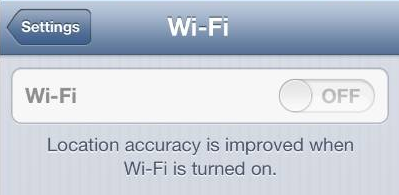
If you are using iPhone 4S or iPhone 5 and have recently upgraded iOS, you might have ended up with your iPhone WiFi switch being greyed out. Read the article below to find out what causes this problem and ways it can be resolved.
The Apple Support Communities have seen a surge in problems related to iPhone users? WiFi being defunct. In many cases, the issue is related to iPhone 4S recently updted from iOS 5 to iOS 6 but also occurs in iPhone 5.
UPDATE: I found a useful post which summarizes iPhone WiFi connectivity issues in general. It might be useful for you.
Check out this tumblr post for an exotic way to fix iPhone WiFi:
http://bit.ly/17vldCD
What causes iPhone WiFi greyed out?
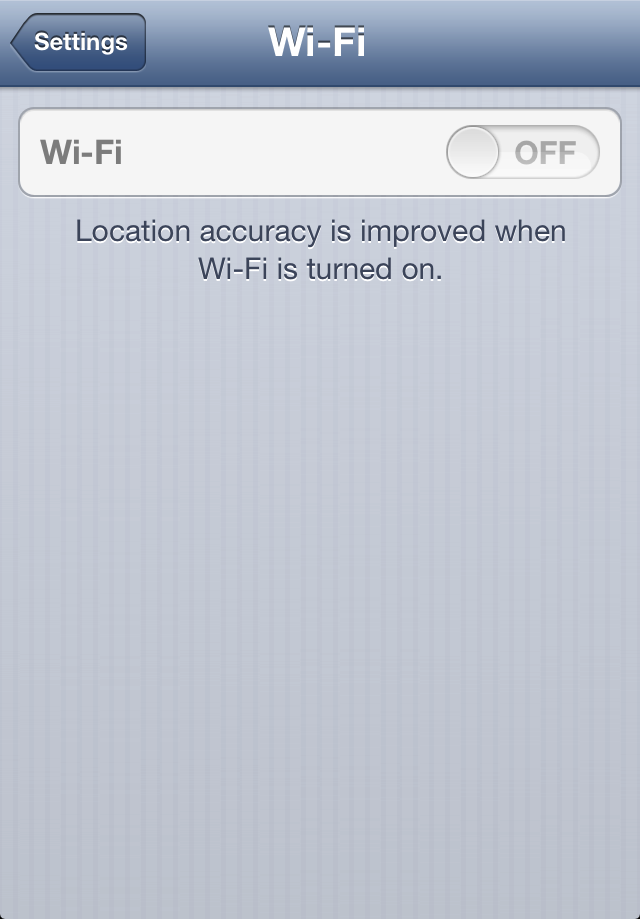
iPhone Wifi being greyed out means that there is a hardware-related issue ? i.e. the iPhone WiFi chip does not function.
With the release of iOS 6 back in September last year, Apple improved power management for better iPhone performance over iOS 5. As a result of inadequate testing, however, it happens that some WiFi chips in both iPhone 4S and iPhone 5 overheat under iOS 6.

Fortunately, the iPhone is a piece of advanced technology which automatically prevents damage when the WiFi chip becomes too hot by powering the chip off. This causes your iPhone WiFi to be greyed out and ultimately, you cannot connect iPhone to the Internet via WiFi.
How to solve issue with iPhone WiFi not functioning?
You can verify whether your iPhone WiFi setting is greyed out or dimmed by navigating to Settings > WiFi.
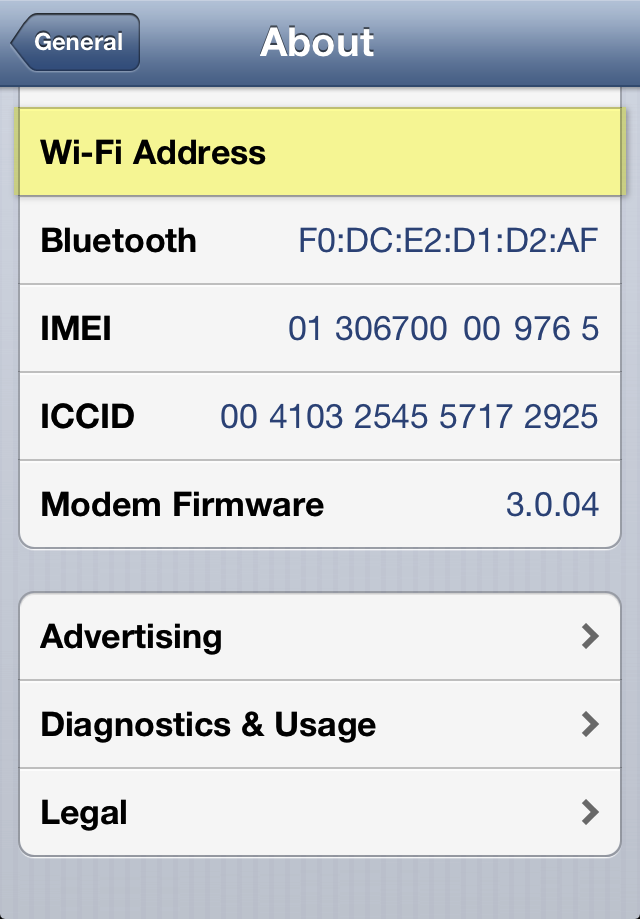
Also, go to Settings > General > About and you will see your Wi-Fi Address empty.
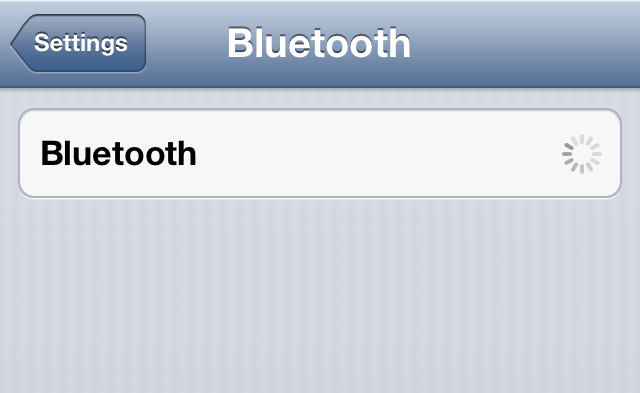
Since WiFi and Bluetooth use the same radio chip, it is very probable the iPhone Bluetooth feature under Settings > Bluetooth is disabled, disconnected, or inaccessible.
To resolve the issue:
1. Navigate to Settings and make sure that Airplane Mode is switched off
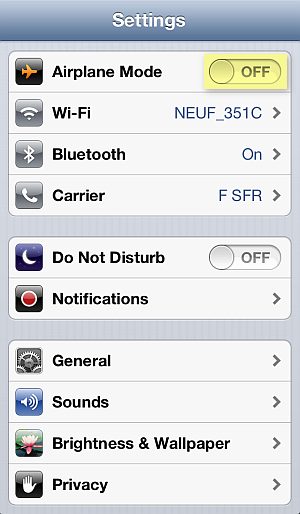
2. In the iPhone Settings, go to General > Reset > Rest Network Settings

3. Cold-restart the iPhone by pressing and holding the Sleep/Wake and Home buttons simultaneously for 10 seconds until you see the iPhone screen go blank
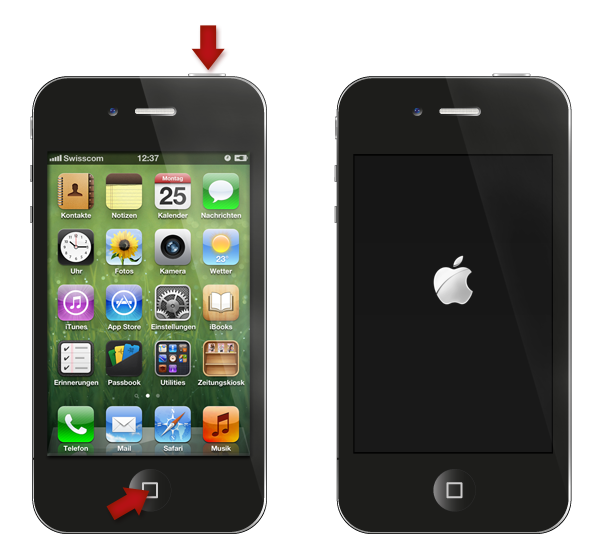
4. If this does not sort out the issue, update the iPhone?s iOS to the latest version by connecting the device to iTunes on your PC
Alternative method known to have worked in case of iPhone WiFi setting dimmed using freezer
1. Tap Settings >General> Cellular > Cellular Data > OFF
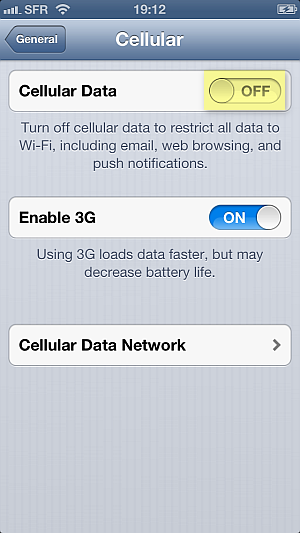
2. Place the iPhone in a ziplock bag and make sure to squeeze the air out of the bag
3. Put the bag in a freezer for 15 minutes
Why place the iPhone in a freezer? As the iPhone would automatically turn off the WiFi chip due to overheating, when you cool down the chip sufficiently, the iPhone automatic protection is disabled. However, this is a temporary fix, until the next time the iPhone WiFi chip overheats and greys out.
If all fails or you wish to have a permanent solution for your iPhone WiFi greyed out, you must contact Apple directly. If your iPhone is in warranty, you are eligible for free-of-charge iPhone replacement by sending the device to the nearest Apple Store.
Still need help?
Post your question directly on my Facebook wall, Ill answer the same day with as many detailed instructions as possible.
To visit my helpful Facebook page click on the link below or scan the QR code to create your ticket:
- http://www.facebook.com/iPhone.Contacts

Available link for download
Tuesday, August 23, 2016
This is Why We Cant Use Mobile Phone on A Plane
This is Why We Cant Use Mobile Phone on A Plane
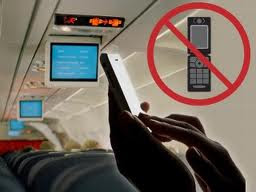
Available link for download