Showing posts with label what. Show all posts

Tuesday, October 25, 2016

WHAT IS RFID

WHAT IS RFID


INTRODUCTION

Radio-frequency identification (RFID) is an automatic detection method, relying on storing and remotely retrieving data using devices called RFID tags or transponders. The technology requires some extent of cooperation of an RFID reader and an RFID tag.

An RFID tag is an object that can be applied to or incorporated into a product, animal, or person for the purpose of identification and tracking using radio waves. Some tags can be read from several meters away and beyond the line of sight of the reader.

Most RFID tags contain at least two parts. One is an integrated circuit for storing and processing information, modulating and demodulating a radio frequency (RF) signal, and other specialized functions. The second is an antenna for receiving and transmitting the signal.

There are generally two types of RFID tags: active RFID tags, which contain a battery, and passive RFID tags, which have no battery.This project uses passive tags. Read-only tags are typically passive and are programmed with a unique set of data (usually 32 to 128 bits) that cannot be modified.

Future chip less RFID allows for discrete identification of tags without an integrated circuit, thereby allowing tags to be printed directly onto assets at a lower cost than traditional tags. Currently (2008) none of the chip less concepts has become operational.

Today, RFID is used in enterprise supply chain management to improve the efficiency of inventory tracking and management.


APPLICATIONS OF RFID ?

1. Access Control System

2. Attendance Recording System

3. Bank Locker System

4. Vehical Parking System

5.  Parts Identification

6. Person Identification


Of all this, we have implemented the  RFID based Access Control


       An embedded system can be defined as a computing device that does a specific focused job. Appliances such as the air-conditioner, VCD player, DVD player, printer, fax machine, mobile phone etc. are examples of embedded systems. Each of these appliances will have a processor and special hardware to meet the specific requirement of the application along with the embedded software that is executed by the processor for meeting that specific requirement. The embedded software is also called “firm ware”. The desktop/laptop computer is a general purpose computer. You can use it for a variety of applications such as playing games, word processing, accounting, software development and so on. In contrast, the software in the embedded systems is always fixed listed below:


 Embedded systems do a very specific task, they cannot be programmed to do different things. Embedded systems have very limited resources, particularly the memory. Generally, they do not have secondary storage devices such as the CDROM or the floppy disk. Embedded systems have to work against some deadlines. A specific job has to be completed within a specific time. In some embedded systems, called real-time systems, the deadlines are stringent. Missing a deadline may cause a catastrophe-loss of life or damage to property. Embedded systems are constrained for power. As many embedded systems operate through a battery, the power consumption has to be very low.

· Some embedded systems have to operate in extreme environmental conditions such as very high temperatures and humidity.


Application Areas

Nearly 99 per cent of the processors manufactured end up in embedded systems. The embedded system market is one of the highest growth areas as these systems are used in very market segment- consumer electronics, office automation, industrial automation, biomedical engineering, wireless communication,


data communication, telecommunications, transportation, military and so on.


Consumer appliances:

At home we use a number of embedded systems which include digital camera, digital diary, DVD player, electronic toys, microwave oven, remote controls for TV and air-conditioner, VCO player, video game consoles, video recorders etc. Today’s high-tech car has about 20 embedded systems for transmission control, engine spark control, air-conditioning, navigation etc. Even wristwatches are now  

becoming embedded systems. The palmtops are powerful embedded systems using which we can carry out many general-purpose tasks such as playing games and word processing.


Office automation:

The office automation products using em embedded systems are copying machine, fax machine, key telephone, modem, printer, scanner etc.


Industrial automation:

Today a lot of industries use embedded systems for process control. These include pharmaceutical, cement, sugar, oil exploration, nuclear energy, electricity generation and transmission. The embedded systems for industrial use are designed to carry out specific tasks such as monitoring the temperature, pressure, humidity, voltage, current etc., and then take appropriate action based on the monitored levels to control other devices or to send information to a centralized monitoring station. In hazardous industrial environment, where human presence has to be avoided, robots are used, which are programmed to do specific jobs. The robots are now becoming very powerful and carry out many interesting and complicated tasks such as hardware assembly.


Medical electronics:

Almost every medical equipment in the hospital is an embedded system. These equipments include diagnostic aids such as ECG, EEG, blood pressure measuring devices, X-ray scanners; equipment used in blood analysis, radiation, colonscopy, endoscopy etc. Developments in medical electronics have paved way for more accurate diagnosis of diseases.


Computer networking:

Computer networking products such as bridges, routers, Integrated Services Digital Networks (ISDN), Asynchronous Transfer Mode (ATM), X.25 and frame relay switches are embedded systems which implement the necessary data communication protocols. For example, a router interconnects two networks. The two networks may be running different protocol stacks. The router’s function is to obtain the data packets from incoming pores, analyze the packets and send them towards the destination after doing necessary protocol conversion. Most networking equipments, other than the end systems (desktop computers) we use to access the networks, are embedded systems

.

Telecommunications:

In the field of telecommunications, the embedded systems can be categorized as subscriber terminals and network equipment. The subscriber terminals such as key telephones, ISDN phones, terminal adapters, web cameras are embedded systems. The network equipment includes multiplexers, multiple access systems, Packet Assemblers Dissemblers (PADs), sate11ite modems etc. IP phone, IP gateway, IP gatekeeper etc. are the latest embedded systems that provide very low-cost voice communication over the Internet.


Wireless technologies:

Advances in mobile communications are paving way for many interesting applications using embedded systems. The mobile phone is one of the marvels of the last decade of the 20’h century. It is a very powerful embedded system that provides voice communication while we are on the move. The Personal Digital Assistants and the palmtops can now be used to access multimedia services over  the Internet. Mobile communication infrastructure such as base station controllers, mobile switching centers are also powerful embedded systems.

Insemination:

Testing and measurement are the fundamental requirements in all scientific and engineering activities. The measuring equipment we use in laboratories to measure parameters such as weight, temperature, pressure, humidity, voltage, current etc. are all embedded systems. Test equipment such as oscilloscope, spectrum analyzer, logic analyzer, protocol analyzer, radio communication test set etc. are embedded systems built around powerful processors. Thank to miniaturization, the test and measuring equipment are now  becoming portable facilitating easy testing and measurement in the field by field-personnel.


Security:

Security of persons and information has always been a major issue. We need to protect our homes and offices; and also the information we transmit and store. Developing embedded systems for security applications is one of the most lucrative businesses nowadays. Security devices at homes, offices, airports etc. for authentication and verification are embedded systems. Encryption devices are nearly 99 per cent of

the processors that are manufactured end up in~ embedded systems. Embedded systems find applications in . every industrial segment- consumer electronics, transportation, avionics, biomedical engineering, manufacturing, process control and industrial automation, data communication, telecommunication, defense, security etc. Used to encrypt the data/voice being transmitted on communication links such as telephone lines. Biometric systems using fingerprint and face recognition are now being extensively used for user authentication in banking applications as well as for access control in high security buildings.


Finance:


Financial dealing through cash and cheques are now slowly paving way for transactions using smart cards and ATM (Automatic Teller Machine, also expanded as Any Time Money) machines. Smart card, of the size of a credit card, has a small micro-controller and memory; and it interacts with the smart card reader! ATM machine and acts as an electronic wallet. Smart card technology has the capability of ushering in a cashless society. Well, the list goes on. It is no exaggeration to say that eyes wherever you go, you can see, or at least feel, the work of an embedded system! 


Available link for download

Read more »

Monday, October 17, 2016

What is web hosting

What is web hosting


When you create website, it is composed of web pages having text, images, videos and other content for people to see them. However, people can see your website only when it is available on the Internet. To make your website available on the Internet, you have to store it on a computer called web server. When you buy some space on a web server and store your webpages there, your website becomes hosted and can be seen by anyone. When you make a website and want other people to see it, you will need to publish (or upload) it with a web hosting service.
Web hosting services work by storing your website files in high-powered computers (web servers) connected to a very fast network. When someone types in your web address, the Internet connects to the web server holding your website files and then transfers your website information back to their computer. From there they can surf and view the pages of your website.
There are number of companies who provide the web hosting in a very low cost rates such as www.hostgator.com, www.godaddy.com, bigrock.com.

Available link for download

Read more »

Saturday, October 8, 2016

What is 8051 Standard

What is 8051 Standard


Microcontroller manufacturers have been competing for a long time for attracting choosy customers and every couple of days a new chip with a higher operating frequency, more memory and upgraded A/D converters appeared on the market.

However, most of them had the same or at least very similar architecture known in the world of microcontrollers as “8051 compatible”. What is all this about?

The whole story has its beginnings in the far 80s when Intel launched the first series of microcontrollers called the MCS 051. Even though these microcontrollers had quite modest features in comparison to the new ones, they conquered the world very soon and became a standard for what nowadays is called the microcontroller.

The main reason for their great success and popularity is a skillfully chosen configuration which satisfies different needs of a large number of users allowing at the same time constant expansions (refers to the new types of microcontrollers). Besides, the software has been developed in great extend in the meantime, and it simply was not profitable to change anything in the microcontroller’s basic core. This is the reason for having a great number of various microcontrollers which basically are solely upgraded versions of the 8051 family. What makes this microcontroller so special and universal so that almost all manufacturers all over the world manufacture it today under different name?

As seen in figure above, the 8051 microcontroller has nothing impressive in appearance:

  • 4 Kb of ROM is not much at all.

  • 128b of RAM (including SFRs) satisfies the users basic needs.

  • 4 ports having in total of 32 input/output lines are in most cases sufficient to make all necessary connections to peripheral environment.

The whole configuration is obviously thought of as to satisfy the needs of most programmers working on development of automation devices. One of its advantages is that nothing is missing and nothing is too much. In other words, it is created exactly in accordance to the average user‘s taste and needs. Another advantages are RAM organization, the operation of Central Processor Unit (CPU) and ports which completely use all recourses and enable further upgrade.

2.2 Pinout Description

Pins 1-8: Port 1 Each of these pins can be configured as an input or an output.

Pin 9: RS A logic one on this pin disables the microcontroller and clears the contents of most registers. In other words, the positive voltage on this pin resets the microcontroller. By applying logic zero to this pin, the program starts execution from the beginning.

Pins10-17: Port 3 Similar to port 1, each of these pins can serve as general input or output. Besides, all of them have alternative functions:

Pin 10: RXD Serial asynchronous communication input or Serial synchronous communication output.

Pin 11: TXD Serial asynchronous communication output or Serial synchronous communication clock output.

Pin 12: INT0 Interrupt 0 input.

Pin 13: INT1 Interrupt 1 input.

Pin 14: T0 Counter 0 clock input.

Pin 15: T1 Counter 1 clock input.

Pin 16: WR Write to external (additional) RAM.

Pin 17: RD Read from external RAM.

Pin 18, 19: X2, X1 Internal oscillator input and output. A quartz crystal which specifies operating frequency is usually connected to these pins. Instead of it, miniature ceramics resonators can also be used for frequency stability. Later versions of microcontrollers operate at a frequency of 0 Hz up to over 50 Hz.

Pin 20: GND Ground.

Pin 21-28: Port 2 If there is no intention to use external memory then these port pins are configured as general inputs/outputs. In case external memory is used, the higher address byte, i.e. addresses A8-A15 will appear on this port. Even though memory with capacity of 64Kb is not used, which means that not all eight port bits are used for its addressing, the rest of them are not available as inputs/outputs.

Pin 29: PSEN If external ROM is used for storing program then a logic zero (0) appears on it every time the microcontroller reads a byte from memory.

Pin 30: ALE Prior to reading from external memory, the microcontroller puts the lower address byte (A0-A7) on P0 and activates the ALE output. After receiving signal from the ALE pin, the external register (usually 74HCT373 or 74HCT375 add-on chip) memorizes the state of P0 and uses it as a memory chip address. Immediately after that, the ALU pin is returned its previous logic state and P0 is now used as a Data Bus. As seen, port data multiplexing is performed by means of only one additional (and cheap) integrated circuit. In other words, this port is used for both data and address transmission.

Pin 31: EA By applying logic zero to this pin, P2 and P3 are used for data and address transmission with no regard to whether there is internal memory or not. It means that even there is a program written to the microcontroller, it will not be executed. Instead, the program written to external ROM will be executed. By applying logic one to the EA pin, the microcontroller will use both memories, first internal then external (if exists).

Pin 32-39: Port 0 Similar to P2, if external memory is not used, these pins can be used as general inputs/outputs. Otherwise, P0 is configured as address output (A0-A7) when the ALE pin is driven high (1) or as data output (Data Bus) when the ALE pin is driven low (0).

Pin 40: VCC +5V power supply.

2.3 Input/Output Ports (I/O Ports)

All 8051 microcontrollers have 4 I/O ports each comprising 8 bits which can be configured as inputs or outputs. Accordingly, in total of 32 input/output pins enabling the microcontroller to be connected to peripheral devices are available for use.

Pin configuration, i.e. whether it is to be configured as an input (1) or an output (0), depends on its logic state. In order to configure a microcontroller pin as an output, it is necessary to apply a logic zero (0) to appropriate I/O port bit. In this case, voltage level on appropriate pin will be 0.

Similarly, in order to configure a microcontroller pin as an input, it is necessary to apply a logic one (1) to appropriate port. In this case, voltage level on appropriate pin will be 5V (as is the case with any TTL input). This may seem confusing but dont loose your patience. It all becomes clear after studying simple electronic circuits connected to an I/O pin.


Input/Output (I/O) pin
Figure above illustrates a simplified schematic of all circuits within the microcontroler connected to one of its pins. It refers to all the pins except those of the P0 port which do not have pull-up resistors built-in.


Output pin
A logic zero (0) is applied to a bit of the P register. The output FE transistor is turned on, thus connecting the appropriate pin to ground.


Input pin
A logic one (1) is applied to a bit of the P register. The output FE transistor is turned off and the appropriate pin remains connected to the power supply voltage over a pull-up resistor of high resistance.


Logic state (voltage) of any pin can be changed or read at any moment. A logic zero (0) and logic one (1) are not equal. A logic one (0) represents a short circuit to ground. Such a pin acts as an output.

A logic one (1) is “loosely” connected to the power supply voltage over a resistor of high resistance. Since this voltage can be easily “reduced” by an external signal, such a pin acts as an input.

Port 0

The P0 port is characterized by two functions. If external memory is used then the lower address byte (addresses A0-A7) is applied on it. Otherwise, all bits of this port are configured as inputs/outputs.

The other function is expressed when it is configured as an output. Unlike other ports consisting of pins with built-in pull-up resistor connected by its end to 5 V power supply, pins of this port have this resistor left out. This apparently small difference has its consequences:


If any pin of this port is configured as an input then it acts as if it “floats”. Such an input has unlimited input resistance and indetermined potential.


When the pin is configured as an output, it acts as an “open drain”. By applying logic 0 to a port bit, the appropriate pin will be connected to ground (0V). By applying logic 1, the external output will keep on “floating”. In order to apply logic 1 (5V) on this output pin, it is necessary to built in an external pull-up resistor.


Only in case P0 is used for addressing external memory, the microcontroller will provide internal power supply source in order to supply its pins with logic one. There is no need to add external pull-up resistors.

Port 1

P1 is a true I/O port, because it doesnt have any alternative functions as is the case with P0, but can be cofigured as general I/O only. It has a pull-up resistor built-in and is completely compatible with TTL circuits.

Port 2

P2 acts similarly to P0 when external memory is used. Pins of this port occupy addresses intended for external memory chip. This time it is about the higher address byte with addresses A8-A15. When no memory is added, this port can be used as a general input/output port showing features similar to P1.

Port 3

All port pins can be used as general I/O, but they also have an alternative function. In order to use these alternative functions, a logic one (1) must be applied to appropriate bit of the P3 register. In tems of hardware, this port is similar to P0, with the difference that its pins have a pull-up resistor built-in.

Pins Current limitations


When configured as outputs (logic zero (0)), single port pins can receive a current of 10mA. If all 8 bits of a port are active, a total current must be limited to 15mA (port P0: 26mA). If all ports (32 bits) are active, total maximum current must be limited to 71mA. When these pins are configured as inputs (logic 1), built-in pull-up resistors provide very weak current, but strong enough to activate up to 4 TTL inputs of LS series.

Available link for download

Read more »

Saturday, September 17, 2016

What You Can Do With Your iPhone’s Health App

What You Can Do With Your iPhone’s Health App


Apples Health application touched base in iOS 8, and its presently on each exceptional iPhone. This application seems basic at first look, however it shrouds a considerable measure of information and propelled usefulness.


The Health application is in really the client unmistakable face of HealthKit, Apples endeavor at putting all your wellbeing information in one spot.

The Dashboard (and Step Tracking)

Open up the Health application and youll see the Dashboard. On the off chance that you have an iPhone 6 or iPhone 6 Plus, the telephones inherent, low-power step following sensor will consequently populate this information with data about your physical movement. The sensor tracks the strides you take, the separation you walk or run, and the flights of stairs you climb. You can then perceive how dynamic you were in the course of the most recent day, week, month, or year.

On the off chance that you have an iPhone 6 or 6 Plus, you can utilize the Health application as a speedy approach to perceive the amount youre strolling and running — no different pedometer or step-GPS beacon fundamental. With no extra applications or devices, this is all a great many people will see on their iPhones Health application — accepting they have a cutting edge iPhone with these sensors.

In spite of the fact that the Dashboard naturally incorporates this stride information on the off chance that you have an iPhone 6, you can really show any sort of information on the Dashboard you like. Well cover that later.

Medicinal ID

The Medical ID tab permits you to make a "Medicinal ID." This is data that can be shown on your lock screen without opening your telephone. The thought is that you can include data about you that may be helpful in a crisis — medicinal conditions, hypersensitivities, blood classification, organ giver status, crisis contacts, and the sky is the limit from there. These critical subtle elements can then be gotten to from your telephones lock screen if individuals need to know it in a crisis.

This is kind of an advanced adaptation of the medicinal ID wristband, yet it depends on somebody checking your iPhone in a crisis. Its additionally a touch intense to discover, as somebody needs to tap the Emergency catch on the lock screen to open the crisis dialer and after that tap Medical ID. On the off chance that more individuals use Medical ID, maybe Medical ID will be regularly checked later on. As of right now, I would stay with a committed therapeutic ID wristband in case youre truly agonized over conveying vital points of interest in a crisis.

Wellbeing Data

The Health Data tab is a gigantic rundown of distinctive sorts of wellbeing information. This is really a rundown of all the diverse sorts of information Apples "HealthKit" administration can track. Apples HealthKit administration will permit outsider wellbeing following contraptions and applications to impart their information to Apples Health application and access the information you have put away there, in the event that you give them consent. The Health application should be a solitary vault where all your Health information is put away.

On the off chance that you have applications or gadgets that coordinate with HealthKit, they can naturally add information to the distinctive sorts of Health Data, pretty much as your iPhone is continually upgrading the stride following information with information from its own sensors. Apples own particular Apple Watch will incorporate wellness following elements that coordinate with HealthKit, for instance.

In any case, you can really include a ton of information by hand, on the off chance that you need. For instance, suppose you measure yourself day by day. You can go into Health Data > Body Measurements > Weight and tap Add Data Point. Consistently when you measure yourself, you can include the most recent estimation here and track a background marked by your weight. You can even flip the "Show on Dashboard" alternative to On so you can see your weight on the Dashboard screen.

This isnt the most advantageous alternative, obviously. Over the long haul, Apple might want for you to get some kind of Bluetooth-empowered scale that will naturally enter your weight into HealthKit when you measure yourself. Be that as it may, on the off chance that youd like to track something physically — whether its weight, pulse, time spent dozing, or caffeine consumption — you can include it physically. You are constrained to sorts of information Apple incorporates, be that as it may. There are some observable exclusions at this time.

For every kind of information, you can likewise tap "Offer Data" to see which applications are consequently giving this information to the Health application, and which applications have been offered authorization to see the information.

Sources

RELATED ARTICLE

iOS Has App Permissions, Too: And Theyre Arguably Better Than Androids

Android has an authorizations framework for individual applications, however so do iPhones and iPads. Android gives you a solitary brief... [Read Article]

The Sources tab looks a touch desolate as a matter of course. Applications you introduce from the App Store might ask for access to redesign your wellbeing information, and theyll show up here in the wake of asking for authorization to do as such. This tab may be valuable on the off chance that youve effectively offered access to such applications, so you can see which applications have admittance.

For instance, suppose you have an action following band that tracks the time you spend snoozing or a restroom scale that can report your weight to your telephone through Bluetooth. The going with applications on your telephone can ask for authorization to incorporate with HealthKit. They can then put their information into the Health application so you can get to everything in one spot. This information can then be imparted to different applications, which could utilize it to give bits of knowledge after they take a gander at months or years of diverse information focuses.

It isnt about physical sensors, obviously. An application that you physically enter information into could likewise coordinate with HealthKit, naturally replicating the information you went into HealthKit so its all accessible in one focal area.

This application is really not extremely Apple-like from numerous points of view. The Dashboard is decent, and Medical ID is alright, yet you can without much of a stretch wind up in the weeds in the event that you tap Health Data and begin glancing around.

While its conceivable to fanatically enter all the information focuses you have physically, the genuine expectation is for you to utilize gadgets and applications that naturally enter the information for you. To discover these applications, youll need to look somewhere else — the Health application on iOS doesnt yet offer you some assistance with finding HealthKit-empowered applications and gadgets. That appears like a conspicuous accommodating component Apple ought to include what

Available link for download

Read more »

Tuesday, September 13, 2016

What are the Hacking techniques to Hack Facebook Account How to Secure Facebook Account from Hackers and How to Recover Facebook Account if Hacked

What are the Hacking techniques to Hack Facebook Account How to Secure Facebook Account from Hackers and How to Recover Facebook Account if Hacked


There are two types ov Hackers in this world. One, who are Professional Hackers, they don’t need to use any reset option to hack into facebook account they directly recover the current password n login the account by disabling the secure browsing and 2-step verification system and even Facebook Team can’t trace/stop them. It looks horrible but don’t be afraid all professional Hackers don’t hack facebook or any email account without any solid reason.
So now question arises who are they who hack facebook account and how they hack?
There is 2nd type ov non-professional hackers who hack accounts only to show their power to others and to make them terrified.

So what techniques they use?
There are two major techniques to hack facebook account.
  1. Use of Keylogger
  2. By resetting facebook password or the password ov associated Email Address


What is the Use ov Keylogger?


Keylogger is the file generator software (its image I have shown above) in which you enter your own email address & password n generate a executable file. The deal is very simple, you only send that file to anyone by renaming it as picture or video so that anyone‘ll definitely open it. Once a user opens this file your each n every activity even your every single keystroke goes by email to hacker’s Email Address. So by this he receives your ID n Password n becomes able to login ur account without ur permission. So do not receive any .exe format file from any unknown person. (n Don’t be worried I am going to give you solution about it that how you can safe your account even if you have trapped by any keylogger)


How they Hack by resetting your password?
They simply go to facebook login page n click on “forgot password” option. Then they get the below page.


Now Facebook gives you different ways to identify your account as you can see in above image.  Its quite difficult sometimes to use Friend’s name, Email and phone option to identify the account as all these are mostly hidden on accounts but they use very simple way to identify the account which is username option. They simply go to your profile and they copy the user name from your profile’s URL . For example: if my profile’s URL is www.facebook.com/AbdulHananOfficialthen after “facebook.com/” you can find the user name which is AbdulHananOfficial.
Then they simply enter this username and go to reset your password. Then facebook gives them three options to reset the password.
  1. Send reset link to associated email address with facebook account
  2. Send reset code to mobile phone (if you have added phone to your account)
  3. No longer access to above options

First they try to find out the associated email address n if they become able to find then they go to reset your email address (for example if you have yahoo account then they go to yahoomail.com n try to reset the password ov associated email address)
If they become fail to reset associated email address then They click on “no longer access” option n then facebook gives option to Enter answer ov security question which is associated with facebook account n make several guesses to give right answer (Don’t worry I ‘ll explain below that how to choose strong security question, Above I was just telling that how many ways are there to reset the password)


So How to secure your account from Hackers?
To secure your account, you have to make all security measures enabled. For this purpose, Facebook gives you several security hurdles to be retained secured. Below I am going to explain that how you can enable all security measures.
Go to your Account settings ov Facebook account n then click on “Security” option given at the left side. Then you ‘ll see the below page


Now enable first 2 options Secure Browsing n Login Notifications one by one by clicking on “Edit”
Now Enable 2-step verification system on your facebook Account which is really important to secure your account. To enable 2-step verification system Edit the option “Login Approvals” n check the box “Require a security code to access my account from unknown browsers”. When you ‘ll check that box then you ‘ll get the option to get started this security. Simply click on “Get started”. Then you ‘ll notice below image


Now enter any name to add your known browser such as Home, My PC etc. Then after clicking on Add Browser button you ‘ll see below image


Then choose first option if you have Android, Iphone or Ipod Touch or otherwise “Other” Then click on “Continue” Then you ‘ll see below image


Enter your phone number which you want to add to your facebook account and then click on Continue. Then you ‘ll notice below image on your screen and get a security code on your cell phone.


Then enter the code which you received on your cell n then click on confirm.
Now you have enabled the 2-step verification system.

How 2-step verification system makes you secure?
When you have enabled 2-step verification system then whenever anyone ‘ll try to login your account by entering your password from Unknown Device or Browser (the device or browser which you hadn’t saved in your facebook account) then facebook ‘ll send a security code to your cell phone n request you to enter that code to login. So if you have cell in your own custody then doesn’t matter if someone has your password or not.


How to Enable https Browsing in Facebook?


https browsing keeps you secure from Session Hijacking which is a usual way of Hacking.
To Enable it just press setting Button and click on Account Settings. Then Click on Security Option given on the Left side of Page. I have also shown in Below picture. Then Click on Edit and check the Option "Browse Facebook on a secure connection (https) when possible"

How to Edit saved devices in your facebook account?
Go to security page ov your facebook account n then edit the option ov Recognized devices. Then you ‘ll notice below image


Here you ‘ll see all saved devices with the name like Home etc whatever you saved n you ‘ll see Remove option to remove that device from your account (if you want to remove). If you ‘ll remove that device then the person who ‘ll try to login your account from that device ‘ll have to enter the code (which facebook ‘ll send on your cell phone)


How to check that How much your facebook account is secured and you have enabled all security measures?
To check please go to this Address https://www.facebook.com/update_security_info.php
You ‘ll be asked to enter your password, so please enter your password then you


Your overall protection should be “High”.
Here you can add your contact Email, Mobile Phone and security Question to reset your password if you ‘ll be hacked in future.


How to recover your Facebook Account if you have Hacked?
You become hacked completely whenever hackers access your account n remove your associated email address and phone number from your account. Now question arises how you can recover now?
Simply go to your email address which was associated with your facebook account then you ‘ll must see this below email in your email account.


This above email ‘ll show you that your email address has been removed from your facebook account but this email ‘ll also give you option “Secure your account” to recover your account again. So click on this then you ‘ll be asked that it was you who removed email address or someone else? Then click on “someone else” then facebook ‘ll redirect you to choose a new password page like below


So choose your new password n recover your facebook account.
What is the crux of this above article n what we should do to create unbreakable security?
There are 3 Main Things that should be protected to make your account safe.

1. Your password
Use ov 2-step verification‘ll kill the password theft threat

2. Your security Question
Choose the security question which is constructed by answer in shape ov Name ov a person. Do not choose the questions which have the answer in the shape ov city Name like “where did you spend your childhood summers” or “where was your mother born” because these questions mostly have the answer in shape ov City Name which can be guessed by trying again n again. So Try to choose the question like “What was the last name of your first grade teacher?” etc.

3. Your associated Email Address
You are secured n can recover your facebook account till you have access to your associated email address otherwise there is no way to recover facebook account. So try to associate most strong email address with your facebook which can’t be reset or hacked. For this, I prefer Gmail because its quite difficult to reset or hack Gmail Account. So always associate Gmail account with your facebook or you can also associate 2lets.com Email account (if you have) n always try to associated more than 2 email accounts with your facebook account so that if you become fail to remember or access to one Email address then you can access other one.
These above 3 Measures ‘ll  guarantee you complete security against 2ndtype ov hackers (which I mentioned in start ov article) 


Available link for download

Read more »

Saturday, September 10, 2016

WHAT IS ASP NET WEB FORMS

WHAT IS ASP NET WEB FORMS


The ASP.NET Web Forms page framework is a scalable common language runtime programming model that can be used on the server to dynamically generate Web pages.

Intended as a logical evolution of ASP (ASP.NET provides syntax compatibility with existing pages), the ASP.NET Web Forms framework has been specifically designed to address a number of key deficiencies in the previous model. In particular, it provides:

·         The ability to create and use reusable UI controls that can encapsulate common functionality and thus reduce the amount of code that a page developer has to write.

·         The ability for developers to cleanly structure their page logic in an orderly fashion (not "spaghetti code").

·         The ability for development tools to provide strong WYSIWYG design support for pages (existing ASP code is opaque to tools).


ASP.NET Web Forms pages are text files with an .aspx file name extension. They can be deployed throughout an IIS virtual root directory tree. When a browser client requests .aspx resources, the ASP.NET runtime parses and compiles the target file into a .NET Framework class. This class can then be used to dynamically process incoming requests. (Note that the .aspx file is compiled only the first time it is accessed; the compiled type instance is then reused across multiple requests).

An ASP.NET page can be created simply by taking an existing HTML file and changing its file name extension to .aspx (no modification of code is required). For example, the following sample demonstrates a simple HTML page that collects a users name and category preference and then performs a form postback to the originating page when a button is clicked:


ASP.NET provides syntax compatibility with existing ASP pages. This includes support for <% %> code render blocks that can be intermixed with HTML content within an .aspx file. These code blocks execute in a top-down manner at page render time.


Available link for download

Read more »

Monday, September 5, 2016

What Can Java Technology Do

What Can Java Technology Do


The most common types of programs written in the Java programming language are appletsand applications. If you’ve surfed the Web, you’re probably already familiar with applets. An applet is a program that adheres to certain conventions that allow it to run within a Java-enabled browser.

However, the Java programming language is not just for writing cute, entertaining applets for the Web. The general-purpose, high-level Java programming language is also a powerful software platform. Using the generous API, you can write many types of programs.

An application is a standalone program that runs directly on the Java platform. A special kind of application known as a serverserves and supports clients on a network. Examples of servers are Web servers, proxy servers, mail servers, and print servers. Another specialized program is a servlet. A servlet can almost be thought of as an applet that runs on the server side. Java Servlets are a popular choice for building interactive web applications, replacing the use of CGI scripts. Servlets are similar to applets in that they are runtime extensions of applications. Instead of working in browsers, though, servlets run within Java Web servers, configuring or tailoring the server.

How does the API support all these kinds of programs? It does so with packages of software components that provides a wide range of functionality. Every full implementation of the Java platform gives you the following features:

·         The essentials: Objects, strings, threads, numbers, input and output, data structures, system properties, date and time, and so on.

·         Applets: The set of conventions used by applets.

·         Networking: URLs, TCP (Transmission Control Protocol), UDP (User Data gram Protocol) sockets, and IP (Internet Protocol) addresses.

·         Internationalization: Help for writing programs that can be localized for users worldwide. Programs can automatically adapt to specific locales and be displayed in the appropriate language.

·         Security: Both low level and high level, including electronic signatures, public and private key management, access control, and certificates.

·         Software components: Known as JavaBeansTM, can plug into existing component architectures.

·         Object serialization: Allows lightweight persistence and communication via Remote Method Invocation (RMI).

·         Java Database Connectivity (JDBCTM): Provides uniform access to a wide range of relational databases.


The Java platform also has APIs for 2D and 3D graphics, accessibility, servers, collaboration, telephony, speech, animation, and more. The following figure depicts what is included in the Java 2 SDK. 


Available link for download

Read more »

Tuesday, August 30, 2016

What to do if iPhone WiFi is greyed out

What to do if iPhone WiFi is greyed out
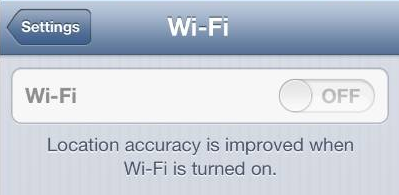

iphone wifi not functioning

If you are using iPhone 4S or iPhone 5 and have recently upgraded iOS, you might have ended up with your iPhone WiFi switch being greyed out. Read the article below to find out what causes this problem and ways it can be resolved.

The Apple Support Communities have seen a surge in problems related to iPhone users? WiFi being defunct. In many cases, the issue is related to iPhone 4S recently updted from iOS 5 to iOS 6 but also occurs in iPhone 5.

UPDATE: I found a useful post which summarizes iPhone WiFi connectivity issues in general. It might be useful for you.

Check out this tumblr post for an exotic way to fix iPhone WiFi:

  • http://bit.ly/17vldCD


What causes iPhone WiFi greyed out?

iPhone Wifi being greyed out means that there is a hardware-related issue ? i.e. the iPhone WiFi chip does not function.

With the release of iOS 6 back in September last year, Apple improved power management for better iPhone performance over iOS 5. As a result of inadequate testing, however, it happens that some WiFi chips in both iPhone 4S and iPhone 5 overheat under iOS 6.

ios 6 and iphone wifi greyed out

Fortunately, the iPhone is a piece of advanced technology which automatically prevents damage when the WiFi chip becomes too hot by powering the chip off. This causes your iPhone WiFi to be greyed out and ultimately, you cannot connect iPhone to the Internet via WiFi.

How to solve issue with iPhone WiFi not functioning?

You can verify whether your iPhone WiFi setting is greyed out or dimmed by navigating to Settings > WiFi.
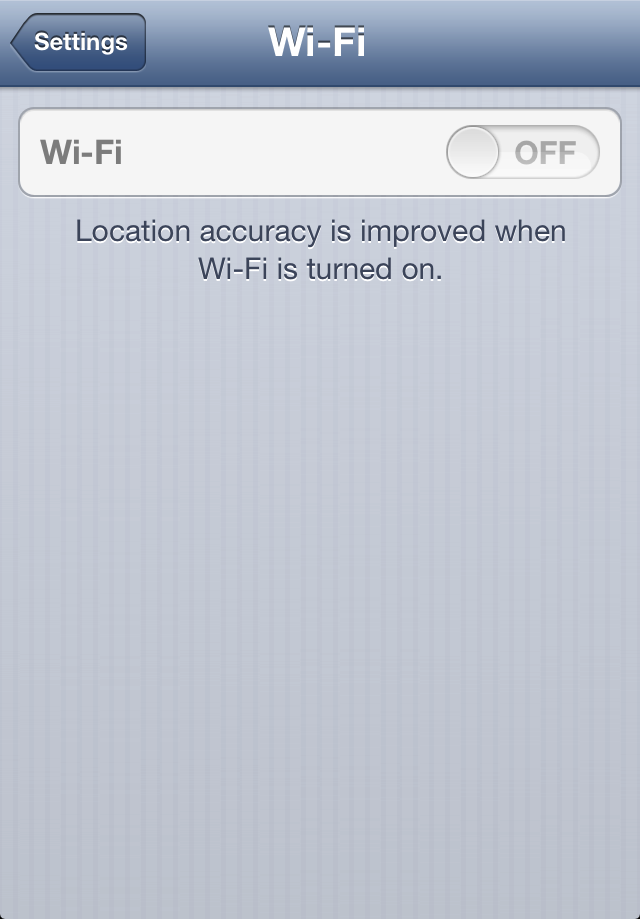
iphone wifi setting dimmed

Also, go to Settings > General > About and you will see your Wi-Fi Address empty.
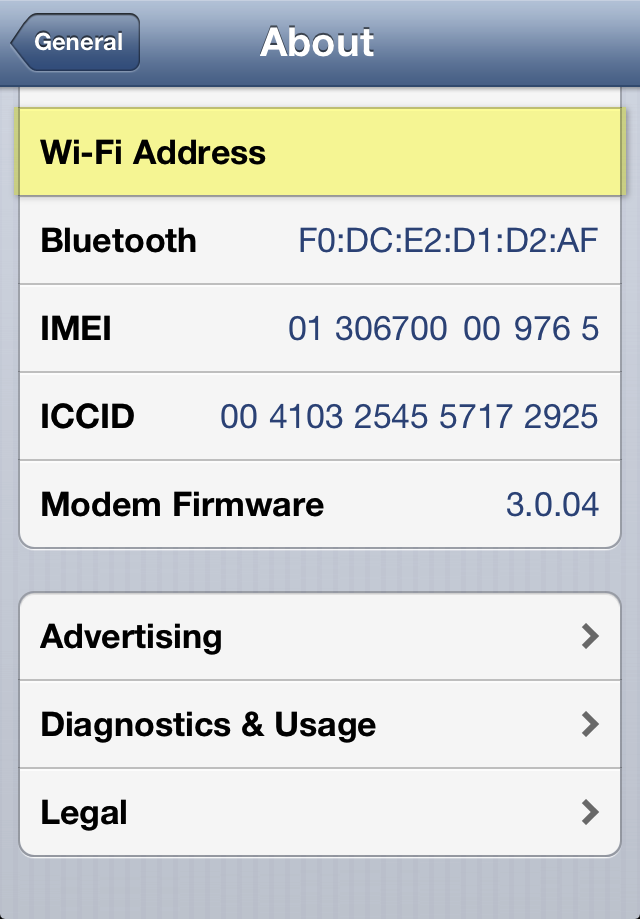
iphone wifi address missing

Since WiFi and Bluetooth use the same radio chip, it is very probable the iPhone Bluetooth feature under Settings > Bluetooth is disabled, disconnected, or inaccessible.
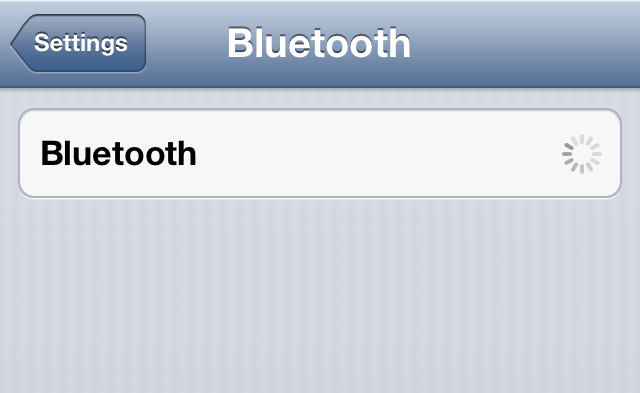
iphone bluetooth unavailable

To resolve the issue:

1. Navigate to Settings and make sure that Airplane Mode is switched off
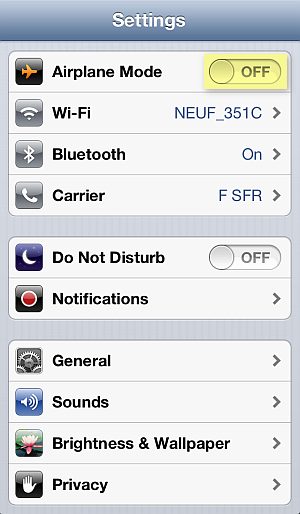
airlpane mode switched off on iphone

2. In the iPhone Settings, go to General > Reset > Rest Network Settings

reset settings iphone network

3. Cold-restart the iPhone by pressing and holding the Sleep/Wake and Home buttons simultaneously for 10 seconds until you see the iPhone screen go blank
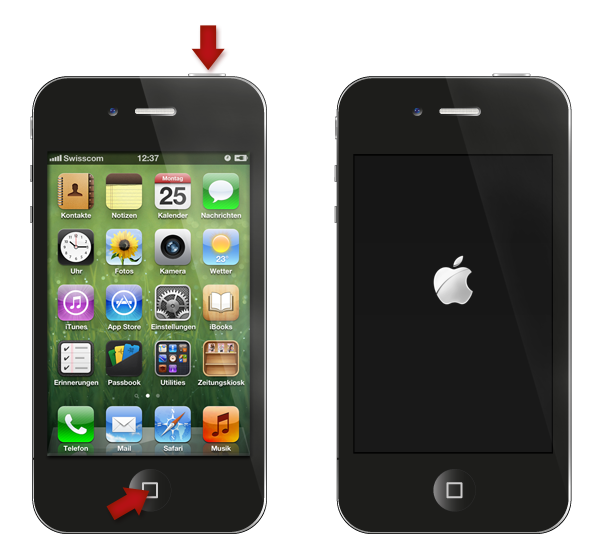
press home and sleep buttons to restart iphone

4. If this does not sort out the issue, update the iPhone?s iOS to the latest version by connecting the device to iTunes on your PC


Alternative method known to have worked in case of iPhone WiFi setting dimmed using freezer

1. Tap Settings >General> Cellular > Cellular Data > OFF
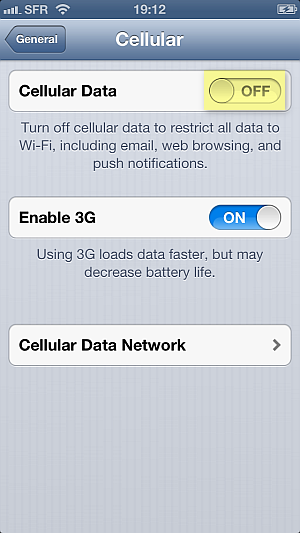
turn iphone cellular data off

2. Place the iPhone in a ziplock bag and make sure to squeeze the air out of the bag

3. Put the bag in a freezer for 15 minutes

Why place the iPhone in a freezer? As the iPhone would automatically turn off the WiFi chip due to overheating, when you cool down the chip sufficiently, the iPhone automatic protection is disabled. However, this is a temporary fix, until the next time the iPhone WiFi chip overheats and greys out.

If all fails or you wish to have a permanent solution for your iPhone WiFi greyed out, you must contact Apple directly. If your iPhone is in warranty, you are eligible for free-of-charge iPhone replacement by sending the device to the nearest Apple Store.

Still need help?

Post your question directly on my Facebook wall, Ill answer the same day with as many detailed instructions as possible.

To visit my helpful Facebook page click on the link below or scan the QR code to create your ticket:

  • http://www.facebook.com/iPhone.Contacts

qr code iphone wifi greyed out and other questions on facebook

Available link for download

Read more »