- click on start menu >>open control penal>>click on Network and Internet connection.

- Click on Network Connection>>>>

- Right Click on Local Area Connection>>>>>than click on Properties

- click on internet protocol >>>>>>>than click on properties

- click on (use the following DNS server address)type 8.8.8.8 in the 1st box
and type 8.8.4.4 in the 2nd box and SAVE.

- Enjoy You Tube in Pakistan.
Showing posts with label out. Show all posts
Showing posts with label out. Show all posts
Sunday, November 6, 2016
Open YouTube In Pakistan With Out any Proxy in Pakistan
Open YouTube In Pakistan With Out any Proxy in Pakistan
How to Open YouTube In Pakistan With Out any Proxy or Software:
0 Response to "Open YouTube In Pakistan With Out any Proxy in Pakistan"
Available link for download

Saturday, October 8, 2016
Pastor Gives Out 16 SUVs 16 Cars Millions Of Naira To Celebrate Birthday
Pastor Gives Out 16 SUVs 16 Cars Millions Of Naira To Celebrate Birthday
The Senior Pastor of Champions Royal Assembly, Kubwa, Abuja, Joshua Iginla on Sunday, gave out 32 cars out of which were 16 SUVs to celebrate his birthday.

Iginla also gave out money running into several millions of naira to the aged, widows, orphanages and scholarships to orphans from nursery school to university. Six Nollywood actors and actresses got Hummer jeep 3 series, Mercedes G-Wagon and Mercedes CLS 550.
They include Jide Kosoko, Francis Duru, Alex Usifo, Ngozi Osondu, Thelma Nwosu and Sunday Omobolanle, popularly known as Babaluwe. Artisans got generators and cash gifts while the widows got deep freezers, rice and cash gifts ranging from N150,000 to N1.5 million.
Treasure Orphanage Foundation, Nyanya, Divine Wound Orphanage, Kubwa and Christ Home Foundation, Kuje, got N1.5 million each and rice while some orphans in the homes were awarded scholarships from nursery to university.
Iginla said he had 782 widows and orphans he caters for. “It doesn’t matter to me if I trek home as I have given even the car that I personally drive.
“I can only drive one car and live in one house at a time. This understanding is what has taught me that when I die, others will inherit my assets.
“The beauty of life is not in its duration but in its donation. I have not seen some of the beneficiaries before in my life or spoken to them.
“I’m seeing many of them for the first time today. I am seeing Jide Kosoko for the first time,” he said.
Iginla also said he gave cars to the Nollywood actors because many of them were poor but people erroneously think they were rich.
According to him, the fruit of the Nollywood artistes were being reaped by pirates and challenged government to do something to arrest it.
“The Nollywood actors and actresses are our ambassadors; they have projected the image of this country positively,” he said.
Kosoko, who confirmed he was meeting Iginla for the first time, commending him for his philanthropy.
Iginla had, in 2015, given 18 cars and millions of naira as birthday gifts to people to celebrate his birthday
RELATED POSTS THAT WOULD INTREST YOU
See awesome before and after picture of your favourite celebrity click here to view
See 5 things every woman should always deny Click here to view
See Traffic evasion Technique by china Click here to view
See Reboot of Prison break. Find out whats new click here to view
Weekly publication from Madonna University Block Rosary Crusade 1 Click here to be updated spiritually
Beware Ladies See Things your husband is too scared to tell you click here to view
4 Tips for creating marriage you want click here to view
5 ways to make your husband say I LOVE YOU click here to view
NUC releases lattest ranking of Nigerian Universities click here to see list
Weekly publication from Madonna University Block Rosary Crusade 2 Click here to be updated spiritually
Available link for download
Wednesday, October 5, 2016
Smart Clip2 Software v1 02 04 is out!
Smart Clip2 Software v1 02 04 is out!
Smart-Clip2 Software v1.02.04 released!
MTK platform update:
1.Updated Unlock Code Calculator for Alcatel phones: 550 new PIDs have been added.
2. Alcatel OT-1009 has been added to MTK Calculator.
3. Some phones that had issues with ADB communication are now supported
Download Smart-Clip2 Software v1.02.04
More info and discussion are HERE.
Smart-Clip2-On!
Best Regards
GSMServer team
Available link for download
Saturday, October 1, 2016
Samsung GT S7582 cert File Download 100 okay With Out Password
Samsung GT S7582 cert File Download 100 okay With Out Password
Download Here
Available link for download
Saturday, September 17, 2016
Sunday, September 11, 2016
SigmaKey Software v1 30 00 is out! Acer Liquid MT S120 and others are added!
SigmaKey Software v1 30 00 is out! Acer Liquid MT S120 and others are added!

Sigma Software v1.30.00
and Sigma Firmware v1.32 are out!

Get the most out of the servicing software that today got even better!
Qualcomm Platform Update:
1. Added Direct Unlock / Read Unlock Codes features for:
? Acer Liquid MT S120 / Liquid Metal
How to connect the smartphone: On the powered OFF phone, press fully Camera and Vol+ simultaneously, and then press Power On button.
2. Updated Fast IMEI Repair database for the following ZTE phones:
? T7, F952: added 1 new version for each model
MTK Platform Update:
1. New models added to the list of supported:
? Avvio 402 (MT6250)
? Doro PhoneEasy 610 (MT6250)
? Bess VZ102 (MT6223)
? Stone ST-TC533 (MT6235)
Need unlock solution for other new and popular in your area Qualcomm-based smartphones of different brands?
Name them here.
Do you have locked MTK Android smartphone? You are welcome to test unlock solution for it here.
Download Sigma Software v1.30.00
Available link for download
Thursday, September 8, 2016
Official Google Maps app Out for iPhone
Official Google Maps app Out for iPhone
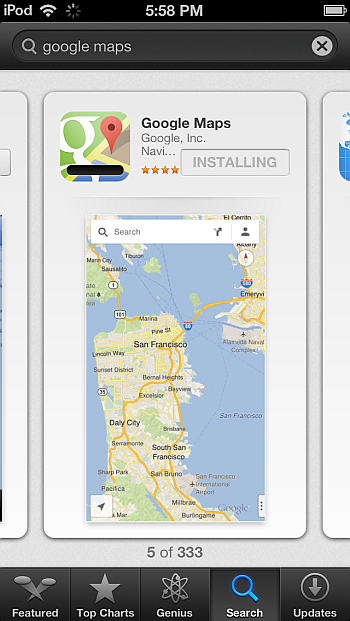
Apple has finally approved a Google-produced Maps app for the iPhone 5, iPhone 4S, iPhone 4 and 3GS as well as for the iPod Touch. You can already download the official Google Maps app from the iTunes store.
With iOS 6, Apple decided to reinvent their Maps app by scrapping the map services offered by Google and replacing them with their own. The revamped Apple Maps iPhone app did not cater to the expectations of many and some even found it disappointing due to numerous incorrectitudes and other issues compared with the service provided by Google Maps.
With users who updated to iOS 6 finding no way to revert back to the Google Maps service which the official Maps iPhone app offered in previous iOS versions, Google initially remained silent on any prospects of developing their own native Google Maps iOS app.
However, it was clear that Google was cooking a Maps app of their own and on September 12th it was unofficially rumored that Google submitted their Maps app to Apple for approval.
At last, Google Maps iPhone app was just officially approved by Apple for the iPhone ? possibly an iPad app will also follow soon.

At first sight the new Google Maps app looks revamped, yet it features a simple interface. The Maps app gives you a chance to log in with your Google account but you can skip this step.

The satellite map imagery is as outstanding as Google could make it.

You also have the old Traffic and Public transit features we know from the original Maps app.

Here is how the app looks on my iPad Mini. Obviously, the Google Maps app is still available only for the iPhone, at least in the beginning.

Finally, here is a YouTube video from New York Times revuewing the newly-approved official Goolge Maps app.
Available link for download
Thursday, September 1, 2016
Walton Primo R2 Official Firmware Flashtools Drivers With out Password
Walton Primo R2 Official Firmware Flashtools Drivers With out Password
Primo R2 Official Firmware,Flashtools & Drivers Download Link: http://www.mediafire.com/download/9dhlvtld8ntrxwb/Primo_R2.rar
1.Install driver:
1st step: Power Off the phone and Connect your phone with PC via USB cable.
Now go to My Computer>Manage> other devices> MT65xx Preloader

2nd step: A window will appear like below and select browse my computer for driver software

3rd step: To select driver go to driver folder> USB VCOM Driver> Win7


4th step: Windows security window will appear. Select install this driver software anyway

5th step: Wait until Windows has successfully updated your driver software

6th step: Now go to Driver Folder> Open MS_USB_ComPort_Driver_exe_v1.1032.1 > Install Driver


2. Open Flash Tool

3. Open Download Agent and select MTK_AllinOne_DA

4. Open scatter_loading and select SW---> Primo R2_BGG_EN_BN_0.94.711 MT6589_Android_scatter_emmc

5. Click Firmware->upgrade and connect USB with mobile (with Battery and mobile must be off)
6. When it shows Firmware Upgrade ok in green, the installation is completed.

1.Install driver:
1st step: Power Off the phone and Connect your phone with PC via USB cable.
Now go to My Computer>Manage> other devices> MT65xx Preloader
2nd step: A window will appear like below and select browse my computer for driver software
3rd step: To select driver go to driver folder> USB VCOM Driver> Win7
4th step: Windows security window will appear. Select install this driver software anyway
5th step: Wait until Windows has successfully updated your driver software
6th step: Now go to Driver Folder> Open MS_USB_ComPort_Driver_exe_v1.1032.1 > Install Driver
2. Open Flash Tool
3. Open Download Agent and select MTK_AllinOne_DA
4. Open scatter_loading and select SW---> Primo R2_BGG_EN_BN_0.94.711 MT6589_Android_scatter_emmc
5. Click Firmware->upgrade and connect USB with mobile (with Battery and mobile must be off)
6. When it shows Firmware Upgrade ok in green, the installation is completed.
Available link for download
Tuesday, August 30, 2016
What to do if iPhone WiFi is greyed out
What to do if iPhone WiFi is greyed out
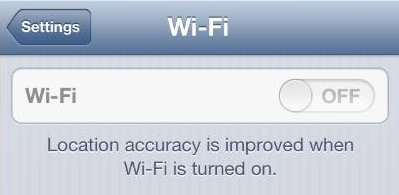
If you are using iPhone 4S or iPhone 5 and have recently upgraded iOS, you might have ended up with your iPhone WiFi switch being greyed out. Read the article below to find out what causes this problem and ways it can be resolved.
The Apple Support Communities have seen a surge in problems related to iPhone users? WiFi being defunct. In many cases, the issue is related to iPhone 4S recently updted from iOS 5 to iOS 6 but also occurs in iPhone 5.
UPDATE: I found a useful post which summarizes iPhone WiFi connectivity issues in general. It might be useful for you.
Check out this tumblr post for an exotic way to fix iPhone WiFi:
http://bit.ly/17vldCD
What causes iPhone WiFi greyed out?
iPhone Wifi being greyed out means that there is a hardware-related issue ? i.e. the iPhone WiFi chip does not function.
With the release of iOS 6 back in September last year, Apple improved power management for better iPhone performance over iOS 5. As a result of inadequate testing, however, it happens that some WiFi chips in both iPhone 4S and iPhone 5 overheat under iOS 6.

Fortunately, the iPhone is a piece of advanced technology which automatically prevents damage when the WiFi chip becomes too hot by powering the chip off. This causes your iPhone WiFi to be greyed out and ultimately, you cannot connect iPhone to the Internet via WiFi.
How to solve issue with iPhone WiFi not functioning?
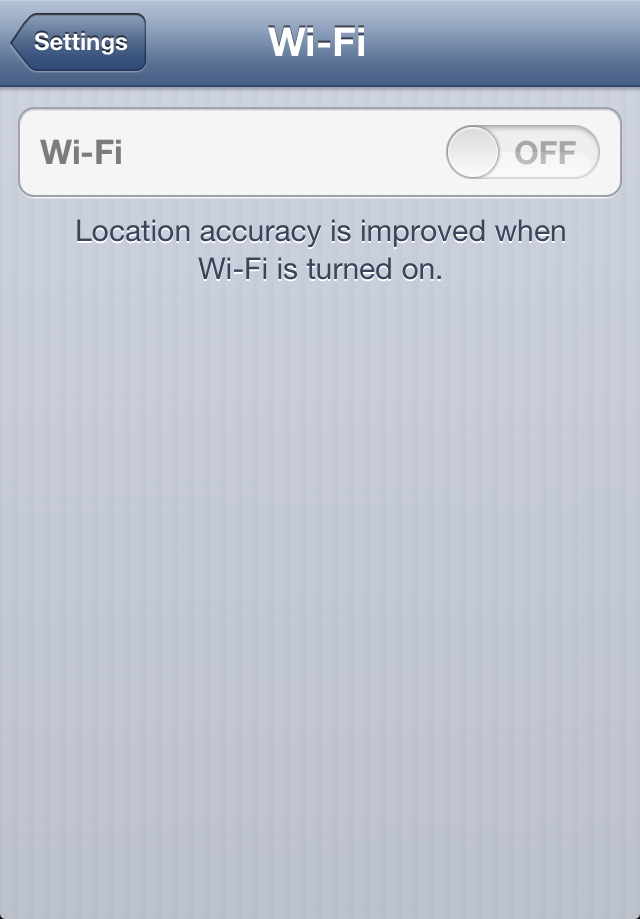
You can verify whether your iPhone WiFi setting is greyed out or dimmed by navigating to Settings > WiFi.
Also, go to Settings > General > About and you will see your Wi-Fi Address empty.
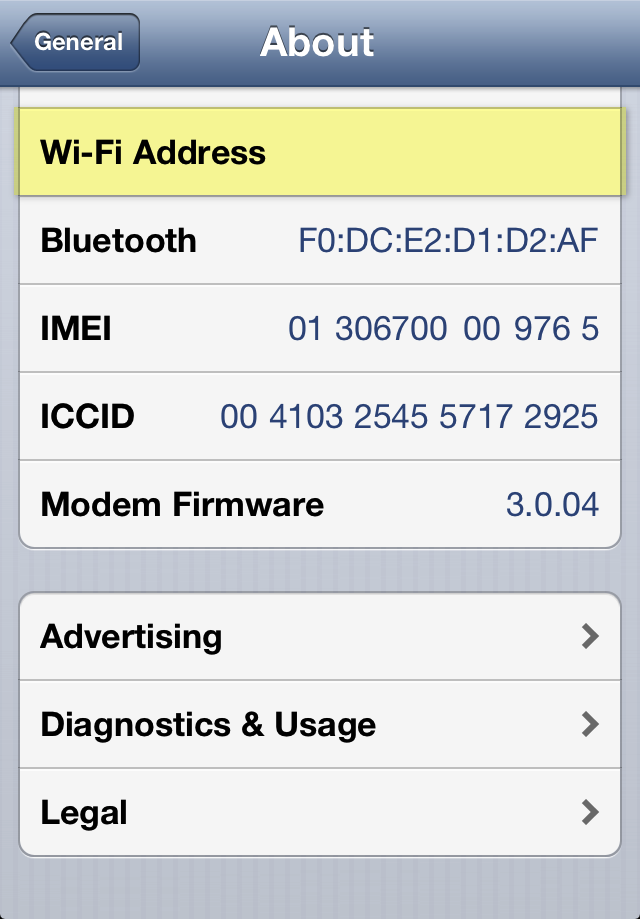
Since WiFi and Bluetooth use the same radio chip, it is very probable the iPhone Bluetooth feature under Settings > Bluetooth is disabled, disconnected, or inaccessible.
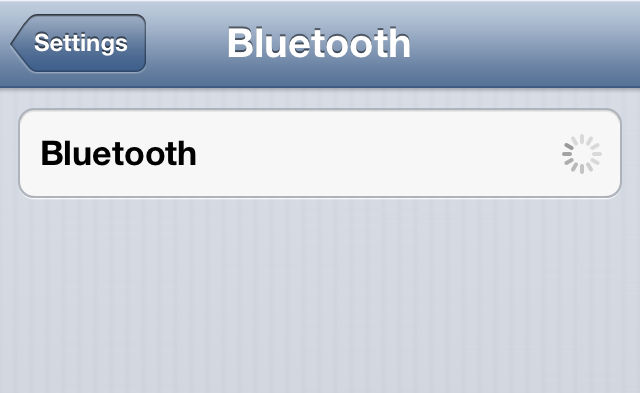
To resolve the issue:
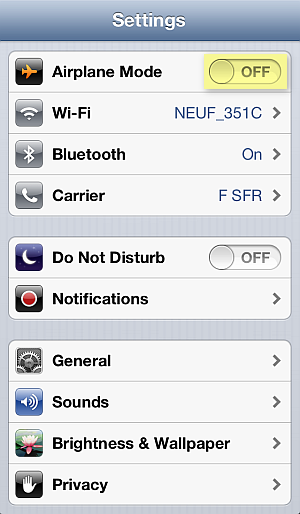
1. Navigate to Settings and make sure that Airplane Mode is switched off
2. In the iPhone Settings, go to General > Reset > Rest Network Settings

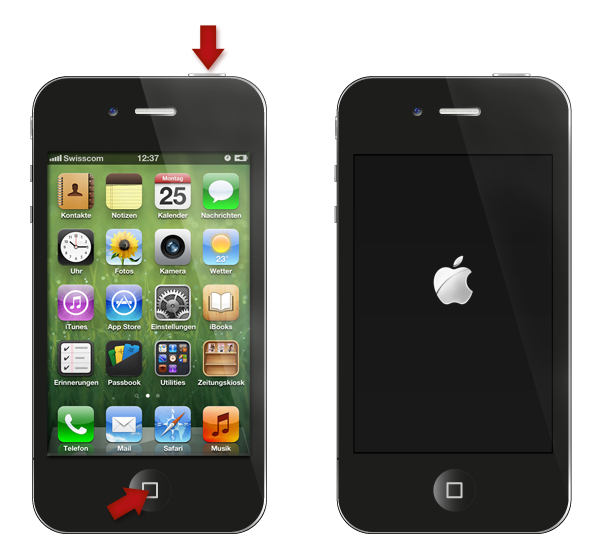
3. Cold-restart the iPhone by pressing and holding the Sleep/Wake and Home buttons simultaneously for 10 seconds until you see the iPhone screen go blank
4. If this does not sort out the issue, update the iPhone?s iOS to the latest version by connecting the device to iTunes on your PC
Alternative method known to have worked in case of iPhone WiFi setting dimmed using freezer
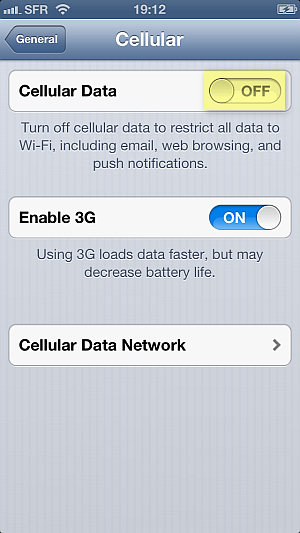
1. Tap Settings >General> Cellular > Cellular Data > OFF
2. Place the iPhone in a ziplock bag and make sure to squeeze the air out of the bag
3. Put the bag in a freezer for 15 minutes
Why place the iPhone in a freezer? As the iPhone would automatically turn off the WiFi chip due to overheating, when you cool down the chip sufficiently, the iPhone automatic protection is disabled. However, this is a temporary fix, until the next time the iPhone WiFi chip overheats and greys out.
If all fails or you wish to have a permanent solution for your iPhone WiFi greyed out, you must contact Apple directly. If your iPhone is in warranty, you are eligible for free-of-charge iPhone replacement by sending the device to the nearest Apple Store.
Still need help?
Post your question directly on my Facebook wall, Ill answer the same day with as many detailed instructions as possible.
To visit my helpful Facebook page click on the link below or scan the QR code to create your ticket:
- http://www.facebook.com/iPhone.Contacts

Available link for download
Subscribe to:
Posts (Atom)