Showing posts with label solution. Show all posts
Showing posts with label solution. Show all posts
Wednesday, November 9, 2016
Nokia C2 08 Insert sim ways problem solution jumpers
Nokia C2 08 Insert sim ways problem solution jumpers
Nokia C2-08 insert sim problem, Sim is not working in Nokia C2-08, Sim is not Valid, Single Sim is not working in Nokia C2-08
Tools:-
Nokia T4 and T5 key, Electronic meter, Electronics Cleaner, Hot Air, Solding Iron, Jumper Wire.
Nokia Asha 201 Ringer Speaker Problem Solution Ways Jumpers

Diagnostic and Solutions.
if sim is not working in Nokia C2-08 is can be cause of water damage or missing components. Use different sim and if sim is not working then de assemble Nokia C2-08.
Once Mobile phone is disassemble check all these parts that are given in above diagram and apply electronics cleaner. Apply hot air so that it can be dry but not to much because it can damage the mother board or may can harm your skin.
these different color lines are indicating different path and tracks that are used in sim function in Nokia C2-08 so if nay of them is missing apply that jumper as shown in diagram to solve insert sim problem in Nokia C2-08
If single sim is not working out of these two you can only jumper those parts that are used by it. And to find prints and track you can see above diagram.
Warnings:
Do not apply to much heat it can damage the mother board and harm your skin.
When apply jumpers make sure the do not be ground with other prints.It can short the mobile phone.
Remove Sim Ic with hot air because with Solding iron it might can damage prints also.
for more detail and new tips and tricks about cellphone service problem keep visiting this page we will update cellphone service diagrams timely with new cellphone diagrams.some related post are also given bellow you can read them also for more information about cellphone.
Tools:-
Nokia T4 and T5 key, Electronic meter, Electronics Cleaner, Hot Air, Solding Iron, Jumper Wire.
Nokia Asha 201 Ringer Speaker Problem Solution Ways Jumpers
Diagnostic and Solutions.
if sim is not working in Nokia C2-08 is can be cause of water damage or missing components. Use different sim and if sim is not working then de assemble Nokia C2-08.
Once Mobile phone is disassemble check all these parts that are given in above diagram and apply electronics cleaner. Apply hot air so that it can be dry but not to much because it can damage the mother board or may can harm your skin.
these different color lines are indicating different path and tracks that are used in sim function in Nokia C2-08 so if nay of them is missing apply that jumper as shown in diagram to solve insert sim problem in Nokia C2-08
If single sim is not working out of these two you can only jumper those parts that are used by it. And to find prints and track you can see above diagram.
Warnings:
Do not apply to much heat it can damage the mother board and harm your skin.
When apply jumpers make sure the do not be ground with other prints.It can short the mobile phone.
Remove Sim Ic with hot air because with Solding iron it might can damage prints also.
for more detail and new tips and tricks about cellphone service problem keep visiting this page we will update cellphone service diagrams timely with new cellphone diagrams.some related post are also given bellow you can read them also for more information about cellphone.
Available link for download

Monday, November 7, 2016
Nokia 101 flashing ok but set is dead 100 working solution
Nokia 101 flashing ok but set is dead 100 working solution
states of the phone is dead ...
flashing with atf ,
flashing is ok but one error is show (lcd test failed )

VBATT Powering Down <<<<
VBATT Powering Up >>>>
SET VCCIO Level Done
SET BSI Load Done
Booting Phone...
CPU ID Response: A200341100
CPU Type: XG110 2.1B
Phone Booted at after First attempt...
************************************************** ****
TIME STARTS HERE
************************************************** ****
Sending PBL 19456 bytes...
PBL Successfully Sent...
Sending SBL 65024 bytes...
SBL Successfully Sent...
Flash Chip Manufacturer: STMicroelectronics
Flash Chip Type: M58WR064 64 Mbit (4Mb x 16) NOR
Extended Information: Multiple Bank / Burst / 1.8v
Processing Image File: C:Program FilesNokiaPhoenixProductsRM-769 m769_007.200
FIRMWARE Image Found...
Number of Sections: 03
FIRMWARE Certificate Block Sent Successfully...
Processing Section 01 of 03
FIRMWARE Erase Block: 0x00000000~0x0001FFFE
Start Erasing...
Erasing Please Wait...
Block Erase Done...
Preparing Data Blocks...
Data Size: 24576 bytes
Data Checksum: F5BE
Uploading Data Blocks to phone...
FIRMWARE Data Blocks uploaded to phone...
Processing Section 02 of 03
FIRMWARE Erase Block: 0x00800000~0x00BFFFFE
Start Erasing...
Erasing Please Wait...
Block Erase Done...
Preparing Data Blocks...
Data Size: 4128768 bytes
Data Checksum: BFB7
Uploading Data Blocks to phone...
FIRMWARE Data Blocks uploaded to phone...
Processing Section 03 of 03
FIRMWARE Erase Block: 0x00C5D000~0x00E5FFFE
Start Erasing...
Erasing Please Wait...
Block Erase Done...
Preparing Data Blocks...
Data Size: 1697536 bytes
Data Checksum: 2B05
Uploading Data Blocks to phone...
FIRMWARE Data Blocks uploaded to phone...
Start Data Verification... (Please wait)
Data Verification Successful...
Processing Image File: C:Program FilesNokiaPhoenixProductsRM-769 m769_007.20mh
PPM Image Found...
Number of Sections: 01
PPM Certificate Block Sent Successfully...
Processing Section 01 of 01
PPM Erase Block: 0x00100000~0x0061813E
Start Erasing...
Erasing Please Wait...
Block Erase Done...
Preparing Data Blocks...
Data Size: 5341504 bytes
Data Checksum: 47D8
Uploading Data Blocks to phone...
PPM Data Blocks uploaded to phone...
Start Data Verification... (Please wait)
Data Verification Successful...
Processing Image File: C:Program FilesNokiaPhoenixProductsRM-769 m7690_nai07.20mh_nlt
CONTENT Image Found...
Number of Sections: 01
CONTENT Certificate Block Sent Successfully...
Processing Section 01 of 01
CONTENT Erase Block: 0x00E60000~0x00F49FFE
Start Erasing...
Erasing Please Wait...
Block Erase Done...
Preparing Data Blocks...
Data Size: 958464 bytes
Data Checksum: BB37
Uploading Data Blocks to phone...
CONTENT Data Blocks uploaded to phone...
Start Data Verification... (Please wait)
Data Verification Successful...
Exit Flash Mode Done...
Time Elapse : 00:04:32
************************************************** ****
You must Factory Reset the phone to enable the
ringtones and other customized settings to work
************************************************** ****
Waiting For Phone to go Online...
5, 4, 3, 2, 1...
MCU: V 07.20 30-03-12 RM-769 (c) Nokia
IMEI: 353654055460122
Product Serial Number: 3D65DAFBI
Product Code : 059J2D0
Module Code : 0204874
Basic Production Code: 059P5G1
PPM SW Version : V 07.20 30-03-12 RM-769 (c) Nokia MH
ADSP Version : p+V 07.20 30-03-12 RM-769 (c) NMP mh_nlt
MCU SW Version : V 07.20 30-03-12 RM-769 (c) Nokia
HW Version : 3000
UEM Version : 1328
UPP Version : 8850
LCD Version : UNKWN: IDs: 00:00:00
********** SIMLOCK INFO **********
CONFIG_DATA : 0010100000000000
PROFILE_BITS : 0000000000040002
ASIC : 11
PROVIDER : Default Test Operator
Block [1] 1:Open 2:Open 3:Open 4:Open 5:Open
Block [2] 1:Open 2:Open 3:Open 4:Open 5:Open
Block [3] 1:Open 2:Open 3:Open 4:Open 5:Open
Block [4] 1:Open 2:Open 3:Open 4:Open 5:Open
Block [5] 1:Open 2:Open 3:Open 4:Open 5:Open
Block [6] 1:Open 2:Open 3:Open 4:Open 5:Open
Block [7] 1:Open 2:Open 3:Open 4:Open 5:Open
ST_LCD_TEST : FAILED
Phone Cannot Enter Normal Mode if LCD
is Damaged or LCD is not Properly
Connected to the Main PCB
FACTORY SET TO : Full Factory Set
OK
FACTORY SET TO : User Data
OK
FACTORY SET TO : Leave Factory
OK
FACTORY SET TO : Service Center
OK
FACTORY SET TO : Software Upgrade
OK
FACTORY SET TO : Production Tune
OK
apply this jumber.. 100% working.....


phone is on condeshion.....

flashing with atf ,
flashing is ok but one error is show (lcd test failed )
VBATT Powering Down <<<<
VBATT Powering Up >>>>
SET VCCIO Level Done
SET BSI Load Done
Booting Phone...
CPU ID Response: A200341100
CPU Type: XG110 2.1B
Phone Booted at after First attempt...
************************************************** ****
TIME STARTS HERE
************************************************** ****
Sending PBL 19456 bytes...
PBL Successfully Sent...
Sending SBL 65024 bytes...
SBL Successfully Sent...
Flash Chip Manufacturer: STMicroelectronics
Flash Chip Type: M58WR064 64 Mbit (4Mb x 16) NOR
Extended Information: Multiple Bank / Burst / 1.8v
Processing Image File: C:Program FilesNokiaPhoenixProductsRM-769 m769_007.200
FIRMWARE Image Found...
Number of Sections: 03
FIRMWARE Certificate Block Sent Successfully...
Processing Section 01 of 03
FIRMWARE Erase Block: 0x00000000~0x0001FFFE
Start Erasing...
Erasing Please Wait...
Block Erase Done...
Preparing Data Blocks...
Data Size: 24576 bytes
Data Checksum: F5BE
Uploading Data Blocks to phone...
FIRMWARE Data Blocks uploaded to phone...
Processing Section 02 of 03
FIRMWARE Erase Block: 0x00800000~0x00BFFFFE
Start Erasing...
Erasing Please Wait...
Block Erase Done...
Preparing Data Blocks...
Data Size: 4128768 bytes
Data Checksum: BFB7
Uploading Data Blocks to phone...
FIRMWARE Data Blocks uploaded to phone...
Processing Section 03 of 03
FIRMWARE Erase Block: 0x00C5D000~0x00E5FFFE
Start Erasing...
Erasing Please Wait...
Block Erase Done...
Preparing Data Blocks...
Data Size: 1697536 bytes
Data Checksum: 2B05
Uploading Data Blocks to phone...
FIRMWARE Data Blocks uploaded to phone...
Start Data Verification... (Please wait)
Data Verification Successful...
Processing Image File: C:Program FilesNokiaPhoenixProductsRM-769 m769_007.20mh
PPM Image Found...
Number of Sections: 01
PPM Certificate Block Sent Successfully...
Processing Section 01 of 01
PPM Erase Block: 0x00100000~0x0061813E
Start Erasing...
Erasing Please Wait...
Block Erase Done...
Preparing Data Blocks...
Data Size: 5341504 bytes
Data Checksum: 47D8
Uploading Data Blocks to phone...
PPM Data Blocks uploaded to phone...
Start Data Verification... (Please wait)
Data Verification Successful...
Processing Image File: C:Program FilesNokiaPhoenixProductsRM-769 m7690_nai07.20mh_nlt
CONTENT Image Found...
Number of Sections: 01
CONTENT Certificate Block Sent Successfully...
Processing Section 01 of 01
CONTENT Erase Block: 0x00E60000~0x00F49FFE
Start Erasing...
Erasing Please Wait...
Block Erase Done...
Preparing Data Blocks...
Data Size: 958464 bytes
Data Checksum: BB37
Uploading Data Blocks to phone...
CONTENT Data Blocks uploaded to phone...
Start Data Verification... (Please wait)
Data Verification Successful...
Exit Flash Mode Done...
Time Elapse : 00:04:32
************************************************** ****
You must Factory Reset the phone to enable the
ringtones and other customized settings to work
************************************************** ****
Waiting For Phone to go Online...
5, 4, 3, 2, 1...
MCU: V 07.20 30-03-12 RM-769 (c) Nokia
IMEI: 353654055460122
Product Serial Number: 3D65DAFBI
Product Code : 059J2D0
Module Code : 0204874
Basic Production Code: 059P5G1
PPM SW Version : V 07.20 30-03-12 RM-769 (c) Nokia MH
ADSP Version : p+V 07.20 30-03-12 RM-769 (c) NMP mh_nlt
MCU SW Version : V 07.20 30-03-12 RM-769 (c) Nokia
HW Version : 3000
UEM Version : 1328
UPP Version : 8850
LCD Version : UNKWN: IDs: 00:00:00
********** SIMLOCK INFO **********
CONFIG_DATA : 0010100000000000
PROFILE_BITS : 0000000000040002
ASIC : 11
PROVIDER : Default Test Operator
Block [1] 1:Open 2:Open 3:Open 4:Open 5:Open
Block [2] 1:Open 2:Open 3:Open 4:Open 5:Open
Block [3] 1:Open 2:Open 3:Open 4:Open 5:Open
Block [4] 1:Open 2:Open 3:Open 4:Open 5:Open
Block [5] 1:Open 2:Open 3:Open 4:Open 5:Open
Block [6] 1:Open 2:Open 3:Open 4:Open 5:Open
Block [7] 1:Open 2:Open 3:Open 4:Open 5:Open
ST_LCD_TEST : FAILED
Phone Cannot Enter Normal Mode if LCD
is Damaged or LCD is not Properly
Connected to the Main PCB
FACTORY SET TO : Full Factory Set
OK
FACTORY SET TO : User Data
OK
FACTORY SET TO : Leave Factory
OK
FACTORY SET TO : Service Center
OK
FACTORY SET TO : Software Upgrade
OK
FACTORY SET TO : Production Tune
OK
apply this jumber.. 100% working.....
phone is on condeshion.....
Available link for download
Nokia 5250 volume up down not working solution
Nokia 5250 volume up down not working solution
nokia 5250 volume up down not working then it’s solution can be as given in bellow diagram.volume keys are used to make it up and down speaker voice during call or during music and video playbacks.to solve key volume problems you can check a few parts and tracks.Nokia Asha 200 MMC Memory Card Problem Solution Ways Jumpers

as in above diagram buttons location can be found check these two voluem buttons and if any of them is not working or damage then replace it.if buttons are ok then black lines are defining ground prints that are -v and red color line shows +v track so check these path and if missing apply jumpers as you can see in diagram above.
for more detail and new tips and tricks about cellphone service problem keep visiting this page we will update cellphone service diagrams timely with new cellphone diagrams.some related post are also given bellow you can read them also for more information about cellphone.
Available link for download
Sunday, November 6, 2016

Friday, November 4, 2016
Nokia C2 06 Charger Not Supported Problem Solution Ways
Nokia C2 06 Charger Not Supported Problem Solution Ways
Plug in Charging pin into charging jack of Nokia C2-06 and if it shows an indication message Charger Not Supported it can be due to these few parts that are given bellow in diagram.So after disassemble of Nokia C2-06 clean these parts and area with electronics cleaner.
NOKIA 5230 KEYPAD IC JUMPER KEYPAD SOLUTION

Apply hot air and make it dry.Resold these parts indicated with red lines in above diagram to solve Charger Not Supported in Nokia C2-06
You can take these parts from other models of nokia also to solve charging problem in nokia C2-06
for more detail and new tips and tricks about cellphone service problem keep visiting this page we will update cellphone service diagrams timely with new cellphone diagrams.some related post are also given bellow you can read them also for more information about cellphone.
NOKIA 5230 KEYPAD IC JUMPER KEYPAD SOLUTION
Apply hot air and make it dry.Resold these parts indicated with red lines in above diagram to solve Charger Not Supported in Nokia C2-06
You can take these parts from other models of nokia also to solve charging problem in nokia C2-06
for more detail and new tips and tricks about cellphone service problem keep visiting this page we will update cellphone service diagrams timely with new cellphone diagrams.some related post are also given bellow you can read them also for more information about cellphone.
Available link for download


Thursday, November 3, 2016
Nokia Asha 300 Speaker Problem Solution jumpers
Nokia Asha 300 Speaker Problem Solution jumpers
Nokia Asha 300 Speaker problem can be solve with a few steps that are given in diagram bellow so look at diagram bellow to solve love Speaker voice, no Speaker tones, no Speaker working problems in nokia asha 300.in diagram there are two colors blue and red both colors are defining path of circuit in mobile phone.

Check Speaker and if Speaker do not show continuity or a good value with meter then change Speaker with new one. Check points on board where Speaker have to attaché after put in casing housing.
Then check all these paths as shown in diagram above and if any of them is broken or missing components then apply jumpers as described above. Small circle shows positions where we are able to make jumpers. in these place we can apply jumpers to solve Speaker problem in nokia asha 300.
for more detail and new tips and tricks about cellphone service problem keep visiting this page we will update cellphone service diagrams timely with new cellphone diagrams.some related post are also given bellow you can read them also for more information about cellphone.
Check Speaker and if Speaker do not show continuity or a good value with meter then change Speaker with new one. Check points on board where Speaker have to attaché after put in casing housing.
Then check all these paths as shown in diagram above and if any of them is broken or missing components then apply jumpers as described above. Small circle shows positions where we are able to make jumpers. in these place we can apply jumpers to solve Speaker problem in nokia asha 300.
for more detail and new tips and tricks about cellphone service problem keep visiting this page we will update cellphone service diagrams timely with new cellphone diagrams.some related post are also given bellow you can read them also for more information about cellphone.
Available link for download
Nokia 2220s power supply amp software devise power on but battery no power on solution
Nokia 2220s power supply amp software devise power on but battery no power on solution

Available link for download
Nokia 5130 hank keypad solution
Nokia 5130 hank keypad solution
Nokia 5130 hank keypad solution1.Cek barriers in pd and row coloum there smua
2.cek voltage on row v = 1.8, and Colom = 0 .. .... 4v pwron Hemm .. everything seems normal keypad pd
3.gw Lihat2 lg er turns msh 5 lg namely volume buttons and a music player on the left and right (s2460. s2461 .. ... .. s2464 s2463 s2462 .. i check the voltage ...). pd 5 key theres just down there .... 0.65v varistor short reply is definitely on track
4.plototin scheme ... uh no one varistor smua who deal directly with the 5 buttons ... I wrote r2431 remove
immediately wrote bro just copy and paste: d:
Available link for download
Tuesday, November 1, 2016

Friday, October 28, 2016
Micromax A27 Hard Reset Solution
Micromax A27 Hard Reset Solution
Micromax A27 Pattern Lock Problem Solution
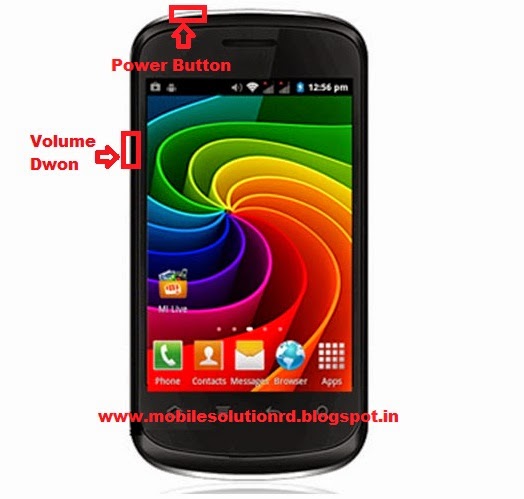
( Note:- Following Doing Hard Reset Not probable To Recover Your Data, So On-line Backup Is Always Important. For All Of Your Data, A Backup must Be Done On A External Device, Hard Drive, Raid System Media Or Sd Card)
Provision by Preforming Hard Reset:
1.Phone Battery should Be charge More after that 70%.
2.Backup Your main Data be fond of Phone-book, Message, Email, Images And Settings And In mainly Cases Take Out Sim Card And Sd Card.
Necessary :
1. Android Multi Tool
2. Fastboot Driver - Click Download Android Multi Tool + Driver From Now
Hard Reset Micromax A27:
- Open And Re-insert The Battery
- Get The Sim Card And Sd Card Out
- Fastboot Driver install in your Pc
- Press And Hold Volume Down + Power Key For 20-30 Seconds.
- Look For Warning Logo On Screen.
- Open The Android Multi Tool Flasher Software
- Open Flasher And Press “8”( Wipe Data / Factory Reset)
- After Format Re-insert The Battery
- Power On The Handset.
Available link for download

Worlds First only On GpgForum Samsung Infenion set Factory Application Not working showing solution
Worlds First only On GpgForum Samsung Infenion set Factory Application Not working showing solution
Worlds First only On GpgForum Samsung Infenion set Factory Application Not working /showing solution
Hear Is the solution for Samsung Infenion base handset like c3312,e2652,s3310i,c3200...etc for After flash compony application like opera mini ,games,etc..set not showing or Not opening
Kindally use following Guide

Simpally Press Thanks if it is helpfull to you

Available link for download
Wednesday, October 26, 2016
nokia asha 200 light solution
nokia asha 200 light solution
nokia Asha 200 light Jumper Solution nokia Asha 200 light problem com, Asha 200 light problem solution, Light sollution for nokia Asha 200, nokia Asha 200 light solution, nokia Asha 200 light not displaying, nokia Asha 200 backlight solution, nokiaAsha 200 light problem, gsm forum nokia Asha 200 light problem, nokia Asha 200 light salution, nokia Asha 200 light jumper solution, Asha 200 light solution,Nokia 2323 Classic Not Not Charging Problem Solution Jumpers

nokia 1209 lcd jumper, Asha 200 light jumper solution , nokia Asha 200 light problem , Asha 200 nokia light jumper , nokia Asha 200 light jumper , nokia Asha 200 light problem , nokia Asha 200 light solution , Nokia Asha 200 backlight solution , nokia Asha 200 light not working, nokia Asha 200 light jumper, nokia Asha 200 light ways, nokia Asha 200 Asha 200 light jumpers , Asha 200 nokia light solution,
nokia 1209 lcd jumper, Asha 200 light jumper solution , nokia Asha 200 light problem , Asha 200 nokia light jumper , nokia Asha 200 light jumper , nokia Asha 200 light problem , nokia Asha 200 light solution , Nokia Asha 200 backlight solution , nokia Asha 200 light not working, nokia Asha 200 light jumper, nokia Asha 200 light ways, nokia Asha 200 Asha 200 light jumpers , Asha 200 nokia light solution,
Available link for download
Tuesday, October 25, 2016

Monday, October 24, 2016
Nokia C1 00 Ringer Problem Solution C1 00 Speaker Ways Jumpers
Nokia C1 00 Ringer Problem Solution C1 00 Speaker Ways Jumpers
Nokia C1-00 Ringer Problem Solution, C1-00 Speaker Ways Jumpers
This post holds Nokia C1-00 Ringer Ways Jumpers, C1-00 Speaker Problem Solution. If you are having one of these problems check these images out and do these simple solutions.- C1-00 Ringer Problem
- C1-00 Buzzer Solution
- C1-00 Ringer Ways Jumpers
- C1-00 Speaker Ways jumpers
- C1-00 Earpiece Problem
- C1 Ringer Speaker Solution
Here Are The Solutions. Please Observe Carefully.

C1-00 Ringer Speaker Ways Problem Solution
Note: Every repairing solution posted here is tested by at least one member of our team. Use the information available here at Your Own Risk. We are not responsible if any harm comes to your device during the repairing process.
Available link for download
Samsung service manuals schematics assembly solution here free download now
Samsung service manuals schematics assembly solution here free download now
GT-i6220
Deposit Files
GT-i6230L Star Lite
Deposit Files
GT-i6410 Vodafone
Deposit Files
GT-i7110
Deposit Files
GT-I7500
Deposit Files
GT-i8000 Omnia II
Deposit Files
GT-i8150 Galaxy W
Deposit Files
GT-i8320 Vodafone
Deposit Files
GT-i8330 Vodafone
Deposit Files
GT-i8510 INNOV8
Deposit Files
GT-i8700 Omnia
Deposit Files
GT-i8910 Omnia
Deposit Files
GT-I9000 Galaxy S
Deposit Files
GT-I9000B
Deposit Files
GT-i9001 Galaxy
Deposit Files
GT-i9003 Galaxy
Deposit Files
GT-i9003C
Deposit Files
GT-I9010
Deposit Files
GT-i9023 Google Nexus
Deposit Files
GT-I9100 Galaxy
Deposit Files
GT-M200
Deposit Files
GT-M2310
Deposit Files
GT-M2510
Deposit Files
GT-M2513
Deposit Files
GT-M2520 GT-M2520L
Deposit Files
GT-M2710 GT-M2710L
Deposit Files
GT-M3318 GT-M3318C
Deposit Files
GT-M3510 Beat
Deposit Files
GT-M3318 GT-M3318C
Deposit Files
Deposit Files
GT-i6230L Star Lite
Deposit Files
GT-i6410 Vodafone
Deposit Files
GT-i7110
Deposit Files
GT-I7500
Deposit Files
GT-i8000 Omnia II
Deposit Files
GT-i8150 Galaxy W
Deposit Files
GT-i8320 Vodafone
Deposit Files
GT-i8330 Vodafone
Deposit Files
GT-i8510 INNOV8
Deposit Files
GT-i8700 Omnia
Deposit Files
GT-i8910 Omnia
Deposit Files
GT-I9000 Galaxy S
Deposit Files
GT-I9000B
Deposit Files
GT-i9001 Galaxy
Deposit Files
GT-i9003 Galaxy
Deposit Files
GT-i9003C
Deposit Files
GT-I9010
Deposit Files
GT-i9023 Google Nexus
Deposit Files
GT-I9100 Galaxy
Deposit Files
GT-M200
Deposit Files
GT-M2310
Deposit Files
GT-M2510
Deposit Files
GT-M2513
Deposit Files
GT-M2520 GT-M2520L
Deposit Files
GT-M2710 GT-M2710L
Deposit Files
GT-M3318 GT-M3318C
Deposit Files
GT-M3510 Beat
Deposit Files
GT-M3318 GT-M3318C
Deposit Files
Available link for download
Sunday, October 23, 2016
Nokia Asha 311 Touch is not working problem Solution Jumper Ways
Nokia Asha 311 Touch is not working problem Solution Jumper Ways
As we know Nokia Asha 311 have keypad and touch screen both.So if you are facing touch screen problem in Nokia Asha 311 it can be solve with a few steps that i am going to describe in this post.Look at the diagram bellow and follow steps that are given in it.
In above diagram you can see touch pad jack and a few different color lines in it. In first step try calibration to solve touch screen problem if touch screen touch positions are not correct.Nokia C5 Handsfree Headset problem solution ways

If touch screen is totally not working you can replace with new one and if replacement of touch screen is not working that can be problem of touch pad ways.
In above diagram you can see touch pad tracks so check all these paths with meter and if any of them is missing apply jumpers as given in repairing diagram for Nokia Asha 311 touch screen.
for more detail and new tips and tricks about cellphone service problem keep visiting this page we will update cellphone service diagrams timely with new cellphone diagrams.some related post are also given bellow you can read them also for more information about cellphone.
In above diagram you can see touch pad jack and a few different color lines in it. In first step try calibration to solve touch screen problem if touch screen touch positions are not correct.Nokia C5 Handsfree Headset problem solution ways
If touch screen is totally not working you can replace with new one and if replacement of touch screen is not working that can be problem of touch pad ways.
In above diagram you can see touch pad tracks so check all these paths with meter and if any of them is missing apply jumpers as given in repairing diagram for Nokia Asha 311 touch screen.
for more detail and new tips and tricks about cellphone service problem keep visiting this page we will update cellphone service diagrams timely with new cellphone diagrams.some related post are also given bellow you can read them also for more information about cellphone.
Available link for download
Wednesday, October 19, 2016

Subscribe to:
Posts (Atom)