Showing posts with label 9. Show all posts
Showing posts with label 9. Show all posts
Wednesday, November 9, 2016
Nokia 2710c 2 → RM 586 Firmware Version 9 69 Flash File
Nokia 2710c 2 → RM 586 Firmware Version 9 69 Flash File
Phone Name : Nokia 2710c-2
Product Type : RM-586
Firmware Version : 9.69
Variant Id : 5954556189
Varian Name : Rm-586 Var Euro-d Ba Telecom Sl Black
Product Code : 059G4S3
File Name : Rm586 059g4s3 09.69 002.vpl
File Size : 4.17 Kb
File Name : Rm586 059g4s3 09.69 002.dcp
File Size : 16.79 Kb
File Name : Rm586 09.69.mcusw
File Size : 24.66 Mb
File Name : Rm586 09.69.ppm D
File Size : 5.74 Mb
File Name : Rm586 09.69 002.image D Telecom Ba 9g4s3
File Size : 11.06 Mb
File Name : Rm586 09.69 Sd Easteu.fpsimage
File Size : 611.46 Mb
File Name : 059g4s3 Rm586 Maps.bin
File Size : 779 Bytes
File Name : 059g4s3 Simlock.bin
File Size : 76 Bytes
File Name : Cardverref 059g4s3 09.69 002.xml
File Size : 199 Bytes
File Name : P7328101dpi600.pcx
File Size : 12.4 Kb
File Name : P7328102dpi600 Label Layout.xml
File Size : 1.75 Kb
File Name : Rm586 059g4s3 09.69 002.spr
File Size : 2.06 Kb
File Name : Ccc 059g4s3.bin
File Size : 352 Bytes
File Name : Hwc 059g4s3.bin
File Size : 212 Bytes
File Name : Wmdrm 059g4s3 09.69 002.bin
File Size : 3.9 Kb
File Name : Rm586 059g4s3 09.69 002 Signature.bin
File Size : 3.2 Kb
Product Type : RM-586
Firmware Version : 9.69
Variant Id : 5954556189
Varian Name : Rm-586 Var Euro-d Ba Telecom Sl Black
Product Code : 059G4S3
File Name : Rm586 059g4s3 09.69 002.vpl
File Size : 4.17 Kb
File Name : Rm586 059g4s3 09.69 002.dcp
File Size : 16.79 Kb
File Name : Rm586 09.69.mcusw
File Size : 24.66 Mb
File Name : Rm586 09.69.ppm D
File Size : 5.74 Mb
File Name : Rm586 09.69 002.image D Telecom Ba 9g4s3
File Size : 11.06 Mb
File Name : Rm586 09.69 Sd Easteu.fpsimage
File Size : 611.46 Mb
File Name : 059g4s3 Rm586 Maps.bin
File Size : 779 Bytes
File Name : 059g4s3 Simlock.bin
File Size : 76 Bytes
File Name : Cardverref 059g4s3 09.69 002.xml
File Size : 199 Bytes
File Name : P7328101dpi600.pcx
File Size : 12.4 Kb
File Name : P7328102dpi600 Label Layout.xml
File Size : 1.75 Kb
File Name : Rm586 059g4s3 09.69 002.spr
File Size : 2.06 Kb
File Name : Ccc 059g4s3.bin
File Size : 352 Bytes
File Name : Hwc 059g4s3.bin
File Size : 212 Bytes
File Name : Wmdrm 059g4s3 09.69 002.bin
File Size : 3.9 Kb
File Name : Rm586 059g4s3 09.69 002 Signature.bin
File Size : 3.2 Kb
Available link for download

Tuesday, November 8, 2016
Volcano Box Latest Version v2 9 6 Free Download
Volcano Box Latest Version v2 9 6 Free Download
Volcano Box Update Version v2.9.6

Volcano Box
What New Update in Volcano Box 2.9.6
1. Android tool USB Mode add new boot V4.1452
2. Android tool backup factory file add for
MTK6571
MTK6582
MTK6592
3. Change MTK save file failed bug
4. Change MTK Android Write factory file for
MTK6571
MTK6572
MTK6582
5. Lot of other bugs solved
Click Here Free Download Latest Version v2.9.6
Available link for download
Sunday, November 6, 2016
Volcano Box Latest Update v2 9 7 Free Download
Volcano Box Latest Update v2 9 7 Free Download
Volcano Box Latest Update v2.9.7
Volcano Box
What New Update in Volcano Box v2.9.7
1. Update SC8825 & SC6825 to write factory file
2. Solved the SPD save file failed
3. Spd Android Add new flash support
Click Here Free Download Latest Update v2.9.7
Available link for download
Monday, October 31, 2016
Volcano Box latest v2 8 9 Free Download
Volcano Box latest v2 8 9 Free Download
Volcano Box v2.8.9

Volcano Box
Click Here Free Download
New in Update Volcano Box 2.8.9
Added Nokia 108
Read Flash User Code, Format
Added Nokia 130
Read Flash User Code, Format
Added Nokia 220
Read Flash User Code, Format
Added Nokia 225
Read Flash User Code, Format
Added MTK6572 New Flash Support
How to Service Supported Nokia MTK Phones
Go To MTK Tab
Select 625a Boot
Select your Desire Operation ( Read Flash / Format )
Press Run Button
Insert Phone to usb cable
Select your Connected Phone Model ( 108, 220, 225, 130 )
For Example if you connect Nokia 130 then you have to select Nokia 130 from list !! Do not Select Wrong model
Available link for download
Thursday, October 27, 2016
Volcano Box Latest Version v2 9 2 Free Download
Volcano Box Latest Version v2 9 2 Free Download
Volcano Box Update v2.9.2
Volcano Box
What New in Update in Volcano Box v2.9.2
1. Worlds 1st MTK Andriod added new Boot
2. Totally newmethod for read/write
3. MTK Andriod Read maximum size 32G
4. Greatly improved Read speed
5. Support somephones which could not Read/Write in the past
6. In Android tooladd new Boot file
7. MTK6571+NANDadd new flash support and optimize Read/Write
8. MTK6572+NANDadd new flash support and optimize Read/Write
9. MTK6573+NANDadd new flash support and optimize Read/Write
10 MTK6575+NANDadd new flash support and optimize Read/Write
11.MTK6577+NAND add new flash support and optimize Read/Write
12.MTK6571+EMMC add new flash support and optimize Read/Write
13.MTK6572+EMMCadd new flash support and optimize Read/Write
14.MTK6577+EMMC add new flash support and optimize Read/Write
15.MTK6582+EMMCadd new flash support and optimize Read/Write
16.MTK6589+EMMCadd new flash support and optimize Read/Write
17.MTK6592+EMMCadd new flash support and optimize Read/Write
Click Here Free Download v2.9.2
Available link for download
Wednesday, October 26, 2016
TeamViewer 9 0 26297 Incl Premium Enterprise Activator Crack Patch
TeamViewer 9 0 26297 Incl Premium Enterprise Activator Crack Patch

Description
TeamViewer is a simple and fast solution for remote control, desktop sharing and file transfer that works behind any firewall and NAT proxy. To connect to another computer just run TeamViewer on both machines without the need of an installation procedure. With the first start automatic partner IDs are generated on both computers. Enter your partner’s ID into TeamViewer and the connection is established immediately. With many thousand users worldwide TeamViewer is a standard tool to give support and assistance to people in remote locations. The software can also be used for presentations, where you can show your own desktop to a partner. This application also is VNC compatible and offers secure, encrypted data transfer with maximum security. TeamViewer establishes connections to any PC all around the world within just a few seconds. You can remote control your partner’s PC as if you were sitting in right front of it. TeamViewer is completely free for private use.
Features
• One solution for everything. While most competitors offer different packages for remote support, remote administration, training and sales (and also charge for them…) The application is the one-stop solution for everything you need: includes all modules in one simple and very affordable package.
• Remote administration of unattended servers. TeamViewer can also be used to control unattended computers and servers. Installation as a system service even allows remote reboot and reconnect.
• File transfer. TeamViewer comes with integrated file transfer that allows you to copy files and folders from and to a remote partner – which also works behind firewalls
• Highest security standard. TeamViewer is a very secure solution. All versions feature completely secure data channels with key exchange and RC4 session encoding, the same security standard used by https/SSL.
• No installation required. To install TeamViewer no admin rights are required. Just run the software and off you go…
• High performance with international router network. Optimized for connections over LANs AND the Internet, TeamViewer features automatic bandwidth-based quality selection for optimized use on any connection.
TeamViewer uses an extended international server network with server locations in many countries all over the world, so no matter where you are located we will make sure that a high-security, high-performance router near your home destination will ensure great performance.
• Remote support without installation. With TeamViewer you can remotely control any PC anywhere on the Internet. No installation is required, just run the application on both sides and connect – even through tight firewalls.
• Remote presentation of products, solutions and services. The second TeamViewer mode allows you to present your desktop to a partner. Show your demos, products and presentations over the Internet within seconds – live from your screen.
• Works behind firewalls. The major difficulties in using remote control software are firewalls and blocked ports, as well as NAT routing for local IP addresses. If you use TeamViewer you don’t have to worry about firewalls: TeamViewer will find a route to your partner.
• Flexible use for a variety of applications. TeamViewer lets you connect to your partners in many different ways: You can either view or control your partner’s desktop in order to do online-support; You can transmit your screen to your partners for presentation purposes – You may even change directions during a session for high fidelity teamwork!
Rar Password is www.2lets.com

Available link for download
Saturday, October 15, 2016
Redsn0w for iDevices Jailbreak Official Versions 0 9 15b3 Download
Redsn0w for iDevices Jailbreak Official Versions 0 9 15b3 Download
Here you can find direct links to download RedSn0w,
A tool released by the iPhone Dev-Team to jailbreak the iPhone, iPad, and iPod Touch.
RedSn0w 0.9.15b3 (Mac) redsn0w_mac_0.9.15b3.zip
RedSn0W 0.9.15b3 (Windows) redsn0w_win_0.9.15b3.zip
-----------------------------------------------------------
RedSn0w 0.9.15b2 (Mac) redsn0w_mac_0.9.15b2.zip
RedSn0W 0.9.15b2 (Windows) redsn0w_win_0.9.15b2.zip
-----------------------------------------------------------
RedSn0w 0.9.15b1 (Mac) redsn0w_mac_0.9.15b1.zip
RedSn0W 0.9.15b1 (Windows) redsn0w_win_0.9.15b1.zip
-----------------------------------------------------------
RedSn0w 0.9.14b2 (Mac): redsn0w_mac_0.9.14b2.zip
RedSn0w 0.9.14b2 (Windows): redsn0w_win_0.9.14b2.zip
-----------------------------------------------------------
RedSn0w 0.9.14b1 (Mac): redsn0w_mac_0.9.14b1.zip
RedSn0w 0.9.14b1 (Windows): redsn0w_win_0.9.14b1.zip
------------------------------------------------------------
RedSn0w 0.9.13dev2 (Mac): redsn0w_mac_0.9.13dev2.zip
RedSn0w 0.9.13dev2 (Windows): redsn0w_win_0.9.13dev2.zip
------------------------------------------------------------
RedSn0w 0.9.13dev1 (Mac): redsn0w_mac_0.9.13dev1.zip
RedSn0w 0.9.13dev1 (Windows): redsn0w_win_0.9.13dev1.zip
------------------------------------------------------------
RedSn0w 0.9.12b2 (Mac): redsn0w_mac_0.9.12b2.zip
RedSn0w 0.9.12b2 (Windows): redsn0w_win_0.9.12b2.zip
------------------------------------------------------------
RedSn0w 0.9.12b1 (Mac): redsn0w_mac_0.9.12b1.zip
RedSn0w 0.9.12b1 (Windows): redsn0w_win_0.9.12b1.zip
------------------------------------------------------------
RedSn0w 0.9.11b4 (Mac): redsn0w_mac_0.9.11b2.zip
RedSn0w 0.9.11b4 (Windows): redsn0w_win_0.9.11b2.zip
------------------------------------------------------------
RedSn0w 0.9.11b3 (Mac): redsn0w_mac_0.9.11b2.zip
RedSn0w 0.9.11b3 (Windows): redsn0w_win_0.9.11b2.zip
------------------------------------------------------------
RedSn0w 0.9.11b2 (Mac): redsn0w_mac_0.9.11b2.zip
RedSn0w 0.9.11b2 (Windows): redsn0w_win_0.9.11b2.zip
------------------------------------------------------------
RedSn0w 0.9.11b1 (Mac): redsn0w_mac_0.9.11b1.zip
RedSn0w 0.9.11b1 (Windows): redsn0w_win_0.9.11b1.zip
------------------------------------------------------------
RedSn0w 0.9.10b8b (Mac): redsn0w_mac_0.9.10b8b.zip
RedSn0w 0.9.10b8b (Windows): redsn0w_win_0.9.10b8b.zip
------------------------------------------------------------
RedSn0w 0.9.10b8 (Mac): redsn0w_mac_0.9.10b8.zip
RedSn0w 0.9.10b8 (Windows): redsn0w_win_0.9.10b8.zip
------------------------------------------------------------
RedSn0w 0.9.10b7 (Mac): redsn0w_mac_0.9.10b7.zip
RedSn0w 0.9.10b7 (Windows): redsn0w_win_0.9.10b7.zip
------------------------------------------------------------
RedSn0w 0.9.10b6 (Mac): redsn0w_mac_0.9.10b6.zip
RedSn0w 0.9.10b6b (Mac): redsn0w_mac_0.9.10b6b.zip
RedSn0w 0.9.10b6 (Windows): redsn0w_win_0.9.10b6.zip
------------------------------------------------------------
RedSn0w 0.9.10b5c (Mac): redsn0w_mac_0.9.10b5c.zip
RedSn0w 0.9.10b5c (Windows): redsn0w_win_0.9.10b5c.zip
------------------------------------------------------------
RedSn0w 0.9.10b5b (Mac): redsn0w_mac_0.9.10b5b.zip
RedSn0w 0.9.10b5b (Windows): redsn0w_win_0.9.10b5b.zip
------------------------------------------------------------
RedSn0w 0.9.10b5 (Mac): redsn0w_mac_0.9.10b5.zip
RedSn0w 0.9.10b5 (Windows): redsn0w_win_0.9.10b5.zip
------------------------------------------------------------
RedSn0w 0.9.10b4 (Mac): redsn0w_mac_0.9.10b4.zip
RedSn0w 0.9.10b4 (Windows): redsn0w_win_0.9.10b4.zip
------------------------------------------------------------
RedSn0w 0.9.10b3 (Mac): redsn0w_mac_0.9.10b3.zip
RedSn0w 0.9.10b3 (Windows): redsn0w_win_0.9.10b3.zip
------------------------------------------------------------
RedSn0w 0.9.10b2 (Mac): redsn0w_mac_0.9.10b2.zip
RedSn0w 0.9.10b2 (Windows): redsn0w_win_0.9.10b2.zip
------------------------------------------------------------
RedSn0w 0.9.10b1 (Mac): redsn0w_mac_0.9.10b1.zip
RedSn0w 0.9.10b1 (Windows): redsn0w_win_0.9.10b1.zip
------------------------------------------------------------
RedSn0w 0.9.9b9d (Mac): redsn0w_mac_0.9.9b9d.zip
RedSn0w 0.9.9b9d (Windows): redsn0w_win_0.9.9b9d.zip
------------------------------------------------------------
RedSn0w 0.9.9b9 (Mac): redsn0w_mac_0.9.9b9.zip
RedSn0w 0.9.9b9 (Windows): redsn0w_win_0.9.9b9.zip
------------------------------------------------------------
RedSn0w 0.9.9b8 (Mac): redsn0w_mac_0.9.9b8.zip
RedSn0w 0.9.9b8 (Windows): redsn0w_win_0.9.9b8.zip
------------------------------------------------------------
RedSn0w 0.9.9b7 (Mac): redsn0w_mac_0.9.9b7.zip
RedSn0w 0.9.9b7 (Windows): redsn0w_win_0.9.9b7.zip
------------------------------------------------------------
RedSn0w 0.9.9b6 (Mac): redsn0w_mac_0.9.9b6.zip
RedSn0w 0.9.9b6 (Windows): redsn0w_win_0.9.9b6.zip
------------------------------------------------------------
RedSn0w 0.9.9b5 (Mac): redsn0w_mac_0.9.9b5.zip
------------------------------------------------------------
RedSn0w 0.9.9b3 (Mac): redsn0w_mac_0.9.9b3.zip
RedSn0w 0.9.9b3 (Windows): redsn0w_win_0.9.9b3.zip
RedSn0w 0.9.9b3a (Windows): redsn0w_win_0.9.9b3a.zip
------------------------------------------------------------
RedSn0w 0.9.9b2 (Mac): redsn0w_mac_0.9.9b2.zip
RedSn0w 0.9.9b2 (Windows): redsn0w_win_0.9.9b2.zip
------------------------------------------------------------
RedSn0w 0.9.9b1 (Mac): redsn0w_mac_0.9.9b1.zip
RedSn0w 0.9.9b1 (Windows): redsn0w_win_0.9.9b1.zip
------------------------------------------------------------
RedSn0w 0.9.8b7b (Mac): redsn0w_mac_0.9.8b7b.zip
RedSn0w 0.9.8b7b (Windows): redsn0w_win_0.9.8b7b.zip
------------------------------------------------------------
RedSn0w 0.9.8b7 (Mac): redsn0w_mac_0.9.8b7.zip
RedSn0w 0.9.8b7 (Windows): redsn0w_win_0.9.8b7.zip
------------------------------------------------------------
RedSn0w 0.9.8b6 (Mac): redsn0w_mac_0.9.8b6.zip
RedSn0w 0.9.8b6 (Windows): redsn0w_win_0.9.8b6.zip
------------------------------------------------------------
RedSn0w 0.9.8b5 (Mac): redsn0w_mac_0.9.8b5.zip
RedSn0w 0.9.8b5 (Windows): redsn0w_win_0.9.8b5.zip
------------------------------------------------------------
RedSn0w 0.9.8b4 (Mac): redsn0w_mac_0.9.8b4.zip
RedSn0w 0.9.8b4 (Windows): redsn0w_win_0.9.8b4.zip
------------------------------------------------------------
RedSn0w 0.9.8b3 (Mac): redsn0w_mac_0.9.8b3.zip
RedSn0w 0.9.8b3 (Windows): redsn0w_win_0.9.8b3.zip
------------------------------------------------------------
RedSn0w 0.9.8b2 (Mac): redsn0w_mac_0.9.8b2.zip
RedSn0w 0.9.8b2 (Windows): redsn0w_win_0.9.8b2.zip
------------------------------------------------------------
RedSn0w 0.9.8b1 (Mac): redsn0w_mac_0.9.8b1.zip
RedSn0w 0.9.8b1 (Windows): redsn0w_win_0.9.8b1.zip
------------------------------------------------------------
RedSn0w 0.9.6rc19 (Mac): redsn0w_mac_0.9.6rc19.zip
RedSn0w 0.9.6rc19 (Windows): redsn0w_win_0.9.6rc19.zip
------------------------------------------------------------
RedSn0w 0.9.6rc16 (Mac): redsn0w_mac_0.9.6rc16.zip
RedSn0w 0.9.6rc16 (Windows): redsn0w_win_0.9.6rc16.zip
------------------------------------------------------------
NOTE : Thread will be updated as new Versions came out

Available link for download
Volcano Box Latest Version v2 9 3 Free Download
Volcano Box Latest Version v2 9 3 Free Download
Volcano Box Latest Version 2.9.3

Volcano Box
Volcano Box New Update v2.9.3
1.MTK Andriodnew boot add 6571+NAND support
2.MTK functional phone 6261 add Read flash showing password
3.MTK Andriod new boot optimize MTK6572 MTK6582 Read/Write
4.MTK+NAND,MTK+EMMCRead info add new method
5.MTK+NAND add new format method
Click Here Free Download v2.3.9
Available link for download
Thursday, October 13, 2016
Nokia Offline Nokiafirm Virsion 9 0
Nokia Offline Nokiafirm Virsion 9 0
Offline NokifirmVersion 9.0
Nokia Latest Firmware Downloader
Nokia Latest Firmware Downloader
What is New
Firmware Upgrade of
Nokia 208 (rm-950)  10.24
10.24
Nokia Lumia 520 (rm-914) 3056.40000.1349.2011
Nokia Lumia 625 (rm-942) 3056.40000.1349.2003
Nokia Lumia 720 (rm-885) 3056.40000.1349.2016
Nokia Lumia 820 (rm-825)3051.40000.1351.2006
Nokia Lumia 920 (rm-821) 3051.40000.1351.2005
Models Added
Nokia Asha 500 (rm-973)
Nokia Asha 502 Dual SIM (rm-921)Nokia Asha 503 (rm-959)
All Errors fixed on any OS
Download Speed increased
http://www.mediafire.com/download/l9wo2kgexxqxuu8/OFFLINE+NOKIFIRM+V-9.rar
Available link for download
Sunday, October 9, 2016
Sptbox deluxe 17 9 4 released!!!!
Sptbox deluxe 17 9 4 released!!!!
NEWS:
* First IN WORLD GT-N7108D F/I/U
* First IN WORLD SM-G3858 F/U/I
* First IN WORLD GT-I9168I F/I/U
* First IN WORLD GT-I9168 F/I/U
* First IN WORLD SM-N7508V F/U/Super IMEI
* First IN WORLD SM-N7506V F/U/Super IMEI
* First IN WORLD GT-I9308I F/U/Super IMEI
* First IN WORLD GT-I9300I F/U/Super IMEI
* First IN WORLD SM-W2014 U/Super IMEI
* First IN WORLD SM-N7505 F/U/Super IMEI
* SM-G900H F/U/Super IMEI
* SM-G7109 Flash
* GT-S7278U Flash
* GT-S7278 Flash
* GT-I9152P Flash
* SM-T2105 Flash
* SM-G900S Flash
* SM-G900L Flash
* SM-G900K Flash
* SM-G900I Flash
* SM-G900A Flash
* SM-G900T Flash
* SM-P601 Flash
* SM-V700 Flash
Alternative Download Link 1#:
http://support.sptbox.com/SPTCARD1794.rar
Alternative Download Link 2#:
http://support.sptbox2.com/SPTCARD1794.rar
For update disscussing click following link:
Sptbox deluxe 17.9.4 released!!!!
SPT TEAM
B.R
Available link for download
Wednesday, October 5, 2016
Volcano Box Latest Update Version v2 9 8 Download
Volcano Box Latest Update Version v2 9 8 Download
Volcano Box Latest Update Version v2.9.8

Volcano Box
What New Update in Volcano Box v2.9.8
1. World’s 1st MTK Latest Android CPU 6595-4g Reading.
2. World’s 1st MTK Latest Android CPU 6595-4g Writing.
3. Added Reset Android Anti-Theft lock.
4. Improved Repair MTK 6261 imei.
5. Adjust MTK android format.
Click Here Free Download Latest Update v2.9.8
Available link for download
Volcano Box latest Update v2 9 1 free download
Volcano Box latest Update v2 9 1 free download
Volcano Box latest Update v2.9.1
volcano Box
Click Here Free Download
New in Update Volcano Box v2.9.1
Added Support For MTK 6261
Added Support For MTK 6261 Read Flash
Added Support For MTK 6261 Write Flash
Added Support For MTK 6261 Format
Added Support For MTK 6261 UserCode
Added Support For MTK 6261 Privacy Code
Added Support For MTK 6261 Imei Repair
Added Support For MTK Android 6571 NAND Read Flash Beta
Added Support For MTK Android 6571 NAND Write Flash Beta
Added Support For MTK Android 6571 NAND Format Beta
Added Support For MTK Android 6571 Emmc Read Flash Beta
Added Support For MTK Android 6571 Emmc Write Flash Beta
Added Support For MTK Android 6571 Emmc Format Beta
Added Support FOr MTK Android 6582 New Exclusive Flash Ids
Enjoy All Updates With Money Maker Volcano Box
Available link for download
Friday, September 30, 2016
Volcano Box Latest Version 2 9 4 Free Download
Volcano Box Latest Version 2 9 4 Free Download
Volcano Box Latest Version 2.9.4
Volcano Box
What New in Update in Volcano Box 2.9.4
1.MTK6572 Read infor add new calculation
2.SPD Androidadd new flash support
3.Modify MTK6572write factory file
4.65xx Phones Read/Write NVRAM add new calculation
5.Many bugs solved
Click Here Latest Version 2.9.4 Download
Available link for download
Thursday, September 29, 2016
Nokia 2700c→RM 561 Firmware Version 9 98 Flash File
Nokia 2700c→RM 561 Firmware Version 9 98 Flash File
Phone Name : Nokia 2700 classic
Product Type : RM-561
Firmware Version : 9.98
Variant Id : 5255347833
Varian Name : Rm-561 2700c India-mh Ctv In Red Hindi
Product Code : 059B0H4
File Name : Rm561 059b0h4 09.98 006.vpl
File Size : 3.52 Kb
File Name : Rm561 059b0h4 09.98 006.dcp
File Size : 29.26 Kb
File Name : Rm561 09.98.mcusw
File Size : 19.41 Mb
File Name : Rm561 09.98.ppm Mh
File Size : 6.23 Mb
File Name : Rm561 09.98 006.image Mh Ctv In V3 9b0h4
File Size : 8.01 Mb
File Name : Rm561 09.98 Sd India.fpsimage
File Size : 29.81 Mb
File Name : 059b0h4 Simlock.bin
File Size : 964 Bytes
File Name : Cardverref 059b0h4 09.98 006.xml
File Size : 199 Bytes
File Name : Rm561 059b0h4 09.98 006.spr
File Size : 24.29 Kb
File Name : Ccc 059b0h4.bin
File Size : 352 Bytes
File Name : Hwc 059b0h4.bin
File Size : 212 Bytes
File Name : Wmdrm 059b0h4 09.98 006.bin
File Size : 3.9 Kb
File Name : Rm561 059b0h4 09.98 006 Signature.bin
File Size : 2.54 Kb
Product Type : RM-561
Firmware Version : 9.98
Variant Id : 5255347833
Varian Name : Rm-561 2700c India-mh Ctv In Red Hindi
Product Code : 059B0H4
File Name : Rm561 059b0h4 09.98 006.vpl
File Size : 3.52 Kb
File Name : Rm561 059b0h4 09.98 006.dcp
File Size : 29.26 Kb
File Name : Rm561 09.98.mcusw
File Size : 19.41 Mb
File Name : Rm561 09.98.ppm Mh
File Size : 6.23 Mb
File Name : Rm561 09.98 006.image Mh Ctv In V3 9b0h4
File Size : 8.01 Mb
File Name : Rm561 09.98 Sd India.fpsimage
File Size : 29.81 Mb
File Name : 059b0h4 Simlock.bin
File Size : 964 Bytes
File Name : Cardverref 059b0h4 09.98 006.xml
File Size : 199 Bytes
File Name : Rm561 059b0h4 09.98 006.spr
File Size : 24.29 Kb
File Name : Ccc 059b0h4.bin
File Size : 352 Bytes
File Name : Hwc 059b0h4.bin
File Size : 212 Bytes
File Name : Wmdrm 059b0h4 09.98 006.bin
File Size : 3.9 Kb
File Name : Rm561 059b0h4 09.98 006 Signature.bin
File Size : 2.54 Kb
Available link for download
Tuesday, September 27, 2016
Z3X Samsung Tool 16 9 Update
Z3X Samsung Tool 16 9 Update
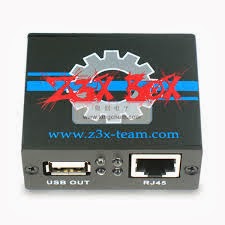
Z3X-BOX Samsund Update 16.9 - 2nd Update of 2014. Look inside
Z3X Samsung Tool 16.9 Update. Second Update of 2014
Just look, all time we trying to improve our sw,
today we give big update for special function which allow you to repair different phone problems.
- added GT-P3100 (Repair Factory EFS - full rebuild ) - first in the world
- added GT-i9100G (Repair Factory EFS - full rebuild ) - first in the world
Now for exynose phones with IMEI sertificate we have add 3 separeted option inside IMEI REPAIR BUTTON:
- disable Service mode
- repair NETWORK
- repair IMEI
- added GT-i9500 (separeted repair imei, network, disable service mode) (work only with phones with old type CPU)
- added GT-i9300 (separeted repair imei, network, disable service mode)
- added GT-N7100 (separeted repair imei, network, disable service mode)
Added new phones:
- support GT-S7392L (Direc Read Codes/Unlock/Imei repair, flashing)
- support GT-S7390E (Direc Read Codes/Unlock/Imei repair, flashing)
- support SM-G350 (Direc Read Codes/Unlock/Imei repair, flashing)
- support GT-I9300T (Direc Read Codes/Unlock/Imei repair, flashing)
- addition support GT-B5330 (Factory EFS repair, Test mode disable(Yellow screen))
- addition support GT-B5330B (Factory EFS repair, Test mode disable(Yellow screen))
- addition support GT-B5330L (Factory EFS repair, Test mode disable(Yellow screen))
- addition support GT-I9080 (Factory EFS repair, Test mode disable(Yellow screen))
- addition support GT-I9080L (Factory EFS repair, Test mode disable(Yellow screen))
- addition support GT-I9105 (Factory EFS repair, Test mode disable(Yellow screen))
- addition support GT-I9105P (Factory EFS repair, Test mode disable(Yellow screen))
- addition support GT-I9150 (Factory EFS repair, Test mode disable(Yellow screen))
- addition support GT-S5301 (Factory EFS repair, Test mode disable(Yellow screen))
- addition support GT-S5301B (Factory EFS repair, Test mode disable(Yellow screen))
- addition support GT-S5301L (Factory EFS repair, Test mode disable(Yellow screen))
- addition support GT-S5310 (Factory EFS repair, Test mode disable(Yellow screen))
- addition support GT-S5310E (Factory EFS repair, Test mode disable(Yellow screen))
- addition support GT-S5310G (Factory EFS repair, Test mode disable(Yellow screen))
- addition support GT-S6010 (Factory EFS repair, Test mode disable(Yellow screen))
- addition support GT-S6010L (Factory EFS repair, Test mode disable(Yellow screen))
- addition support GT-S6010W (Factory EFS repair, Test mode disable(Yellow screen))
- addition support GT-S6790 (Factory EFS repair, Test mode disable(Yellow screen))
- addition support GT-S6790E (Factory EFS repair, Test mode disable(Yellow screen))
- addition support GT-S6790N (Factory EFS repair, Test mode disable(Yellow screen))
- addition support GT-S6810 (Factory EFS repair, Test mode disable(Yellow screen))
- addition support GT-S6810B (Factory EFS repair, Test mode disable(Yellow screen))
- addition support GT-S6810E (Factory EFS repair, Test mode disable(Yellow screen))
- addition support GT-S6810L (Factory EFS repair, Test mode disable(Yellow screen))
- addition support GT-S6810M (Factory EFS repair, Test mode disable(Yellow screen))
- addition support GT-S6810P (Factory EFS repair, Test mode disable(Yellow screen))
- addition support GT-S7270 (Factory EFS repair, Test mode disable(Yellow screen))
- addition support GT-S7270L (Factory EFS repair, Test mode disable(Yellow screen))
- addition support GT-I9082 (Factory EFS repair, Test mode disable(Yellow screen))
- addition support GT-I9082L (Factory EFS repair, Test mode disable(Yellow screen))
- addition support GT-I9152 (Factory EFS repair, Test mode disable(Yellow screen))
- addition support GT-S5303 (Factory EFS repair, Test mode disable(Yellow screen))
- addition support GT-S5303B (Factory EFS repair, Test mode disable(Yellow screen))
- addition support GT-S5312 (Factory EFS repair, Test mode disable(Yellow screen))
- addition support GT-S5312B (Factory EFS repair, Test mode disable(Yellow screen))
- addition support GT-S5312L (Factory EFS repair, Test mode disable(Yellow screen))
- addition support GT-S6012 (Factory EFS repair, Test mode disable(Yellow screen))
- addition support GT-S6792L (Factory EFS repair, Test mode disable(Yellow screen))
- addition support GT-S6812 (Factory EFS repair, Test mode disable(Yellow screen))
- addition support GT-S7272 (Factory EFS repair, Test mode disable(Yellow screen))
- addition support GT-S7273T (Factory EFS repair, Test mode disable(Yellow screen))
- addition support GT-S7390 (Factory EFS repair, Network Repair, Test mode disable(Yellow screen))
- addition support GT-S7390E (Factory EFS repair, Network Repair, Test mode disable(Yellow screen))
- addition support GT-S7580 (Factory EFS repair, Network Repair, Test mode disable(Yellow screen))
- addition support GT-S7580L (Factory EFS repair, Network Repair, Test mode disable(Yellow screen))
- addition support SM-G350 (Factory EFS repair, Network Repair, Test mode disable(Yellow screen))
- addition support GT-S7392 (Factory EFS repair, Network Repair, Test mode disable(Yellow screen))
- addition support GT-S7392L (Factory EFS repair, Network Repair, Test mode disable(Yellow screen))
- addition support GT-S7582 (Factory EFS repair, Network Repair, Test mode disable(Yellow screen))
Additin usefull function added for SPREADTRUM based phones.
- addition support GT-E1200I AUTOFORMAT(FACTORY restore) UDISC
- addition support GT-E1202I AUTOFORMAT(FACTORY restore) UDISC
- addition support GT-E1263E AUTOFORMAT(FACTORY restore) UDISC
- addition support GT-E1270 AUTOFORMAT(FACTORY restore) UDISC
- addition support GT-E1272 AUTOFORMAT(FACTORY restore) UDISC
- addition support GT-E1280 AUTOFORMAT(FACTORY restore) UDISC
AutoFormat UDISC will fix problems like blink phones,disable user code.
For AutoFormat just press FLASH without select flash file.
-
Available link for download
Sunday, September 25, 2016
Z3X Box Samsung Tool 18 9 Update
Z3X Box Samsung Tool 18 9 Update
Samsung Tool 18.9 Update

Z3X Box
Samsung Tool 18.9 Update.
1. S5570B (Flashing, Direct unlock/imei repair, read/write QCN)
2. GT-S7390g (flashing, Unlock, Imei repair, Network repair, READ/WRITE cert)
3. SM-J100H (flashing, Unlock, Imei repair, Network repair, READ/WRITE cert) BETA
4. SM-G800H (Flashing, WIPE efs, write CERT, Read/write QCN, Auto detect CERT compatiblity)
5. SM-G530FZ (Flashing, WIPE efs, write CERT, Read/write QCN, Auto detect CERT compatiblity)
6. SM-G5108 (Flashing, WIPE efs, write CERT, Read/write QCN, Auto detect CERT compatiblity)
7. SM-G5108Q (Flashing, WIPE efs, write CERT, Read/write QCN, Auto detect CERT compatiblity)
8. SM-G5109 (Flashing, WIPE efs, write CERT, Read/write QCN, Auto detect CERT compatiblity)
9. SM-G5306W (Flashing, WIPE efs, write CERT, Read/write QCN, Auto detect CERT compatiblity)
10. SM-G5308W(Flashing, WIPE efs, write CERT, Read/write QCN, Auto detect CERT compatiblity)
11. SM-G5309W(Flashing, WIPE efs, write CERT, Read/write QCN, Auto detect CERT compatiblity)
Addition function added for:
1. I9060 (cert Read/Write)
2. I9060L(cert Read/Write)
3. I9063T(cert Read/Write)
4. I9080E(cert Read/Write)
5. I9082C(cert Read/Write)
6. S7390 (cert Read/Write)
7. S7390E(cert Read/Write)
8. S7390G (cert Read/Write)
9. S7390L(cert Read/Write)
10.S7392 (cert Read/Write)
11.S7392L(cert Read/Write)
12.S7580 (cert Read/Write)
13.S7580L(cert Read/Write)
14.S7582 (cert Read/Write)
15.S7582L(cert Read/Write)
16.S7583T(cert Read/Write)
17.SM-P601(cert Read/Write)
18.SM-P602(cert Read/Write)
19.SM-P901 (cert Read/Write)
20.SM-T311(cert Read/Write)
21.SM-T312 (cert Read/Write)
Note:- Update on Shell
Available link for download
Friday, September 23, 2016
Volcano Box Latest version Free Download v2 9 0
Volcano Box Latest version Free Download v2 9 0
Volcano Box v2.9.0 Download
Volcano Box
Click Here Download Now
New in Update Volcano Box v2.9.0
Added Vitool - Ultimate Iphone Disabled & Passcode Unlocker
SPD Andriod add new flash ic support
MTK 6572 add new flash ic support
Adjust MTK Andriod Imei change algorithm
POST Here All IPhone Passcode - Disabled Successfully Unlocked with Vitool
IPHONE 5 IPHONE Is Disable Done with VI TOOL
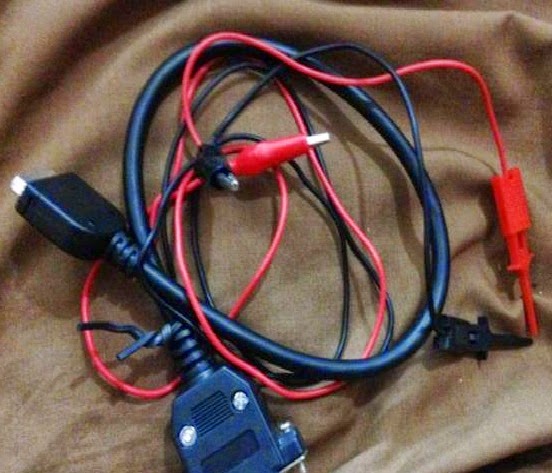
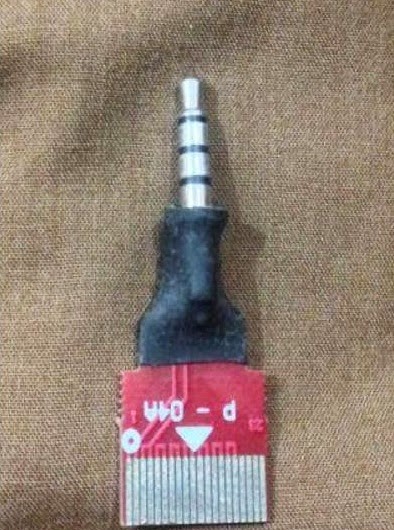
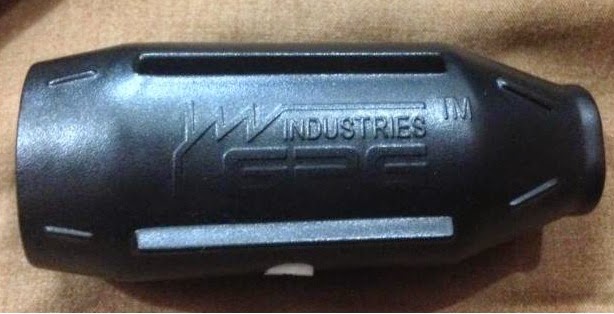
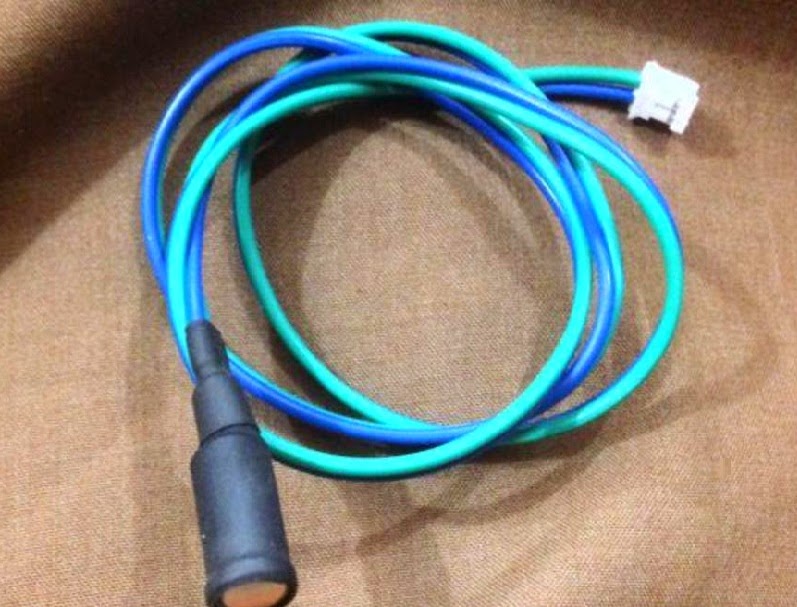
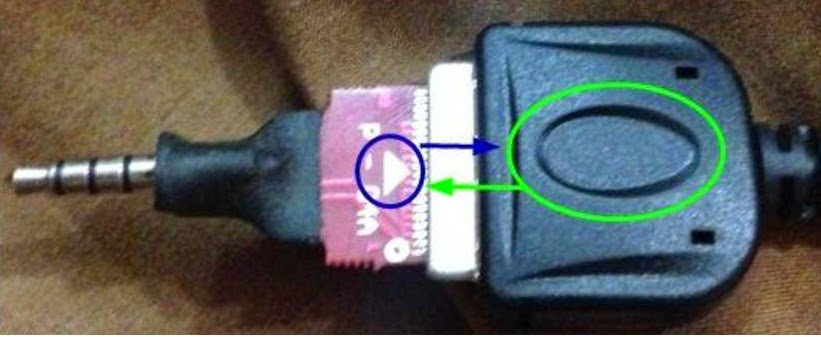
Volcano Boxs Main Cable
Volcano Boxs P-04A Jig
Volcano Boxs ViTools (Hardware Adaptor)
Volcano ViTools Sensor
As you have all require things so lets understand how to connect it.
1. Connect volcano box to computer via usb cable
2. Connect volcano boxs main cable to volcano box (the cable which have Red & Black wires)
3. Connect Jig P- 04A to volcano boxs main cable make sure you it with correct way. Please look have a picture. Arrow must be on thumbs side.
4. Insert P-04A jig into Vitools
5. Attach Sensor with ViTools
6. Plug Cables connector into Iphone (the Cable which have two usb male connectors)
7. Connect one uusb connector to directly computers USB port and check if it start charging or not if not then plug another USB.
8. Now Connect last USB connector into ViTools (if have Iphone5/ 5C/5S etc then use Adaptor)
9. Volcano Utility_iphone already opened if not please run it
10.Now Place sensor onto Iphones Screen (make sure Iphone screen is in idle state)
from Software press Unlock button and wait till software find its correct code.
11.After its finished your Iphone will be Unlocked and on Software you can see which passcode your Iphone have.
Available link for download
Tuesday, September 13, 2016
Volcano Box Latest Update 3 0 9 Volcano Box Version 3 0 9 Free Download
Volcano Box Latest Update 3 0 9 Volcano Box Version 3 0 9 Free Download
Volcano Box Latest Update 3.0.9 Free Download

Volcano Box
Volcano Box Latest Update Add New MTK CPU and Samsung Unlocking and Flash
What New Update in Volcano Box v3.0.9
1. Added MTK android new boot.
1.boot 7.1524
2. Added MTK new cpu support.
1.Mt6850
2.Mt6795
3.Mt8173
3. Added New Many new Flash Support for these CPU.
1.MT6573 2.MT6575 3.MT6577
4.MT6572 5.MT6583 6.MT6582
7.MT8135 8.MT6592 9.MT6571
10.MT6595 11.MT8127 12.MT6752
13.MT8173 14.MT6795 15.MT6735
4. Added more than 600 Samsung Phones for SP Unlocking, Flashing etc..
Models List:
· GT-B5510
· GT-B5510B
· GT-B5510L
· GT-B5512
· GT-B5512B
· GT-I8190
· GT-I8190N
· GT-I8190T
· GT-I8262
· GT-I8530
· GT-I8552
· GT-I9020
· GT-I9023
· GT-I9070
· GT-I9070P
· GT-I9082
· GT-I9100
· GT-I9100G
· GT-I9100P
· GT-I9100T
· GT-I9103
· GT-I9103L
· GT-I9105
· GT-I9105P
· GT-I9108
· GT-I9152
· GT-I9188
· GT-I9190
· GT-I9192
· GT-I9195
· GT-I9200
· GT-I9205
· GT-I9208
· GT-I9210
Available link for download
Read more »
Wednesday, August 31, 2016
Z3X BOX LG 2 3G Tool v2 9 Released
Z3X BOX LG 2 3G Tool v2 9 Released
LG 2-3G Tool v2.9 Released.
More and more Hot updates coming
New phones added:
- support LG E410 (Direct unlock/imei repair, read/write/repair NVM, repair SECURITY, AUTOROOT)
- support LG E410b (Direct unlock/imei repair, read/write/repair NVM, repair SECURITY, AUTOROOT)
- support LG E410f (Direct unlock/imei repair, read/write/repair NVM, repair SECURITY, AUTOROOT)
- support LG E410g (Direct unlock/imei repair, read/write/repair NVM, repair SECURITY, AUTOROOT)
- support LG E410i (Direct unlock/imei repair, read/write/repair NVM, repair SECURITY, AUTOROOT)
- support LG E411g (Direct unlock/imei repair, read/write/repair NVM, repair SECURITY, AUTOROOT)
- support LG E415f (Direct unlock/imei repair, read/write/repair NVM, repair SECURITY, AUTOROOT)
- support LG E415g (Direct unlock/imei repair, read/write/repair NVM, repair SECURITY, AUTOROOT)
P.S.Please post here most wanted phones for adding, we checking this topic.
Our updates will follow your records there.
LG activation can be activated to your Z3X-BOX samsung or to Z3X Easy-JTAG.
About price for this adition activation contact with resellers.
Bulk oder - contact with US. Resellers Welcome.
-
Available link for download
Subscribe to:
Posts (Atom)