Showing posts with label 18. Show all posts
Showing posts with label 18. Show all posts
Sunday, October 30, 2016
Z3X Box latest 18 7 Update
Z3X Box latest 18 7 Update
Samsung Tool 18.7 Update
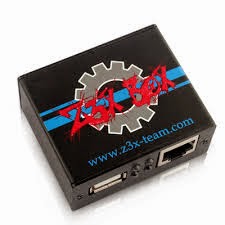
Z3X Box
Z3X Box for use Samsung phones and GSM Solution. It’s Samsung Specialist Box for use Unlocking Samsung handset, Flashing, NVM, Camera, Network, etc. its Products are activation based. In any time you can activate needed futures to your box.
Z3X-Box Samsung Outstanding Features:
1. Easy to use Z3X Box
2. Use Original format fleshing files
3. Easy or Regular Smart card Update
4. Easy Unlock
5. Easy Read Codes
6. Easy Read EEPROM
7. Use Erase Full Flash
8. Easy IMEI Repair (Note: - IMEI Changing, Editing or Repairing is illegal. This Box does not repair, change or edit IMEI of any Handset)
9. Available Options: LCD Contrast, Battery Calibration, RX TX, etc. Service option
10. Download full flash file and software login to support area form main software
11. Software will show information about required cable to each model automatically
Note: - We are not responsible if you use these boxes with any third party software for any illegal operation. This box is just an interface between mobile phone and computer.
Samsung Tool 18.7 Update. First in the world
Added:
1. SM-G386W (flashing, Read/Write QNC, Wipe EFS, Write CERT, auto backup to tar)
2. GT-S5300B (flashing, Unlock, Imei repair, Network repair, READ/WRITE cert)
3. GT-S5310B (flashing, Unlock, Imei repair, Network repair, READ/WRITE cert)
4. GT-S5310T (flashing, Unlock, Imei repair, Network repair, READ/WRITE cert)
5. GT-I9060I (flashing, Unlock, Imei repair, Network repair, READ/WRITE cert)
6. SM-G360H (flashing, Unlock, Imei repair, Network repair, READ/WRITE cert)
7. SM-G357FZ (flashing, Read/Write QNC, Wipe EFS, Write CERT, auto backup to tar)
8. SM-G710 (flashing, Read/Write QNC, Wipe EFS, Write CERT, auto backup to tar)
9. SM-G7102T (flashing, Read/Write QNC, Wipe EFS, Write CERT, auto backup to tar)
10.SM-G7105 (flashing, Read/Write QNC, Wipe EFS, Write CERT, auto backup to tar)
11.SM-G7105H (flashing, Read/Write QNC, Wipe EFS, Write CERT, auto backup to tar)
12.SM-G7105L (flashing, Read/Write QNC, Wipe EFS, Write CERT, auto -backup to tar)
15.SM-G7106 (flashing, Read/Write QNC, Wipe EFS, Write CERT, auto backup to tar)
16.SM-G7108 (flashing, Read/Write QNC, Wipe EFS, Write CERT, auto backup to tar)
Available link for download

Thursday, October 20, 2016
Samsung Tool Latest Update 18 8
Samsung Tool Latest Update 18 8
Samsung Tool 18.8 Update Now
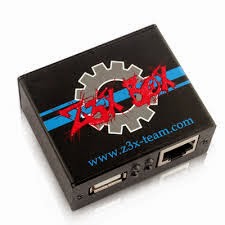
z3x Box
Z3X Box Samsung Tool 18.8 new phones added
New phones added Upgrade Samsung Tool 18.8
1. SM-T805W(flashing, direct unlock/repair, Read/Write CERT, read/write EFS)
2. SM-G3502C(flashing, Read/Write QNC, Wipe EFS, Write CERT, auto backup to tar)
3. SM-G3502I(flashing, Read/Write QNC, Wipe EFS, Write CERT, auto backup to tar)
4. SM-G3502L(flashing, Read/Write QNC, Wipe EFS, Write CERT, auto backup to tar)
5. SM-G3502T(flashing, Read/Write QNC, Wipe EFS, Write CERT, auto backup to tar)
6. SM-G3509I(flashing, Read/Write QNC, Wipe EFS, Write CERT, auto backup to tar)
7. SM-G350L(flashing, Read/Write QNC, Wipe EFS, Write CERT, auto backup to tar)
8. GT-S6293T(flashing, Unlock, Imei repair, Network repair, READ/WRITE cert) - first in the world
9. SM-G130BT(flashing, Unlock, Imei repair, Network repair, READ/WRITE cert) - first in the world
10. SM-G130U(flashing, Unlock, Imei repair, Network repair, READ/WRITE cert) - first in the world
11. SM-C105(flashing, Direct unlock/imei repair)
Addition support added Upgrade Samsung Tool 18.8
1. SM-T705(Read/Write CERT)
2. SM-T705M(Read/Write CERT)
3. SM-T705Y(Read/Write CERT)
4. SM-T805(Read/Write CERT)
5. SM-T805M(Read/Write CERT)
6. SM-T805Y (Read/Write CERT)
Note: - Update Box by Shell
Available link for download
Sunday, September 25, 2016
Z3X Box Samsung Tool 18 9 Update
Z3X Box Samsung Tool 18 9 Update
Samsung Tool 18.9 Update
Z3X Box
Samsung Tool 18.9 Update.
1. S5570B (Flashing, Direct unlock/imei repair, read/write QCN)
2. GT-S7390g (flashing, Unlock, Imei repair, Network repair, READ/WRITE cert)
3. SM-J100H (flashing, Unlock, Imei repair, Network repair, READ/WRITE cert) BETA
4. SM-G800H (Flashing, WIPE efs, write CERT, Read/write QCN, Auto detect CERT compatiblity)
5. SM-G530FZ (Flashing, WIPE efs, write CERT, Read/write QCN, Auto detect CERT compatiblity)
6. SM-G5108 (Flashing, WIPE efs, write CERT, Read/write QCN, Auto detect CERT compatiblity)
7. SM-G5108Q (Flashing, WIPE efs, write CERT, Read/write QCN, Auto detect CERT compatiblity)
8. SM-G5109 (Flashing, WIPE efs, write CERT, Read/write QCN, Auto detect CERT compatiblity)
9. SM-G5306W (Flashing, WIPE efs, write CERT, Read/write QCN, Auto detect CERT compatiblity)
10. SM-G5308W(Flashing, WIPE efs, write CERT, Read/write QCN, Auto detect CERT compatiblity)
11. SM-G5309W(Flashing, WIPE efs, write CERT, Read/write QCN, Auto detect CERT compatiblity)
Addition function added for:
1. I9060 (cert Read/Write)
2. I9060L(cert Read/Write)
3. I9063T(cert Read/Write)
4. I9080E(cert Read/Write)
5. I9082C(cert Read/Write)
6. S7390 (cert Read/Write)
7. S7390E(cert Read/Write)
8. S7390G (cert Read/Write)
9. S7390L(cert Read/Write)
10.S7392 (cert Read/Write)
11.S7392L(cert Read/Write)
12.S7580 (cert Read/Write)
13.S7580L(cert Read/Write)
14.S7582 (cert Read/Write)
15.S7582L(cert Read/Write)
16.S7583T(cert Read/Write)
17.SM-P601(cert Read/Write)
18.SM-P602(cert Read/Write)
19.SM-P901 (cert Read/Write)
20.SM-T311(cert Read/Write)
21.SM-T312 (cert Read/Write)
Note:- Update on Shell
Available link for download
Wednesday, August 31, 2016
Norman Malware Cleaner 2 08 05 2013 07 18
Norman Malware Cleaner 2 08 05 2013 07 18

Norman Malware Cleaner is one of the new apps in the security software industry, promising to keep computers around the world away from malware and other dangerous files that could compromise users safety.
Although it comes packed as an over 130 MB file, Norman Malware Cleaner has adopted a different approach.
This software doesnt have an installer, since viruses are now attempting to block installation of antiviruses and security tools, so its being delivered as an executable file, which means you only need to double click the file to launch the app.
The interface is pretty basic and thats a very good thing, since the purpose of the whole software is to find and delete infections.
There are four scanning modes, quick, normal, full and custom, so choose the one that fits you best. Of course, the full mode will need much more time, while the quick one is better for a quick analysis of the computer.
During our testing, scanning the computer in quick mode took around 2 minutes, while the full option needed around 20 minutes to complete. Still, the latter was a bit more efficient as it checked every single file on the computer for malicious data.
There are multiple options available in the dedicated tab, giving you the power to enable verbose logging, quarantine, archive unpacking, memory scanning, FakeAV scanning, rootkit cleaning, multithreading, detection of potentially unwanted programs and Sandbox.
The Quarantine tab provides a quick look over the suspicious files detected by Norman Malware Cleaner, with dedicated tools to restore or delete the files permanently at the bottom of the main window.
Norman Malware Cleaner is no replacement for a fully fledged antivirus, but if cleaning your computer of infected files wasnt possible with the existing tools, this one is really worth a chance.
DOWNLOAD HERE
or Here
Available link for download
Subscribe to:
Posts (Atom)