Showing posts with label mini. Show all posts

Wednesday, October 26, 2016

Walton Primo X2 mini Official Flashtools Drivers Without Password

Walton Primo X2 mini Official Flashtools Drivers Without Password


Walton Primo X2 mini Official Flashtools & Drivers Download Link: Download Here Tested By Shohag Gsm


Installation Process:

1. Install driver

2. Open Flash Tool

3. Open Download Agent and select MTK_AllinOne_DA


4. Open scatter_loading and select scatter file
SW---> WBW6803WA_0410_T8142? MT6577_Android_scatter_emmc


5. Click Firmware->Upgrade and connect USB cable with mobile (mobile must be off)
6. Then start downloading..
7. When it shows Firmware Upgrade , then installation is completed.


After Firmware Upgrade give Reset to Factory Setting

Available link for download

Read more »

Sunday, October 16, 2016

Nokia N97 mini Mass memory not available solution

Nokia N97 mini Mass memory not available solution


Available link for download

Read more »

Sunday, September 18, 2016

Mini Welding Machine Circuit

Mini Welding Machine Circuit


A small transformerless welding machine circuit can be built using a few high voltage, high value capacitors and a rectifier diode, the following article explains more on it. The idea was requested by Mr. Tun.


In one of my earlier posts we came across a full fledged 100 amp SMPS welding inverter circuit for working with reasonably bigger joints and metals.

Being an SMPS based design and involving high power specs, the above circuit is complex and may be out of the reach of the new hobbyists.

As requested by Mr.Tun a homemade small scale welding machine circuit is what most of the new hobbyists and mechanical engineers would be looking at for solving their occasional work bench metal welding jobs.

A mini welding machine without using complex circuitry could probably be built using a capacitive power supply as shown in the following diagram:


 The idea shown above is an ordinary capacitive power supply circuit incorporating extreme capacitors in terms of their values.

At the input side we can see a formidable 500uF/400V capacitor, while on the output side also a similar rated capacitor can be seen positioned for reinforcing current.

The most basic parameter essential in a welding system is a high current, so that an extremely high temperature can be formed at the short-circuit junction, over the metal joint in question.

This high current generation can be achieved either by using a high watt transformer or an SMPS version of the same which we discussed in the first paragraph.

A transformer could be too bulky and heavy, while the SMPS circuit too complex for the newcomers, the only alternative way to achieve the high current welding through a relatively simpler design is perhaps by employing the high current capacitive power supply as shown above.

The 500uF/400V capacitor can be expected to generate bursts of current upto as high as 36 amps @ 220V, and reinforced with the complementing output filter capacitor this current can be expected to do some serious welding actions.

You can verify the above mentioned specs by using the following two calculator software:

Reactance Calculator

Ohms Law Calculator

The shown push button enables the user to achieve the welding job through shorts bursts, and not through a continuous arcing, which can be dangerous, and anyway is not recommended in welding operations.

The input 500uF/400V capacitor looks massive and it might not be readily available in the market, therefore this can be built by using 500 numbers of 1uF/400V PPC capacitors wired in parallel, this could occupy some space, but still the method is easily achievable.

This capacitor needs to preferably a non-polar capacitor, however since a diode is positioned in series means an electrolyte capacitor could also serve the purpose without issues.

The second capacitor at the output side can be an electrolytic type for sure.

For more current, the values of the caps could be increased to higher limits, thats the only parameter that needs to be focused on.

CAUTION: The mini welding machine circuit explained above is not isolated from mains and has the potentials to kill a person within seconds, therefore extreme caution is advised while handling this equipment in the powered condition. 

Available link for download

Read more »

Sunday, August 28, 2016

Root step by step Manual i8190 N L T I Galaxy S3 Mini

Root step by step Manual i8190 N L T I Galaxy S3 Mini


How to Root I8190 / I8190N / I8190L / I8190T Galaxy S3 Mini -
STEP BY STEP rooting manual for GSM-Hosting users

I have some good news today.
Official recovery files from CWD i found.

What we have?
Simple, now we hav easy and fast way for root any I8190 L, I, T, N Galaxy S3 Mini.
Just Follow Manual now.


1. Step

- Download Samsung USB drivers ----> Click HERE
- Download ODIN 3.04 from ----> Click HERE
- Download recovery-clockwork-touch-6.0.2.7-golden.tar.md5.zip recovery image from here ------> Click HERE!
- Download SuperSu Last version ----> Click HERE


2. Step

- Turn off phone, then switch to download mode:
press together [volume down]+[home button]+[power button] (all at once),
press [volume up] for comfirm download mode.
- Connect usb cable, install drivers.


3. Step

- Run Odin 3.04, ticked 2 option F.reset times+auto reboot,
- Extract ecovery-clockwork-touch-6.0.2.7-golden.tar.md5.zip !Select PDA and browse to where you have extracted ecovery-clockwork-touch-6.0.2.7-golden.tar.md5
and select it


4. Step

- Odin should show device under 1 of ID:COM port.(if this not happends repeat from STEP 2)
- Press START.
- Phone should power on after flashing complete.


5. Step - ROOTING:

- Copy Downloaded SUperSU to externel sdcard (NOT INTERNAL ! )
- Power off your phone, after press [Vol up] + [Power] + [Home button] (all at once)
- Select Install zip from sdcard --->choose zip from sdcard ---> scroll to and open folder where located UPDATE-SuperSU-v1.05.zip-> choise UPDATE-SuperSU-v1.05.zip->
comfirm - YES - Install Update UPDATE-SuperSU-v1.05.zip.


Done ! And you are ready to go

thanks goes to chotu.


You can also use old method for root i8190 - prerooted firmware.
After few days i will update thread and will add link for prerooted Firmware.
i8190 prerooted - will be HERE.

Available link for download

Read more »

Wednesday, August 24, 2016

Samsung galaxy Mini GT S 5570 Hardreset How To

Samsung galaxy Mini GT S 5570 Hardreset How To


Try This :

1. Power off phone
2. Press and hold Menu Button ( middle ) + power on for at least 10 seconds
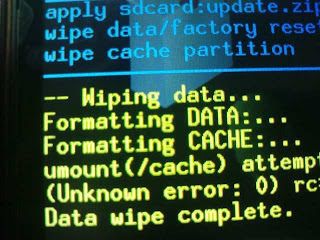
3. Android System Recovery Mode Appear
4. There are 4 options

reboot system now

apply sdcard:update.zip

wipe data/factory reset

wipe cache partition

5. Move the options to " Wipe data / factory reset " using volume down ( - ) button and menu button to confirm, because the touchscreen doesnt work in reovery mode
6. After the process done, phone will reboot.

Available link for download

Read more »