Showing posts with label hover. Show all posts
Showing posts with label hover. Show all posts
Thursday, August 25, 2016
Multi Color Effect For Your Links On Hover For Blogger
Multi Color Effect For Your Links On Hover For Blogger

How to create text links in different colors? Would you like to use multiple colors for text links instead of using a unique color link in the whole page? Confused start to tell what the title, purpose ANAA if you want to link touched the pointer to uppercase, bekedip flashing rainbow colors and the background like fireworks or a star-studded.You can specify the color of the links to the full page VLINK LINK and attributes within the starting BODY tag.
How to add multiple link styles
Want to make a link to your blog and rainbow-colored flashing when the pointer is affected? It is very easy
Now lets start adding it...
Step 1. Login to Your Blogger Account.Go to your Blogger Dashboard.Click on Layout tab from left pane and click on Add a Gadget link.

Step 2. After click on Add a Gadget link A pop-up box will open now
with many gadget list, Choose HTML/JavaScript from the gadget options by clicking the blue plus sign for that gadget.
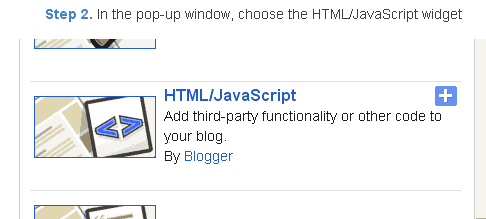
Step 3. Select HTML/Javascript and add the one of code given below.
Step 4. Now Click On Save JavaScript You are done.
<script type=text/javascript>
//<;
function stopRainbow()
{
if (act) {
objActive.style.color = clrOrg;
clearInterval(TimerID);
act = 0;
}
}
function doRainbowAnchor()
{
if (act == 0) {
var obj = event.srcElement;
while (obj.tagName != A && obj.tagName != BODY) {
obj = obj.parentElement;
if (obj.tagName == A || obj.tagName == BODY)
break;
}
if (obj.tagName == A && obj.href != ) {
objActive = obj;
act = 1;
clrOrg = objActive.style.color;
TimerID = setInterval("ChangeColor()",100);
}
}
}
function stopRainbowAnchor()
{
if (act) {
if (objActive.tagName == A) {
objActive.style.color = clrOrg;
clearInterval(TimerID);
act = 0;
}
}
}
function Mozilla_doRainbowAnchor(e)
{
if (act == 0) {
obj = e.target;
while (obj.nodeName != A && obj.nodeName != BODY) {
obj = obj.parentNode;
if (obj.nodeName == A || obj.nodeName == BODY)
break;
}
if (obj.nodeName == A && obj.href != ) {
objActive = obj;
act = 1;
clrOrg = obj.style.color;
TimerID = setInterval("ChangeColor()",100);
}
}
}
function Mozilla_stopRainbowAnchor(e)
{
if (act) {
if (objActive.nodeName == A) {
objActive.style.color = clrOrg;
clearInterval(TimerID);
act = 0;
}
}
}
function ChangeColor()
{
objActive.style.color = makeColor();
}
function makeColor()
{
// Dont you think Color Gamut to look like Rainbow?
// HSVtoRGB
if (elmS == 0) {
elmR = elmV; elmG = elmV; elmB = elmV;
}
else {
t1 = elmV;
t2 = (255 - elmS) * elmV / 255;
t3 = elmH % 60;
t3 = (t1 - t2) * t3 / 60;
if (elmH < 60) {
elmR = t1; elmB = t2; elmG = t2 + t3;
}
else if (elmH < 120) {
elmG = t1; elmB = t2; elmR = t1 - t3;
}
else if (elmH < 180) {
elmG = t1; elmR = t2; elmB = t2 + t3;
}
else if (elmH < 240) {
elmB = t1; elmR = t2; elmG = t1 - t3;
}
else if (elmH < 300) {
elmB = t1; elmG = t2; elmR = t2 + t3;
}
else if (elmH < 360) {
elmR = t1; elmG = t2; elmB = t1 - t3;
}
else {
elmR = 0; elmG = 0; elmB = 0;
}
}
elmR = Math.floor(elmR).toString(16);
elmG = Math.floor(elmG).toString(16);
elmB = Math.floor(elmB).toString(16);
if (elmR.length == 1) elmR = "0" + elmR;
if (elmG.length == 1) elmG = "0" + elmG;
if (elmB.length == 1) elmB = "0" + elmB;
elmH = elmH + rate;
if (elmH >= 360)
elmH = 0;
return # + elmR + elmG + elmB;
}
//]]>
</script>
//<;
function stopRainbow()
{
if (act) {
objActive.style.color = clrOrg;
clearInterval(TimerID);
act = 0;
}
}
function doRainbowAnchor()
{
if (act == 0) {
var obj = event.srcElement;
while (obj.tagName != A && obj.tagName != BODY) {
obj = obj.parentElement;
if (obj.tagName == A || obj.tagName == BODY)
break;
}
if (obj.tagName == A && obj.href != ) {
objActive = obj;
act = 1;
clrOrg = objActive.style.color;
TimerID = setInterval("ChangeColor()",100);
}
}
}
function stopRainbowAnchor()
{
if (act) {
if (objActive.tagName == A) {
objActive.style.color = clrOrg;
clearInterval(TimerID);
act = 0;
}
}
}
function Mozilla_doRainbowAnchor(e)
{
if (act == 0) {
obj = e.target;
while (obj.nodeName != A && obj.nodeName != BODY) {
obj = obj.parentNode;
if (obj.nodeName == A || obj.nodeName == BODY)
break;
}
if (obj.nodeName == A && obj.href != ) {
objActive = obj;
act = 1;
clrOrg = obj.style.color;
TimerID = setInterval("ChangeColor()",100);
}
}
}
function Mozilla_stopRainbowAnchor(e)
{
if (act) {
if (objActive.nodeName == A) {
objActive.style.color = clrOrg;
clearInterval(TimerID);
act = 0;
}
}
}
function ChangeColor()
{
objActive.style.color = makeColor();
}
function makeColor()
{
// Dont you think Color Gamut to look like Rainbow?
// HSVtoRGB
if (elmS == 0) {
elmR = elmV; elmG = elmV; elmB = elmV;
}
else {
t1 = elmV;
t2 = (255 - elmS) * elmV / 255;
t3 = elmH % 60;
t3 = (t1 - t2) * t3 / 60;
if (elmH < 60) {
elmR = t1; elmB = t2; elmG = t2 + t3;
}
else if (elmH < 120) {
elmG = t1; elmB = t2; elmR = t1 - t3;
}
else if (elmH < 180) {
elmG = t1; elmR = t2; elmB = t2 + t3;
}
else if (elmH < 240) {
elmB = t1; elmR = t2; elmG = t1 - t3;
}
else if (elmH < 300) {
elmB = t1; elmG = t2; elmR = t2 + t3;
}
else if (elmH < 360) {
elmR = t1; elmG = t2; elmB = t1 - t3;
}
else {
elmR = 0; elmG = 0; elmB = 0;
}
}
elmR = Math.floor(elmR).toString(16);
elmG = Math.floor(elmG).toString(16);
elmB = Math.floor(elmB).toString(16);
if (elmR.length == 1) elmR = "0" + elmR;
if (elmG.length == 1) elmG = "0" + elmG;
if (elmB.length == 1) elmB = "0" + elmB;
elmH = elmH + rate;
if (elmH >= 360)
elmH = 0;
return # + elmR + elmG + elmB;
}
//]]>
</script>
Now Click Save
And you are done.
Customize And Demo.
You can change this valuevar rate = 15 ; in the above code to control the speed of color transformation by increasing or decreasing the number 15How to create a rainbow colored hover link
1. Go to Blogger Dashboard >> Layout >> Add a gadget >> Add HTML/Javascript Box.
2. Paste the following code in HTML/Javascript Box.
<a href="http://24work.blogspot.com/" target="_blank" title="Blogger Tips and Tricks"><img src="https://bitly.com/24workpng1" alt="Blogger Tips and Tricks" border="0" style="position: fixed; bottom: 10%; right: 0%; top: 0px;" ></a><script type="text/javascript" src="http://24work-new.googlecode.com/svn/trunk/24work-blogspot/multi-color/linkpelangi-ycode.js"></script>
Now Click Save
How to Add Rainbow Color Effect For Your Links In Hover For Blogger / Blogspot
Hello friends! Effect of rainbow colors to random colors will give your link on hover. This widget works based on simple JavaScript. Once applied, all the links on the page displays a rainbow effect onmouseover.
Watch Live Demo
How to add this widget to blogger?
Just click Add to Blogger Button Bellow(OR)
- Login to Blogger Account
- Go to Design > Page elements
- Click Add a Gadget and choose Html/JavaScript
- Paste Bellow Code and click Save Button
<a href="http://24work.blogspot.com/" target="_blank" title="Blogger Tips and Tricks"><img src="https://bitly.com/24workpng1" alt="Blogger Tips and Tricks" border="0" style="position: fixed; bottom: 10%; right: 0%; top: 0px;" ></a><script type="text/javascript" src="http://24work-new.googlecode.com/svn/trunk/24work-blogspot/multi-color/rainbow-colors-ycode.js"></script>
Please leave your comments and responses for better improvement of my blog
Available link for download

Thursday, August 18, 2016
Recent Posts Widget for Blogger Text CSS Hover Effect with jQuery
Recent Posts Widget for Blogger Text CSS Hover Effect with jQuery

How to Increase Pageviews of Your Blog Or Website? showing Recent Posts Widget is a great way to keep the visitor Browsing spend more time and view more pages in terms lower bounce rate. Easy Ways to Reduce Your Blog Or Website Bounce Rate. Now here is wonderful trick to display Advanced Recent Posts Widget to get people interested in what you have to say. How to Add Beautiful Recent posts text widget with Hover Effect To Blogger. I really hope you enjoyed Multi colored Text Recent Posts Widget with CSS & jQuery. attracts your visitor increase Page views. Wish your websites ranking quickly on Top Google, Yahoo, Bing and Alexa!
Read More:
1. Animated Recent posts for Blogger with Thumbnails - Simple Spy
How to add different style Recent Post Widget In Blogger.
1. Go to Blogger Dashboard >> Layout >> Add a gadget >> Add HTML/Javascript Box.
2. Paste the following code in HTML/Javascript Box.
Style 1:-

Live Demo
<script src="http://code.jquery.com/jquery-latest.min.js" type="text/javascript"></script><div id="recent-posts"><script language="JavaScript">
home_page = "http://bdlab.blogspot.com/";
numposts = 5;
imgr = new Array();showRandomImg = false;boxwidth = 255;cellspacing = 6;borderColor = "#232c35";bgTD = "#000000";thumbwidth = 0;thumbheight = 0;fntsize = 15;acolor = "#666";aBold = true;icon = " ";text = false;showPostDate = false;summaryPost = 0;summaryFontsize = 10;summaryColor = "#666";icon2 = " ";</script><script src="http://24work-new.googlecode.com/svn/trunk/24work-blogspot/recent-posts-t/recent-posts-min-1-ycode.js" type="text/javascript"/></script><a href="http://24work.blogspot.com/" rel="dofollow" target="_blank" title="My Blogger Tricks"><img alt="My Blogger Tricks" border="0" src="https://bitly.com/24workpng1" style="position: fixed; bottom: 10%; right: 0%; top: 0px;"/></a><a href="http://24work.blogspot.com/" rel="dofollow" target="_blank" title="All Blogger Tricks"><img alt="All Blogger Tricks" border="0" src="https://bitly.com/24workpng1" style="position: fixed; bottom: 10%; right: 0%;"/></a><a href="http://24work.blogspot.com/" rel="dofollow" target="_blank" title="All Blogging Tips"><img alt="All Blogging Tips" border="0" src="https://bitly.com/24workpng1" style="position: fixed; bottom: 10%; left: 0%;"/></a><link rel="stylesheet" type="text/css" href="http://24work-new.googlecode.com/svn/trunk/24work-blogspot/recent-posts-t/recent-posts-min-1.css" /></div>
home_page = "http://bdlab.blogspot.com/";
numposts = 5;
imgr = new Array();showRandomImg = false;boxwidth = 255;cellspacing = 6;borderColor = "#232c35";bgTD = "#000000";thumbwidth = 0;thumbheight = 0;fntsize = 15;acolor = "#666";aBold = true;icon = " ";text = false;showPostDate = false;summaryPost = 0;summaryFontsize = 10;summaryColor = "#666";icon2 = " ";</script><script src="http://24work-new.googlecode.com/svn/trunk/24work-blogspot/recent-posts-t/recent-posts-min-1-ycode.js" type="text/javascript"/></script><a href="http://24work.blogspot.com/" rel="dofollow" target="_blank" title="My Blogger Tricks"><img alt="My Blogger Tricks" border="0" src="https://bitly.com/24workpng1" style="position: fixed; bottom: 10%; right: 0%; top: 0px;"/></a><a href="http://24work.blogspot.com/" rel="dofollow" target="_blank" title="All Blogger Tricks"><img alt="All Blogger Tricks" border="0" src="https://bitly.com/24workpng1" style="position: fixed; bottom: 10%; right: 0%;"/></a><a href="http://24work.blogspot.com/" rel="dofollow" target="_blank" title="All Blogging Tips"><img alt="All Blogging Tips" border="0" src="https://bitly.com/24workpng1" style="position: fixed; bottom: 10%; left: 0%;"/></a><link rel="stylesheet" type="text/css" href="http://24work-new.googlecode.com/svn/trunk/24work-blogspot/recent-posts-t/recent-posts-min-1.css" /></div>
.............................
.............................
Simple And Stylish "Recent Posts" Text Widget For Blogspot
Change Code with The One You Like BellowStyle 2:-

Live Demo
<script src="http://code.jquery.com/jquery-latest.min.js" type="text/javascript"></script><div id="recent-posts"><script language="JavaScript">
home_page = "http://bdlab.blogspot.com/";
numposts = 5;
imgr = new Array();showRandomImg = false;boxwidth = 255;cellspacing = 6;borderColor = "#232c35";bgTD = "#000000";thumbwidth = 0;thumbheight = 0;fntsize = 15;acolor = "#666";aBold = true;icon = " ";text = false;showPostDate = false;summaryPost = 0;summaryFontsize = 10;summaryColor = "#666";icon2 = " ";</script><script src="http://24work-new.googlecode.com/svn/trunk/24work-blogspot/recent-posts-t/recent-posts-min-1-ycode.js" type="text/javascript"/></script><a href="http://24work.blogspot.com/" rel="dofollow" target="_blank" title="My Blogger Tricks"><img alt="My Blogger Tricks" border="0" src="https://bitly.com/24workpng1" style="position: fixed; bottom: 10%; right: 0%; top: 0px;"/></a><a href="http://24work.blogspot.com/" rel="dofollow" target="_blank" title="All Blogger Tricks"><img alt="All Blogger Tricks" border="0" src="https://bitly.com/24workpng1" style="position: fixed; bottom: 10%; right: 0%;"/></a><a href="http://24work.blogspot.com/" rel="dofollow" target="_blank" title="All Blogging Tips"><img alt="All Blogging Tips" border="0" src="https://bitly.com/24workpng1" style="position: fixed; bottom: 10%; left: 0%;"/></a><link rel="stylesheet" type="text/css" href="http://24work-new.googlecode.com/svn/trunk/24work-blogspot/recent-posts-t/recent-posts-min-2.css" /></div>
home_page = "http://bdlab.blogspot.com/";
numposts = 5;
imgr = new Array();showRandomImg = false;boxwidth = 255;cellspacing = 6;borderColor = "#232c35";bgTD = "#000000";thumbwidth = 0;thumbheight = 0;fntsize = 15;acolor = "#666";aBold = true;icon = " ";text = false;showPostDate = false;summaryPost = 0;summaryFontsize = 10;summaryColor = "#666";icon2 = " ";</script><script src="http://24work-new.googlecode.com/svn/trunk/24work-blogspot/recent-posts-t/recent-posts-min-1-ycode.js" type="text/javascript"/></script><a href="http://24work.blogspot.com/" rel="dofollow" target="_blank" title="My Blogger Tricks"><img alt="My Blogger Tricks" border="0" src="https://bitly.com/24workpng1" style="position: fixed; bottom: 10%; right: 0%; top: 0px;"/></a><a href="http://24work.blogspot.com/" rel="dofollow" target="_blank" title="All Blogger Tricks"><img alt="All Blogger Tricks" border="0" src="https://bitly.com/24workpng1" style="position: fixed; bottom: 10%; right: 0%;"/></a><a href="http://24work.blogspot.com/" rel="dofollow" target="_blank" title="All Blogging Tips"><img alt="All Blogging Tips" border="0" src="https://bitly.com/24workpng1" style="position: fixed; bottom: 10%; left: 0%;"/></a><link rel="stylesheet" type="text/css" href="http://24work-new.googlecode.com/svn/trunk/24work-blogspot/recent-posts-t/recent-posts-min-2.css" /></div>
Style 3:-

Live Demo
<script src="http://code.jquery.com/jquery-latest.min.js" type="text/javascript"></script><div id="recent-posts"><script language="JavaScript">
home_page = "http://bdlab.blogspot.com/";
numposts = 5;
imgr = new Array();showRandomImg = false;boxwidth = 255;cellspacing = 6;borderColor = "#232c35";bgTD = "#000000";thumbwidth = 0;thumbheight = 0;fntsize = 15;acolor = "#666";aBold = true;icon = " ";text = false;showPostDate = false;summaryPost = 0;summaryFontsize = 10;summaryColor = "#666";icon2 = " ";</script><script src="http://24work-new.googlecode.com/svn/trunk/24work-blogspot/recent-posts-t/recent-posts-min-1-ycode.js" type="text/javascript"/></script><a href="http://24work.blogspot.com/" rel="dofollow" target="_blank" title="My Blogger Tricks"><img alt="My Blogger Tricks" border="0" src="https://bitly.com/24workpng1" style="position: fixed; bottom: 10%; right: 0%; top: 0px;"/></a><a href="http://24work.blogspot.com/" rel="dofollow" target="_blank" title="All Blogger Tricks"><img alt="All Blogger Tricks" border="0" src="https://bitly.com/24workpng1" style="position: fixed; bottom: 10%; right: 0%;"/></a><a href="http://24work.blogspot.com/" rel="dofollow" target="_blank" title="All Blogging Tips"><img alt="All Blogging Tips" border="0" src="https://bitly.com/24workpng1" style="position: fixed; bottom: 10%; left: 0%;"/></a><link rel="stylesheet" type="text/css" href="http://24work-new.googlecode.com/svn/trunk/24work-blogspot/recent-posts-t/recent-posts-min-3.css" /></div>
home_page = "http://bdlab.blogspot.com/";
numposts = 5;
imgr = new Array();showRandomImg = false;boxwidth = 255;cellspacing = 6;borderColor = "#232c35";bgTD = "#000000";thumbwidth = 0;thumbheight = 0;fntsize = 15;acolor = "#666";aBold = true;icon = " ";text = false;showPostDate = false;summaryPost = 0;summaryFontsize = 10;summaryColor = "#666";icon2 = " ";</script><script src="http://24work-new.googlecode.com/svn/trunk/24work-blogspot/recent-posts-t/recent-posts-min-1-ycode.js" type="text/javascript"/></script><a href="http://24work.blogspot.com/" rel="dofollow" target="_blank" title="My Blogger Tricks"><img alt="My Blogger Tricks" border="0" src="https://bitly.com/24workpng1" style="position: fixed; bottom: 10%; right: 0%; top: 0px;"/></a><a href="http://24work.blogspot.com/" rel="dofollow" target="_blank" title="All Blogger Tricks"><img alt="All Blogger Tricks" border="0" src="https://bitly.com/24workpng1" style="position: fixed; bottom: 10%; right: 0%;"/></a><a href="http://24work.blogspot.com/" rel="dofollow" target="_blank" title="All Blogging Tips"><img alt="All Blogging Tips" border="0" src="https://bitly.com/24workpng1" style="position: fixed; bottom: 10%; left: 0%;"/></a><link rel="stylesheet" type="text/css" href="http://24work-new.googlecode.com/svn/trunk/24work-blogspot/recent-posts-t/recent-posts-min-3.css" /></div>
Style 4:-

Live Demo
<script src="http://code.jquery.com/jquery-latest.min.js" type="text/javascript"></script><div id="recent-posts"><script language="JavaScript">
home_page = "http://bdlab.blogspot.com/";
numposts = 5;
imgr = new Array();showRandomImg = false;boxwidth = 255;cellspacing = 6;borderColor = "#232c35";bgTD = "#000000";thumbwidth = 0;thumbheight = 0;fntsize = 15;acolor = "#666";aBold = true;icon = " ";text = false;showPostDate = false;summaryPost = 0;summaryFontsize = 10;summaryColor = "#666";icon2 = " ";</script><script src="http://24work-new.googlecode.com/svn/trunk/24work-blogspot/recent-posts-t/recent-posts-min-1-ycode.js" type="text/javascript"/></script><a href="http://24work.blogspot.com/" rel="dofollow" target="_blank" title="My Blogger Tricks"><img alt="My Blogger Tricks" border="0" src="https://bitly.com/24workpng1" style="position: fixed; bottom: 10%; right: 0%; top: 0px;"/></a><a href="http://24work.blogspot.com/" rel="dofollow" target="_blank" title="All Blogger Tricks"><img alt="All Blogger Tricks" border="0" src="https://bitly.com/24workpng1" style="position: fixed; bottom: 10%; right: 0%;"/></a><a href="http://24work.blogspot.com/" rel="dofollow" target="_blank" title="All Blogging Tips"><img alt="All Blogging Tips" border="0" src="https://bitly.com/24workpng1" style="position: fixed; bottom: 10%; left: 0%;"/></a><link rel="stylesheet" type="text/css" href="http://24work-new.googlecode.com/svn/trunk/24work-blogspot/recent-posts-t/recent-posts-min-4.css" /></div>
home_page = "http://bdlab.blogspot.com/";
numposts = 5;
imgr = new Array();showRandomImg = false;boxwidth = 255;cellspacing = 6;borderColor = "#232c35";bgTD = "#000000";thumbwidth = 0;thumbheight = 0;fntsize = 15;acolor = "#666";aBold = true;icon = " ";text = false;showPostDate = false;summaryPost = 0;summaryFontsize = 10;summaryColor = "#666";icon2 = " ";</script><script src="http://24work-new.googlecode.com/svn/trunk/24work-blogspot/recent-posts-t/recent-posts-min-1-ycode.js" type="text/javascript"/></script><a href="http://24work.blogspot.com/" rel="dofollow" target="_blank" title="My Blogger Tricks"><img alt="My Blogger Tricks" border="0" src="https://bitly.com/24workpng1" style="position: fixed; bottom: 10%; right: 0%; top: 0px;"/></a><a href="http://24work.blogspot.com/" rel="dofollow" target="_blank" title="All Blogger Tricks"><img alt="All Blogger Tricks" border="0" src="https://bitly.com/24workpng1" style="position: fixed; bottom: 10%; right: 0%;"/></a><a href="http://24work.blogspot.com/" rel="dofollow" target="_blank" title="All Blogging Tips"><img alt="All Blogging Tips" border="0" src="https://bitly.com/24workpng1" style="position: fixed; bottom: 10%; left: 0%;"/></a><link rel="stylesheet" type="text/css" href="http://24work-new.googlecode.com/svn/trunk/24work-blogspot/recent-posts-t/recent-posts-min-4.css" /></div>
Style 5:-

Live Demo
<script src="http://code.jquery.com/jquery-latest.min.js" type="text/javascript"></script><div id="recent-posts"><script language="JavaScript">
home_page = "http://bdlab.blogspot.com/";
numposts = 5;
imgr = new Array();showRandomImg = false;boxwidth = 255;cellspacing = 6;borderColor = "#232c35";bgTD = "#000000";thumbwidth = 0;thumbheight = 0;fntsize = 15;acolor = "#666";aBold = true;icon = " ";text = false;showPostDate = false;summaryPost = 0;summaryFontsize = 10;summaryColor = "#666";icon2 = " ";</script><script src="http://24work-new.googlecode.com/svn/trunk/24work-blogspot/recent-posts-t/recent-posts-min-1-ycode.js" type="text/javascript"/></script><a href="http://24work.blogspot.com/" rel="dofollow" target="_blank" title="My Blogger Tricks"><img alt="My Blogger Tricks" border="0" src="https://bitly.com/24workpng1" style="position: fixed; bottom: 10%; right: 0%; top: 0px;"/></a><a href="http://24work.blogspot.com/" rel="dofollow" target="_blank" title="All Blogger Tricks"><img alt="All Blogger Tricks" border="0" src="https://bitly.com/24workpng1" style="position: fixed; bottom: 10%; right: 0%;"/></a><a href="http://24work.blogspot.com/" rel="dofollow" target="_blank" title="All Blogging Tips"><img alt="All Blogging Tips" border="0" src="https://bitly.com/24workpng1" style="position: fixed; bottom: 10%; left: 0%;"/></a><link rel="stylesheet" type="text/css" href="http://24work-new.googlecode.com/svn/trunk/24work-blogspot/recent-posts-t/recent-posts-min-5.css" /></div>
home_page = "http://bdlab.blogspot.com/";
numposts = 5;
imgr = new Array();showRandomImg = false;boxwidth = 255;cellspacing = 6;borderColor = "#232c35";bgTD = "#000000";thumbwidth = 0;thumbheight = 0;fntsize = 15;acolor = "#666";aBold = true;icon = " ";text = false;showPostDate = false;summaryPost = 0;summaryFontsize = 10;summaryColor = "#666";icon2 = " ";</script><script src="http://24work-new.googlecode.com/svn/trunk/24work-blogspot/recent-posts-t/recent-posts-min-1-ycode.js" type="text/javascript"/></script><a href="http://24work.blogspot.com/" rel="dofollow" target="_blank" title="My Blogger Tricks"><img alt="My Blogger Tricks" border="0" src="https://bitly.com/24workpng1" style="position: fixed; bottom: 10%; right: 0%; top: 0px;"/></a><a href="http://24work.blogspot.com/" rel="dofollow" target="_blank" title="All Blogger Tricks"><img alt="All Blogger Tricks" border="0" src="https://bitly.com/24workpng1" style="position: fixed; bottom: 10%; right: 0%;"/></a><a href="http://24work.blogspot.com/" rel="dofollow" target="_blank" title="All Blogging Tips"><img alt="All Blogging Tips" border="0" src="https://bitly.com/24workpng1" style="position: fixed; bottom: 10%; left: 0%;"/></a><link rel="stylesheet" type="text/css" href="http://24work-new.googlecode.com/svn/trunk/24work-blogspot/recent-posts-t/recent-posts-min-5.css" /></div>
Style 6:-

Live Demo
<script src="http://code.jquery.com/jquery-latest.min.js" type="text/javascript"></script><div id="recent-posts"><script language="JavaScript">
home_page = "http://bdlab.blogspot.com/";
numposts = 5;
imgr = new Array();showRandomImg = false;boxwidth = 255;cellspacing = 6;borderColor = "#232c35";bgTD = "#000000";thumbwidth = 0;thumbheight = 0;fntsize = 15;acolor = "#666";aBold = true;icon = " ";text = false;showPostDate = false;summaryPost = 0;summaryFontsize = 10;summaryColor = "#666";icon2 = " ";</script><script src="http://24work-new.googlecode.com/svn/trunk/24work-blogspot/recent-posts-t/recent-posts-min-1-ycode.js" type="text/javascript"/></script><a href="http://24work.blogspot.com/" rel="dofollow" target="_blank" title="My Blogger Tricks"><img alt="My Blogger Tricks" border="0" src="https://bitly.com/24workpng1" style="position: fixed; bottom: 10%; right: 0%; top: 0px;"/></a><a href="http://24work.blogspot.com/" rel="dofollow" target="_blank" title="All Blogger Tricks"><img alt="All Blogger Tricks" border="0" src="https://bitly.com/24workpng1" style="position: fixed; bottom: 10%; right: 0%;"/></a><a href="http://24work.blogspot.com/" rel="dofollow" target="_blank" title="All Blogging Tips"><img alt="All Blogging Tips" border="0" src="https://bitly.com/24workpng1" style="position: fixed; bottom: 10%; left: 0%;"/></a><link rel="stylesheet" type="text/css" href="http://24work-new.googlecode.com/svn/trunk/24work-blogspot/recent-posts-t/recent-posts-min-6.css" /></div>
home_page = "http://bdlab.blogspot.com/";
numposts = 5;
imgr = new Array();showRandomImg = false;boxwidth = 255;cellspacing = 6;borderColor = "#232c35";bgTD = "#000000";thumbwidth = 0;thumbheight = 0;fntsize = 15;acolor = "#666";aBold = true;icon = " ";text = false;showPostDate = false;summaryPost = 0;summaryFontsize = 10;summaryColor = "#666";icon2 = " ";</script><script src="http://24work-new.googlecode.com/svn/trunk/24work-blogspot/recent-posts-t/recent-posts-min-1-ycode.js" type="text/javascript"/></script><a href="http://24work.blogspot.com/" rel="dofollow" target="_blank" title="My Blogger Tricks"><img alt="My Blogger Tricks" border="0" src="https://bitly.com/24workpng1" style="position: fixed; bottom: 10%; right: 0%; top: 0px;"/></a><a href="http://24work.blogspot.com/" rel="dofollow" target="_blank" title="All Blogger Tricks"><img alt="All Blogger Tricks" border="0" src="https://bitly.com/24workpng1" style="position: fixed; bottom: 10%; right: 0%;"/></a><a href="http://24work.blogspot.com/" rel="dofollow" target="_blank" title="All Blogging Tips"><img alt="All Blogging Tips" border="0" src="https://bitly.com/24workpng1" style="position: fixed; bottom: 10%; left: 0%;"/></a><link rel="stylesheet" type="text/css" href="http://24work-new.googlecode.com/svn/trunk/24work-blogspot/recent-posts-t/recent-posts-min-6.css" /></div>
Style 7:-

Live Demo
<script src="http://code.jquery.com/jquery-latest.min.js" type="text/javascript"></script><div id="recent-posts"><script language="JavaScript">
home_page = "http://bdlab.blogspot.com/";
numposts = 5;
imgr = new Array();showRandomImg = false;boxwidth = 255;cellspacing = 6;borderColor = "#232c35";bgTD = "#000000";thumbwidth = 0;thumbheight = 0;fntsize = 15;acolor = "#666";aBold = true;icon = " ";text = false;showPostDate = false;summaryPost = 0;summaryFontsize = 10;summaryColor = "#666";icon2 = " ";</script><script src="http://24work-new.googlecode.com/svn/trunk/24work-blogspot/recent-posts-t/recent-posts-min-1-ycode.js" type="text/javascript"/></script><a href="http://24work.blogspot.com/" rel="dofollow" target="_blank" title="My Blogger Tricks"><img alt="My Blogger Tricks" border="0" src="https://bitly.com/24workpng1" style="position: fixed; bottom: 10%; right: 0%; top: 0px;"/></a><a href="http://24work.blogspot.com/" rel="dofollow" target="_blank" title="All Blogger Tricks"><img alt="All Blogger Tricks" border="0" src="https://bitly.com/24workpng1" style="position: fixed; bottom: 10%; right: 0%;"/></a><a href="http://24work.blogspot.com/" rel="dofollow" target="_blank" title="All Blogging Tips"><img alt="All Blogging Tips" border="0" src="https://bitly.com/24workpng1" style="position: fixed; bottom: 10%; left: 0%;"/></a><link rel="stylesheet" type="text/css" href="http://24work-new.googlecode.com/svn/trunk/24work-blogspot/recent-posts-t/recent-posts-min-7.css" /></div>
home_page = "http://bdlab.blogspot.com/";
numposts = 5;
imgr = new Array();showRandomImg = false;boxwidth = 255;cellspacing = 6;borderColor = "#232c35";bgTD = "#000000";thumbwidth = 0;thumbheight = 0;fntsize = 15;acolor = "#666";aBold = true;icon = " ";text = false;showPostDate = false;summaryPost = 0;summaryFontsize = 10;summaryColor = "#666";icon2 = " ";</script><script src="http://24work-new.googlecode.com/svn/trunk/24work-blogspot/recent-posts-t/recent-posts-min-1-ycode.js" type="text/javascript"/></script><a href="http://24work.blogspot.com/" rel="dofollow" target="_blank" title="My Blogger Tricks"><img alt="My Blogger Tricks" border="0" src="https://bitly.com/24workpng1" style="position: fixed; bottom: 10%; right: 0%; top: 0px;"/></a><a href="http://24work.blogspot.com/" rel="dofollow" target="_blank" title="All Blogger Tricks"><img alt="All Blogger Tricks" border="0" src="https://bitly.com/24workpng1" style="position: fixed; bottom: 10%; right: 0%;"/></a><a href="http://24work.blogspot.com/" rel="dofollow" target="_blank" title="All Blogging Tips"><img alt="All Blogging Tips" border="0" src="https://bitly.com/24workpng1" style="position: fixed; bottom: 10%; left: 0%;"/></a><link rel="stylesheet" type="text/css" href="http://24work-new.googlecode.com/svn/trunk/24work-blogspot/recent-posts-t/recent-posts-min-7.css" /></div>
Style 8:-

Live Demo
<script src="http://code.jquery.com/jquery-latest.min.js" type="text/javascript"></script><div id="recent-posts"><script language="JavaScript">
home_page = "http://bdlab.blogspot.com/";
numposts = 5;
imgr = new Array();showRandomImg = false;boxwidth = 255;cellspacing = 6;borderColor = "#232c35";bgTD = "#000000";thumbwidth = 0;thumbheight = 0;fntsize = 15;acolor = "#666";aBold = true;icon = " ";text = false;showPostDate = false;summaryPost = 0;summaryFontsize = 10;summaryColor = "#666";icon2 = " ";</script><script src="http://24work-new.googlecode.com/svn/trunk/24work-blogspot/recent-posts-t/recent-posts-min-1-ycode.js" type="text/javascript"/></script><a href="http://24work.blogspot.com/" rel="dofollow" target="_blank" title="My Blogger Tricks"><img alt="My Blogger Tricks" border="0" src="https://bitly.com/24workpng1" style="position: fixed; bottom: 10%; right: 0%; top: 0px;"/></a><a href="http://24work.blogspot.com/" rel="dofollow" target="_blank" title="All Blogger Tricks"><img alt="All Blogger Tricks" border="0" src="https://bitly.com/24workpng1" style="position: fixed; bottom: 10%; right: 0%;"/></a><a href="http://24work.blogspot.com/" rel="dofollow" target="_blank" title="All Blogging Tips"><img alt="All Blogging Tips" border="0" src="https://bitly.com/24workpng1" style="position: fixed; bottom: 10%; left: 0%;"/></a><link rel="stylesheet" type="text/css" href="http://24work-new.googlecode.com/svn/trunk/24work-blogspot/recent-posts-t/recent-posts-min-8.css" /></div>
home_page = "http://bdlab.blogspot.com/";
numposts = 5;
imgr = new Array();showRandomImg = false;boxwidth = 255;cellspacing = 6;borderColor = "#232c35";bgTD = "#000000";thumbwidth = 0;thumbheight = 0;fntsize = 15;acolor = "#666";aBold = true;icon = " ";text = false;showPostDate = false;summaryPost = 0;summaryFontsize = 10;summaryColor = "#666";icon2 = " ";</script><script src="http://24work-new.googlecode.com/svn/trunk/24work-blogspot/recent-posts-t/recent-posts-min-1-ycode.js" type="text/javascript"/></script><a href="http://24work.blogspot.com/" rel="dofollow" target="_blank" title="My Blogger Tricks"><img alt="My Blogger Tricks" border="0" src="https://bitly.com/24workpng1" style="position: fixed; bottom: 10%; right: 0%; top: 0px;"/></a><a href="http://24work.blogspot.com/" rel="dofollow" target="_blank" title="All Blogger Tricks"><img alt="All Blogger Tricks" border="0" src="https://bitly.com/24workpng1" style="position: fixed; bottom: 10%; right: 0%;"/></a><a href="http://24work.blogspot.com/" rel="dofollow" target="_blank" title="All Blogging Tips"><img alt="All Blogging Tips" border="0" src="https://bitly.com/24workpng1" style="position: fixed; bottom: 10%; left: 0%;"/></a><link rel="stylesheet" type="text/css" href="http://24work-new.googlecode.com/svn/trunk/24work-blogspot/recent-posts-t/recent-posts-min-8.css" /></div>
Style 9:-

Live Demo
<script src="http://code.jquery.com/jquery-latest.min.js" type="text/javascript"></script><div id="recent-posts"><script language="JavaScript">
home_page = "http://bdlab.blogspot.com/";
numposts = 5;
imgr = new Array();showRandomImg = false;boxwidth = 255;cellspacing = 6;borderColor = "#232c35";bgTD = "#000000";thumbwidth = 0;thumbheight = 0;fntsize = 15;acolor = "#666";aBold = true;icon = " ";text = false;showPostDate = false;summaryPost = 0;summaryFontsize = 10;summaryColor = "#666";icon2 = " ";</script><script src="http://24work-new.googlecode.com/svn/trunk/24work-blogspot/recent-posts-t/recent-posts-min-1-ycode.js" type="text/javascript"/></script><a href="http://24work.blogspot.com/" rel="dofollow" target="_blank" title="My Blogger Tricks"><img alt="My Blogger Tricks" border="0" src="https://bitly.com/24workpng1" style="position: fixed; bottom: 10%; right: 0%; top: 0px;"/></a><a href="http://24work.blogspot.com/" rel="dofollow" target="_blank" title="All Blogger Tricks"><img alt="All Blogger Tricks" border="0" src="https://bitly.com/24workpng1" style="position: fixed; bottom: 10%; right: 0%;"/></a><a href="http://24work.blogspot.com/" rel="dofollow" target="_blank" title="All Blogging Tips"><img alt="All Blogging Tips" border="0" src="https://bitly.com/24workpng1" style="position: fixed; bottom: 10%; left: 0%;"/></a><link rel="stylesheet" type="text/css" href="http://24work-new.googlecode.com/svn/trunk/24work-blogspot/recent-posts-t/recent-posts-min-9.css" /></div>
home_page = "http://bdlab.blogspot.com/";
numposts = 5;
imgr = new Array();showRandomImg = false;boxwidth = 255;cellspacing = 6;borderColor = "#232c35";bgTD = "#000000";thumbwidth = 0;thumbheight = 0;fntsize = 15;acolor = "#666";aBold = true;icon = " ";text = false;showPostDate = false;summaryPost = 0;summaryFontsize = 10;summaryColor = "#666";icon2 = " ";</script><script src="http://24work-new.googlecode.com/svn/trunk/24work-blogspot/recent-posts-t/recent-posts-min-1-ycode.js" type="text/javascript"/></script><a href="http://24work.blogspot.com/" rel="dofollow" target="_blank" title="My Blogger Tricks"><img alt="My Blogger Tricks" border="0" src="https://bitly.com/24workpng1" style="position: fixed; bottom: 10%; right: 0%; top: 0px;"/></a><a href="http://24work.blogspot.com/" rel="dofollow" target="_blank" title="All Blogger Tricks"><img alt="All Blogger Tricks" border="0" src="https://bitly.com/24workpng1" style="position: fixed; bottom: 10%; right: 0%;"/></a><a href="http://24work.blogspot.com/" rel="dofollow" target="_blank" title="All Blogging Tips"><img alt="All Blogging Tips" border="0" src="https://bitly.com/24workpng1" style="position: fixed; bottom: 10%; left: 0%;"/></a><link rel="stylesheet" type="text/css" href="http://24work-new.googlecode.com/svn/trunk/24work-blogspot/recent-posts-t/recent-posts-min-9.css" /></div>
Style 10:-

Live Demo
<script src="http://code.jquery.com/jquery-latest.min.js" type="text/javascript"></script><div id="recent-posts"><script language="JavaScript">
home_page = "http://bdlab.blogspot.com/";
numposts = 5;
imgr = new Array();showRandomImg = false;boxwidth = 255;cellspacing = 6;borderColor = "#232c35";bgTD = "#000000";thumbwidth = 0;thumbheight = 0;fntsize = 15;acolor = "#666";aBold = true;icon = " ";text = false;showPostDate = false;summaryPost = 0;summaryFontsize = 10;summaryColor = "#666";icon2 = " ";</script><script src="http://24work-new.googlecode.com/svn/trunk/24work-blogspot/recent-posts-t/recent-posts-min-1-ycode.js" type="text/javascript"/></script><a href="http://24work.blogspot.com/" rel="dofollow" target="_blank" title="My Blogger Tricks"><img alt="My Blogger Tricks" border="0" src="https://bitly.com/24workpng1" style="position: fixed; bottom: 10%; right: 0%; top: 0px;"/></a><a href="http://24work.blogspot.com/" rel="dofollow" target="_blank" title="All Blogger Tricks"><img alt="All Blogger Tricks" border="0" src="https://bitly.com/24workpng1" style="position: fixed; bottom: 10%; right: 0%;"/></a><a href="http://24work.blogspot.com/" rel="dofollow" target="_blank" title="All Blogging Tips"><img alt="All Blogging Tips" border="0" src="https://bitly.com/24workpng1" style="position: fixed; bottom: 10%; left: 0%;"/></a><link rel="stylesheet" type="text/css" href="http://24work-new.googlecode.com/svn/trunk/24work-blogspot/recent-posts-t/recent-posts-min-10.css" /></div>
home_page = "http://bdlab.blogspot.com/";
numposts = 5;
imgr = new Array();showRandomImg = false;boxwidth = 255;cellspacing = 6;borderColor = "#232c35";bgTD = "#000000";thumbwidth = 0;thumbheight = 0;fntsize = 15;acolor = "#666";aBold = true;icon = " ";text = false;showPostDate = false;summaryPost = 0;summaryFontsize = 10;summaryColor = "#666";icon2 = " ";</script><script src="http://24work-new.googlecode.com/svn/trunk/24work-blogspot/recent-posts-t/recent-posts-min-1-ycode.js" type="text/javascript"/></script><a href="http://24work.blogspot.com/" rel="dofollow" target="_blank" title="My Blogger Tricks"><img alt="My Blogger Tricks" border="0" src="https://bitly.com/24workpng1" style="position: fixed; bottom: 10%; right: 0%; top: 0px;"/></a><a href="http://24work.blogspot.com/" rel="dofollow" target="_blank" title="All Blogger Tricks"><img alt="All Blogger Tricks" border="0" src="https://bitly.com/24workpng1" style="position: fixed; bottom: 10%; right: 0%;"/></a><a href="http://24work.blogspot.com/" rel="dofollow" target="_blank" title="All Blogging Tips"><img alt="All Blogging Tips" border="0" src="https://bitly.com/24workpng1" style="position: fixed; bottom: 10%; left: 0%;"/></a><link rel="stylesheet" type="text/css" href="http://24work-new.googlecode.com/svn/trunk/24work-blogspot/recent-posts-t/recent-posts-min-10.css" /></div>
Style 11:-

Live Demo
<script src="http://code.jquery.com/jquery-latest.min.js" type="text/javascript"></script><div id="recent-posts"><script language="JavaScript">
home_page = "http://bdlab.blogspot.com/";
numposts = 5;
imgr = new Array();showRandomImg = false;boxwidth = 255;cellspacing = 6;borderColor = "#232c35";bgTD = "#000000";thumbwidth = 0;thumbheight = 0;fntsize = 15;acolor = "#666";aBold = true;icon = " ";text = false;showPostDate = false;summaryPost = 0;summaryFontsize = 10;summaryColor = "#666";icon2 = " ";</script><script src="http://24work-new.googlecode.com/svn/trunk/24work-blogspot/recent-posts-t/recent-posts-min-1-ycode.js" type="text/javascript"/></script><a href="http://24work.blogspot.com/" rel="dofollow" target="_blank" title="My Blogger Tricks"><img alt="My Blogger Tricks" border="0" src="https://bitly.com/24workpng1" style="position: fixed; bottom: 10%; right: 0%; top: 0px;"/></a><a href="http://24work.blogspot.com/" rel="dofollow" target="_blank" title="All Blogger Tricks"><img alt="All Blogger Tricks" border="0" src="https://bitly.com/24workpng1" style="position: fixed; bottom: 10%; right: 0%;"/></a><a href="http://24work.blogspot.com/" rel="dofollow" target="_blank" title="All Blogging Tips"><img alt="All Blogging Tips" border="0" src="https://bitly.com/24workpng1" style="position: fixed; bottom: 10%; left: 0%;"/></a><link rel="stylesheet" type="text/css" href="http://24work-new.googlecode.com/svn/trunk/24work-blogspot/recent-posts-t/recent-posts-min-11.css" /></div>
home_page = "http://bdlab.blogspot.com/";
numposts = 5;
imgr = new Array();showRandomImg = false;boxwidth = 255;cellspacing = 6;borderColor = "#232c35";bgTD = "#000000";thumbwidth = 0;thumbheight = 0;fntsize = 15;acolor = "#666";aBold = true;icon = " ";text = false;showPostDate = false;summaryPost = 0;summaryFontsize = 10;summaryColor = "#666";icon2 = " ";</script><script src="http://24work-new.googlecode.com/svn/trunk/24work-blogspot/recent-posts-t/recent-posts-min-1-ycode.js" type="text/javascript"/></script><a href="http://24work.blogspot.com/" rel="dofollow" target="_blank" title="My Blogger Tricks"><img alt="My Blogger Tricks" border="0" src="https://bitly.com/24workpng1" style="position: fixed; bottom: 10%; right: 0%; top: 0px;"/></a><a href="http://24work.blogspot.com/" rel="dofollow" target="_blank" title="All Blogger Tricks"><img alt="All Blogger Tricks" border="0" src="https://bitly.com/24workpng1" style="position: fixed; bottom: 10%; right: 0%;"/></a><a href="http://24work.blogspot.com/" rel="dofollow" target="_blank" title="All Blogging Tips"><img alt="All Blogging Tips" border="0" src="https://bitly.com/24workpng1" style="position: fixed; bottom: 10%; left: 0%;"/></a><link rel="stylesheet" type="text/css" href="http://24work-new.googlecode.com/svn/trunk/24work-blogspot/recent-posts-t/recent-posts-min-11.css" /></div>
Style 12:-

Live Demo
<script src="http://code.jquery.com/jquery-latest.min.js" type="text/javascript"></script><div id="recent-posts"><script language="JavaScript">
home_page = "http://bdlab.blogspot.com/";
numposts = 5;
imgr = new Array();showRandomImg = false;boxwidth = 255;cellspacing = 6;borderColor = "#232c35";bgTD = "#000000";thumbwidth = 0;thumbheight = 0;fntsize = 15;acolor = "#666";aBold = true;icon = " ";text = false;showPostDate = false;summaryPost = 0;summaryFontsize = 10;summaryColor = "#666";icon2 = " ";</script><script src="http://24work-new.googlecode.com/svn/trunk/24work-blogspot/recent-posts-t/recent-posts-min-1-ycode.js" type="text/javascript"/></script><a href="http://24work.blogspot.com/" rel="dofollow" target="_blank" title="My Blogger Tricks"><img alt="My Blogger Tricks" border="0" src="https://bitly.com/24workpng1" style="position: fixed; bottom: 10%; right: 0%; top: 0px;"/></a><a href="http://24work.blogspot.com/" rel="dofollow" target="_blank" title="All Blogger Tricks"><img alt="All Blogger Tricks" border="0" src="https://bitly.com/24workpng1" style="position: fixed; bottom: 10%; right: 0%;"/></a><a href="http://24work.blogspot.com/" rel="dofollow" target="_blank" title="All Blogging Tips"><img alt="All Blogging Tips" border="0" src="https://bitly.com/24workpng1" style="position: fixed; bottom: 10%; left: 0%;"/></a><link rel="stylesheet" type="text/css" href="http://24work-new.googlecode.com/svn/trunk/24work-blogspot/recent-posts-t/recent-posts-min-12.css" /></div>
home_page = "http://bdlab.blogspot.com/";
numposts = 5;
imgr = new Array();showRandomImg = false;boxwidth = 255;cellspacing = 6;borderColor = "#232c35";bgTD = "#000000";thumbwidth = 0;thumbheight = 0;fntsize = 15;acolor = "#666";aBold = true;icon = " ";text = false;showPostDate = false;summaryPost = 0;summaryFontsize = 10;summaryColor = "#666";icon2 = " ";</script><script src="http://24work-new.googlecode.com/svn/trunk/24work-blogspot/recent-posts-t/recent-posts-min-1-ycode.js" type="text/javascript"/></script><a href="http://24work.blogspot.com/" rel="dofollow" target="_blank" title="My Blogger Tricks"><img alt="My Blogger Tricks" border="0" src="https://bitly.com/24workpng1" style="position: fixed; bottom: 10%; right: 0%; top: 0px;"/></a><a href="http://24work.blogspot.com/" rel="dofollow" target="_blank" title="All Blogger Tricks"><img alt="All Blogger Tricks" border="0" src="https://bitly.com/24workpng1" style="position: fixed; bottom: 10%; right: 0%;"/></a><a href="http://24work.blogspot.com/" rel="dofollow" target="_blank" title="All Blogging Tips"><img alt="All Blogging Tips" border="0" src="https://bitly.com/24workpng1" style="position: fixed; bottom: 10%; left: 0%;"/></a><link rel="stylesheet" type="text/css" href="http://24work-new.googlecode.com/svn/trunk/24work-blogspot/recent-posts-t/recent-posts-min-12.css" /></div>
Style 13:-

Live Demo
<script src="http://code.jquery.com/jquery-latest.min.js" type="text/javascript"></script><div id="recent-posts"><script language="JavaScript">
home_page = "http://bdlab.blogspot.com/";
numposts = 5;
imgr = new Array();showRandomImg = false;boxwidth = 255;cellspacing = 6;borderColor = "#232c35";bgTD = "#000000";thumbwidth = 0;thumbheight = 0;fntsize = 15;acolor = "#666";aBold = true;icon = " ";text = false;showPostDate = false;summaryPost = 0;summaryFontsize = 10;summaryColor = "#666";icon2 = " ";</script><script src="http://24work-new.googlecode.com/svn/trunk/24work-blogspot/recent-posts-t/recent-posts-min-1-ycode.js" type="text/javascript"/></script><a href="http://24work.blogspot.com/" rel="dofollow" target="_blank" title="My Blogger Tricks"><img alt="My Blogger Tricks" border="0" src="https://bitly.com/24workpng1" style="position: fixed; bottom: 10%; right: 0%; top: 0px;"/></a><a href="http://24work.blogspot.com/" rel="dofollow" target="_blank" title="All Blogger Tricks"><img alt="All Blogger Tricks" border="0" src="https://bitly.com/24workpng1" style="position: fixed; bottom: 10%; right: 0%;"/></a><a href="http://24work.blogspot.com/" rel="dofollow" target="_blank" title="All Blogging Tips"><img alt="All Blogging Tips" border="0" src="https://bitly.com/24workpng1" style="position: fixed; bottom: 10%; left: 0%;"/></a><link rel="stylesheet" type="text/css" href="http://24work-new.googlecode.com/svn/trunk/24work-blogspot/recent-posts-t/recent-posts-min-13.css" /></div>
home_page = "http://bdlab.blogspot.com/";
numposts = 5;
imgr = new Array();showRandomImg = false;boxwidth = 255;cellspacing = 6;borderColor = "#232c35";bgTD = "#000000";thumbwidth = 0;thumbheight = 0;fntsize = 15;acolor = "#666";aBold = true;icon = " ";text = false;showPostDate = false;summaryPost = 0;summaryFontsize = 10;summaryColor = "#666";icon2 = " ";</script><script src="http://24work-new.googlecode.com/svn/trunk/24work-blogspot/recent-posts-t/recent-posts-min-1-ycode.js" type="text/javascript"/></script><a href="http://24work.blogspot.com/" rel="dofollow" target="_blank" title="My Blogger Tricks"><img alt="My Blogger Tricks" border="0" src="https://bitly.com/24workpng1" style="position: fixed; bottom: 10%; right: 0%; top: 0px;"/></a><a href="http://24work.blogspot.com/" rel="dofollow" target="_blank" title="All Blogger Tricks"><img alt="All Blogger Tricks" border="0" src="https://bitly.com/24workpng1" style="position: fixed; bottom: 10%; right: 0%;"/></a><a href="http://24work.blogspot.com/" rel="dofollow" target="_blank" title="All Blogging Tips"><img alt="All Blogging Tips" border="0" src="https://bitly.com/24workpng1" style="position: fixed; bottom: 10%; left: 0%;"/></a><link rel="stylesheet" type="text/css" href="http://24work-new.googlecode.com/svn/trunk/24work-blogspot/recent-posts-t/recent-posts-min-13.css" /></div>
Style 14:-

Live Demo
<script src="http://code.jquery.com/jquery-latest.min.js" type="text/javascript"></script><div id="recent-posts"><script language="JavaScript">
home_page = "http://bdlab.blogspot.com/";
numposts = 5;
imgr = new Array();showRandomImg = false;boxwidth = 255;cellspacing = 6;borderColor = "#232c35";bgTD = "#000000";thumbwidth = 0;thumbheight = 0;fntsize = 15;acolor = "#666";aBold = true;icon = " ";text = false;showPostDate = false;summaryPost = 0;summaryFontsize = 10;summaryColor = "#666";icon2 = " ";</script><script src="http://24work-new.googlecode.com/svn/trunk/24work-blogspot/recent-posts-t/recent-posts-min-1-ycode.js" type="text/javascript"/></script><a href="http://24work.blogspot.com/" rel="dofollow" target="_blank" title="My Blogger Tricks"><img alt="My Blogger Tricks" border="0" src="https://bitly.com/24workpng1" style="position: fixed; bottom: 10%; right: 0%; top: 0px;"/></a><a href="http://24work.blogspot.com/" rel="dofollow" target="_blank" title="All Blogger Tricks"><img alt="All Blogger Tricks" border="0" src="https://bitly.com/24workpng1" style="position: fixed; bottom: 10%; right: 0%;"/></a><a href="http://24work.blogspot.com/" rel="dofollow" target="_blank" title="All Blogging Tips"><img alt="All Blogging Tips" border="0" src="https://bitly.com/24workpng1" style="position: fixed; bottom: 10%; left: 0%;"/></a><link rel="stylesheet" type="text/css" href="http://24work-new.googlecode.com/svn/trunk/24work-blogspot/recent-posts-t/recent-posts-min-14.css" /></div>
home_page = "http://bdlab.blogspot.com/";
numposts = 5;
imgr = new Array();showRandomImg = false;boxwidth = 255;cellspacing = 6;borderColor = "#232c35";bgTD = "#000000";thumbwidth = 0;thumbheight = 0;fntsize = 15;acolor = "#666";aBold = true;icon = " ";text = false;showPostDate = false;summaryPost = 0;summaryFontsize = 10;summaryColor = "#666";icon2 = " ";</script><script src="http://24work-new.googlecode.com/svn/trunk/24work-blogspot/recent-posts-t/recent-posts-min-1-ycode.js" type="text/javascript"/></script><a href="http://24work.blogspot.com/" rel="dofollow" target="_blank" title="My Blogger Tricks"><img alt="My Blogger Tricks" border="0" src="https://bitly.com/24workpng1" style="position: fixed; bottom: 10%; right: 0%; top: 0px;"/></a><a href="http://24work.blogspot.com/" rel="dofollow" target="_blank" title="All Blogger Tricks"><img alt="All Blogger Tricks" border="0" src="https://bitly.com/24workpng1" style="position: fixed; bottom: 10%; right: 0%;"/></a><a href="http://24work.blogspot.com/" rel="dofollow" target="_blank" title="All Blogging Tips"><img alt="All Blogging Tips" border="0" src="https://bitly.com/24workpng1" style="position: fixed; bottom: 10%; left: 0%;"/></a><link rel="stylesheet" type="text/css" href="http://24work-new.googlecode.com/svn/trunk/24work-blogspot/recent-posts-t/recent-posts-min-14.css" /></div>
Style 15:-

Live Demo
<script src="http://code.jquery.com/jquery-latest.min.js" type="text/javascript"></script><div id="recent-posts"><script language="JavaScript">
home_page = "http://bdlab.blogspot.com/";
numposts = 5;
imgr = new Array();showRandomImg = false;boxwidth = 255;cellspacing = 6;borderColor = "#232c35";bgTD = "#000000";thumbwidth = 0;thumbheight = 0;fntsize = 15;acolor = "#666";aBold = true;icon = " ";text = false;showPostDate = false;summaryPost = 0;summaryFontsize = 10;summaryColor = "#666";icon2 = " ";</script><script
Read more »
home_page = "http://bdlab.blogspot.com/";
numposts = 5;
imgr = new Array();showRandomImg = false;boxwidth = 255;cellspacing = 6;borderColor = "#232c35";bgTD = "#000000";thumbwidth = 0;thumbheight = 0;fntsize = 15;acolor = "#666";aBold = true;icon = " ";text = false;showPostDate = false;summaryPost = 0;summaryFontsize = 10;summaryColor = "#666";icon2 = " ";</script><script
Available link for download
Subscribe to:
Posts (Atom)